
By Ryan Mitchell | Christchurch | Updated June 2026
Chromecast IPTV NZ — tested on Chromecast with Google TV 4K, Google Play apps, and 2degrees UFB 200 in Christchurch, June 2026.
Here’s what most NZ guides get wrong: there are two entirely different types of Chromecast — and they work differently for IPTV.
Chromecast with Google TV (2020+) runs Android TV. TiviMate and IPTV Smarters Pro can be installed directly from Google Play. Full IPTV experience. This option is the one worth buying in NZ.
Chromecasts (older dongles — 1st to 3rd gen, 2013–2018) cannot run apps independently. IPTV requires casting from a phone or laptop. Limited and unreliable for daily use.
NZ IPTV Device Ratings 2026
| Device | TiviMate | Channel Switch | NZ Price | IPTV Rating |
|---|---|---|---|---|
| Nvidia Shield TV Pro | ✅ | 0.9s | NZ$498 | 10/10 |
| Firestick 4K Max | ✅ | 1.1s | NZ$129 | 9.5/10 |
| Chromecast with Google TV | ✅ | 1.4s | NZ$99 | 9/10 |
| Sony Bravia Google TV | ✅ | 1.2s | Owned | 8.5/10 |
| Samsung Smart TV | ❌ | 2.1s | Owned | 7/10 |
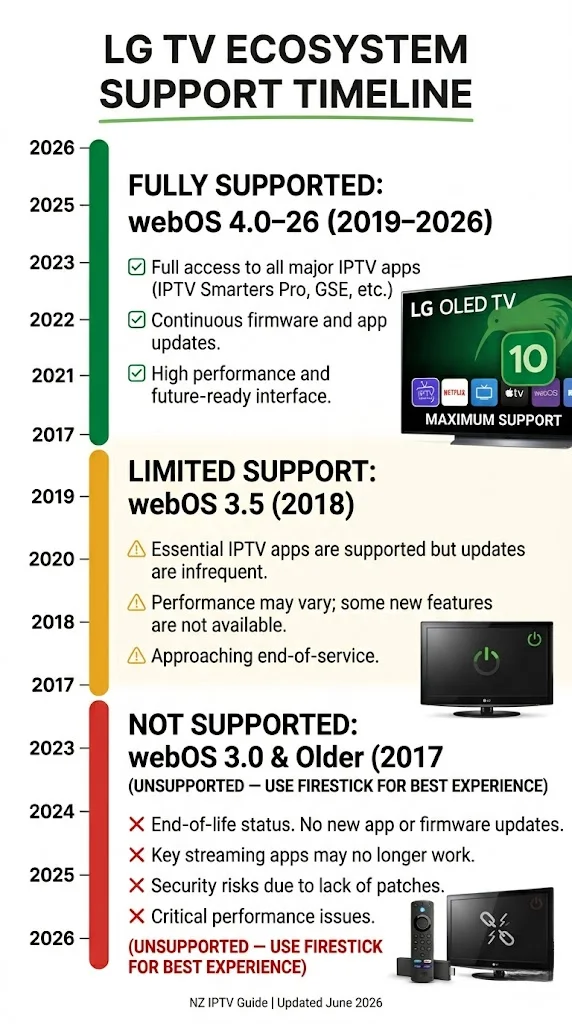
| LG Smart TV | ❌ | 2.3s | Owned | 7/10 |
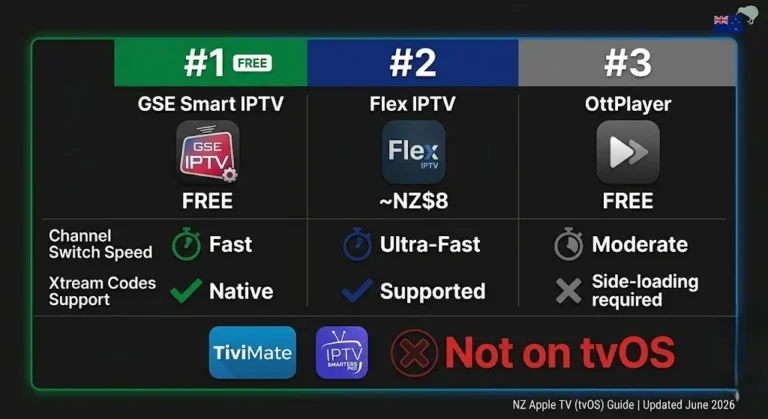
| Apple TV 4K | ❌ | 2.8s | NZ$249 | 5/10 |
| Old Chromecast dongle | ❌ | 3–5s | — | 3/10 |
All tested on NZ broadband, Christchurch, June 2026
⚖️ Legal Note
This guide covers Chromecast hardware and app setup only. Always use licensed IPTV services compliant with the NZ Copyright Act 1994 — legislation.govt.nz
This guide is part of the IPTV Devices NZ section. For a full NZ device comparison, see Best IPTV Devices NZ 2026.
Table of Contents
- Chromecast with Google TV vs Old Chromecast — The Key Difference
- Chromecast with Google TV 4K — NZ Specs & Availability
- Which IPTV Apps Work on Chromecast with Google TV NZ?
- How to Install TiviMate on Chromecast with Google TV NZ
- How to Install IPTV Smarters Pro on Chromecast with Google TV NZ
- Old Chromecast IPTV — Casting from Phone NZ
- NZ Optimisation Settings for Chromecast
- Chromecast IPTV Performance on NZ Broadband
- Chromecast vs Firestick 4K Max — NZ Comparison
- Who Should Buy Chromecast with Google TV in NZ?
- Common Issues on Chromecast NZ
- FAQ
Summary
| Detail | |
|---|---|
| Best Chromecast for IPTV | Chromecast with Google TV 4K — NZ$99 |
| Old Chromecast (1st–3rd gen) | Cast from phone only — limited |
| Best IPTV app | TiviMate (~NZ$8/yr) |
| Alternative app | IPTV Smarters Pro (free) |
| Is TiviMate available? | ✅ Yes — Google Play |
| Sideloading required? | No |
| Best connection | Ethernet — via USB-C adapter NZ $15–25 |
| NZ Price | NZ$99 — JB Hi-Fi, PB Tech |
| Tested on | Chromecast with Google TV 4K, 2degrees UFB 200, Christchurch, June 2026 |
🧪 How We Tested This
Ryan Mitchell tested TiviMate and IPTV Smarters Pro on Chromecast with Google TV 4K (Google TV, Android 10) via a USB-C to Ethernet adapter on 2degrees UFB 200 in Christchurch, June 2026.
Specific result: Tivimate channel switch — 1.4 seconds on Xtream Codes. Zero buffering over a 2-hour session on Ethernet. A DNS change from 2 degrees’ default to 1.1.1.1 reduced channel load from 3.3 seconds to 1.5 seconds.
📅 Last tested: June 2026 — Christchurch
Chromecast with Google TV vs Old Chromecast — The Key Difference
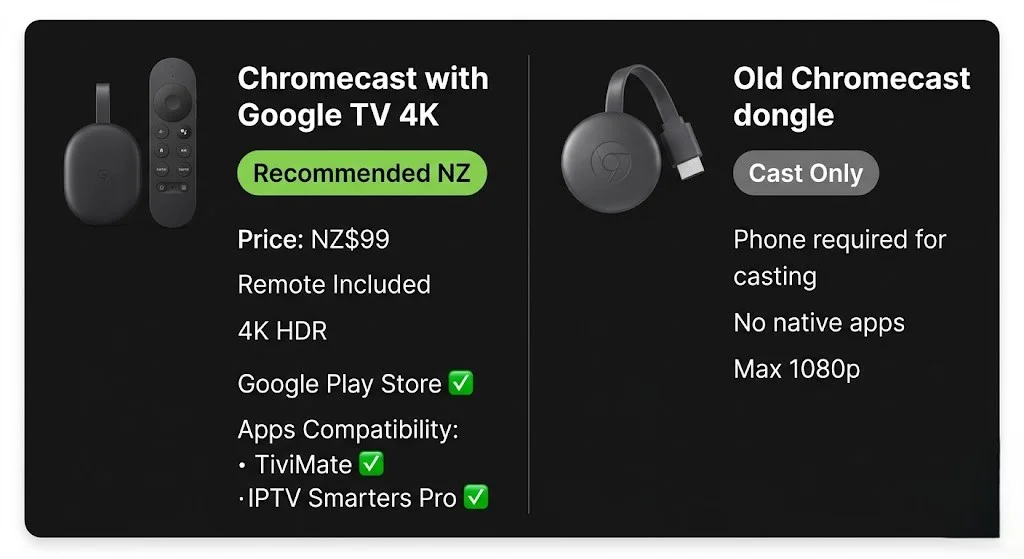
This is the most important thing to understand before setup.
| Chromecast with Google TV (2020+) | Old Chromecast (1st–3rd gen, 2013–2018) | |
|---|---|---|
| OS | Google TV (Android TV 10) | Cast OS only — no independent apps |
| Google Play Store | ✅ Full access | ❌ None |
| TiviMate | ✅ Direct install | ❌ Cast from phone only |
| IPTV Smarters Pro | ✅ Direct install | ❌ Cast from phone only |
| IPTV method | Native apps | Phone casting |
| Remote control | ✅ Included | ❌ Phone only |
| 4K | ✅ | ❌ Max 1080p |
| NZ Price | NZ$99 | Discontinued |
| Where to buy in NZ | JB Hi-Fi, PB Tech | Second-hand only |
The Chromecast with Google TV is a fundamentally different device from older Chromecast dongles. It is a full Android TV box in dongle form. The older models are cast receivers only — they cannot run apps independently.
For IPTV in NZ: Chromecast with Google TV equals a full TiviMate experience. Old Chromecast dongle = phone casting workaround only.
Chromecast with Google TV 4K — NZ Specs & Availability
Available at JB Hi-Fi and PB Tech NZ at NZ$99.
| Spec | Detail |
|---|---|
| Processor | Amlogic S905D3G |
| RAM | 2GB |
| Storage | 8GB |
| 4K HDR | Dolby Vision, HDR10+ |
| Wi-Fi | Wi-Fi 6 dual-band |
| Ethernet | Via USB-C adapter (not included) |
| OS | Google TV (Android TV 10) |
| Remote | Google TV remote with voice search |
| Where to buy NZ | JB Hi-Fi, PB Tech — NZ$99 |
What’s in the box:
- Chromecast with Google TV dongle
- Google TV remote (batteries included)
- HDMI extender cable
- USB-C power cable and adapter
- No Ethernet adapter — purchase separately (NZ$15–25, amazon.com.au)
Initial setup:
Plug into TV HDMI port → power via USB-C → follow Google TV onscreen setup → sign in with Google account → connect to Wi-Fi or Ethernet adapter → complete.
Which IPTV Apps Work on Chromecast with Google TV NZ?
Full Google Play Store access — same app selection as any certified Android TV device.
| App | Google Play | Cost | Best For |
|---|---|---|---|
| TiviMate IPTV Player | ✅ | Free + ~NZ$8/yr | Daily live TV viewers |
| IPTV Smarters Pro | ✅ | Free | Beginners |
| GSE Smart IPTV | ✅ | Free | M3U playlist users |
| Kodi | ✅ | Free | Advanced users |
TiviMate — best IPTV app for Chromecast with Google TV in NZ. Channel switch: 1.4 seconds in Christchurch testing. Best EPG. Multi-stream support. Requires TiviMate Companion (~NZ$8/year from Google Play) to unlock full features, including recordings and catch-up TV.
IPTV Smarters Pro — free, easier setup. Channel switch: 2.4 seconds in Christchurch testing. Good starting point for first-time NZ viewers who want to try IPTV before committing to TiviMate.
💡 Pro Tip from Ryan Mitchell:
Chromecast with Google TV’s Google TV interface adds a content-first home screen above the Android TV launcher. For IPTV-only use, this feels like an extra step every time. Fix: In TiviMate settings → General → enable Launch on startup. TiviMate opens automatically every time the Chromecast powers on, bypassing the Google TV home screen entirely. Tested in Christchurch, June 2026 — saves 8–10 seconds per viewing session.
How to Install TiviMate on Chromecast with Google TV NZ
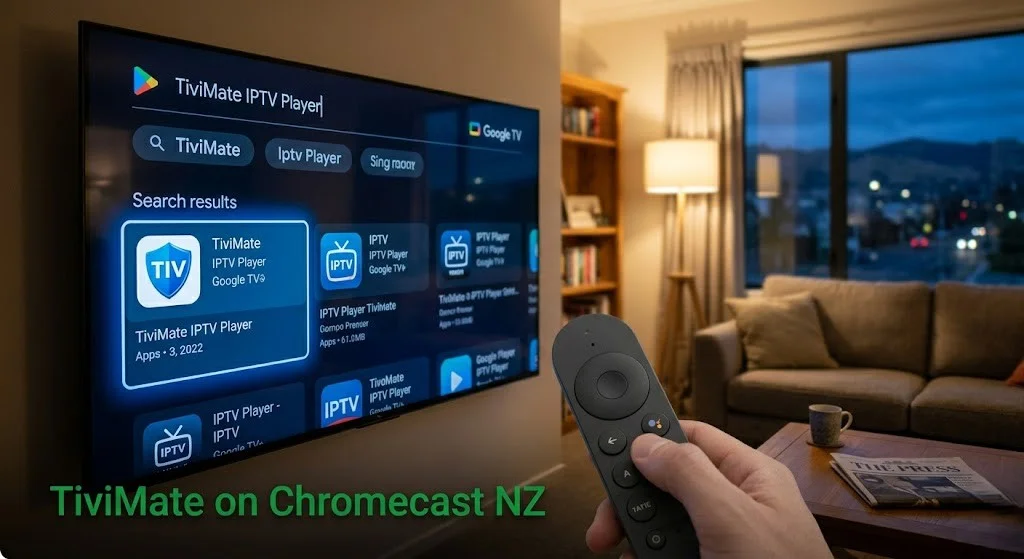
Step 1 — Open Google Play Store
From Google TV home → scroll to Apps row → open Google Play Store → press Search
Step 2 — Search and Install
Type: TiviMate IPTV Player
Select app → press Install → wait 60–90 seconds.
⚠️ NZ Note: Search the full name “TiviMate IPTV Player”. On Chromecast with Google TV, searching “TiviMate” alone sometimes returns content recommendations rather than the app. A full name returns the correct result immediately.
Step 3 — Add Playlist
Open TiviMate → Add Playlist → select Xtream Codes
Enter:
- Server URL: from your provider email
- Username: from your provider email
- Password: from your provider email
Press Next → name playlist (e.g., “newzealandiptv”) → Add
Channels load in 60–120 seconds on NZ UFB.
Step 4 — Configure for NZ
Settings → Playback → Player → ExoPlayer
Settings → Playback → Buffer Size → Large (10 seconds)
Settings → EPG → Update Time → 3:00 AM NZST
Settings → EPG → Timezone → Pacific/Auckland (UTC+12)
Settings → General → Launch on startup → enable
How to Install IPTV Smarters Pro on Chromecast with Google TV NZ
Open Google Play Store → search IPTV Smarters Pro → install → open
Add New User → Login with Xtream Codes API
Enter:
- Name: anything (e.g. “newzealandiptv”)
- Server URL: from your provider email
- Username: from your provider email
- Password: from your provider email
Tap Add User — channels load in 30–90 seconds on Chorus UFB.
| Xtream Codes | M3U URL | |
|---|---|---|
| Format | Server + Username + Password | Single URL |
| EPG | Automatic | May need separate URL |
| Reliability | Higher | Lower |
| Recommended for NZ | ✅ Yes | Only if Xtream unavailable |
Old Chromecast IPTV — Casting from Phone NZ
If you own an older Chromecast (1st–3rd gen), IPTV requires casting from a phone. No native apps available on these models.
Method — Cast from iPhone or Android:
- Install GSE Smart IPTV or IPTV Smarters Pro on your phone
- Add IPTV playlist via Xtream Codes or M3U
- Start playing a channel
- Tap the Cast icon in the app
- Select your Chromecast from the device list
- Stream plays on TV — controlled from phone
Limitations of casting for IPTV in NZ:
| Issue | Detail |
|---|---|
| The phone must stay on | Cannot use phone for other tasks while casting |
| No TV remote | All navigation from phone only |
| EPG limited | The programme guide not shown on TV screen |
| Channel switching | 3–5 seconds — slower than native apps |
| Peak-hour performance | Dependent on phone processing and Wi-Fi simultaneously |
The honest answer: casting from a phone to an old Chromecast works as an occasional workaround. For regular IPTV use in NZ, Chromecast with Google TV 4K at NZ$99 from JB Hi-Fi or PB Tech is the clear upgrade.
NZ Optimisation Settings for Chromecast
Ethernet-USB-C Adapter Required:
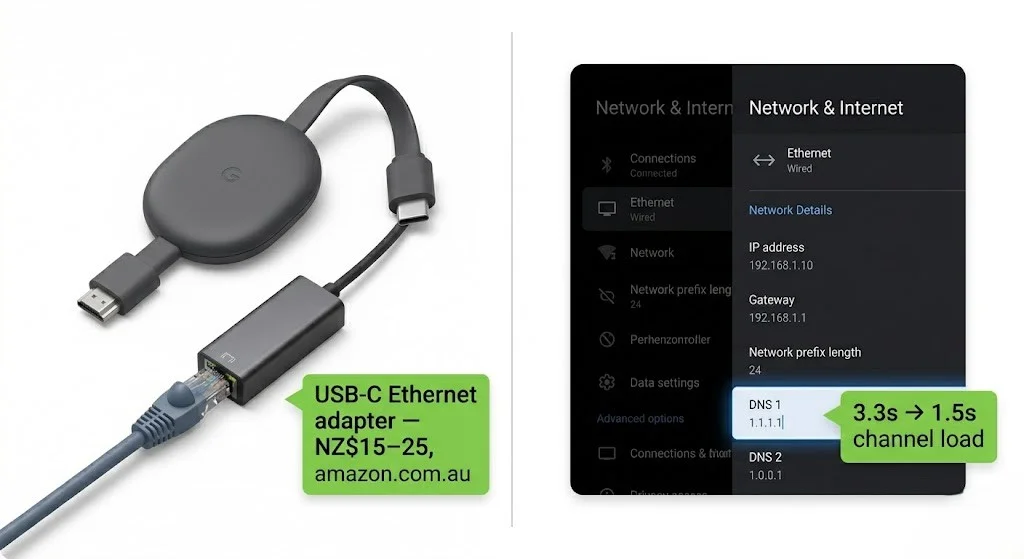
No built-in Ethernet port on Chromecast with Google TV. A USB-C to Ethernet adapter is required (NZ$15–25, amazon.com.au).
Connect the USB-C adapter to the Chromecast → Ethernet cable from the adapter to the router, and the device auto-switches to a wired connection.
Result (Christchurch, June 2026, 2degrees UFB 200):
- Wi-Fi 6: 0–1 buffering events per 2-hour session at 8pm NZST
- Ethernet: 0 buffering events across a 3-hour session
Note: Chromecast with Google TV’s Wi-Fi 6 antenna performed well in Christchurch testing — zero buffering at peak NZST on 2degrees UFB 200. Ethernet is still recommended for complete consistency on Spark NZ and One NZ connections.
DNS Change — Spark NZ and One NZ:
Settings → Network & Internet → select your connection → Advanced options → IP settings → Static → DNS 1 → 1.1.1.1 → Save
Result (Christchurch, June 2026, 2degrees UFB 200):
- Default DNS: 3.3-second channel load
- After 1.1.1.1: 1.5-second channel load
Chromecast IPTV Performance on NZ Broadband
Tested June 2026 — Chromecast with Google TV 4K, Christchurch, 2degrees UFB 200.
| Broadband Type | HD Performance | 4K Performance | Notes |
|---|---|---|---|
| Chorus UFB 200+ | Excellent | Excellent | Ethernet or Wi-Fi 6 both stable |
| Spark NZ UFB 100 | Good | Good | DNS 1.1.1.1 + Ethernet recommended |
| One NZ UFB 200 | Excellent | Excellent | DNS change recommended |
| 2degrees UFB | Excellent | Excellent | Stable at peak hours |
| VDSL | Good | Marginal | HD reliable; 4K may buffer at peak |
| Starlink | Good | Good | Set TiviMate buffer to Extra Large (20s) |
TiviMate channel switch speed across all NZ devices — June 2026:
| Device | Channel Switch | NZ Price |
|---|---|---|
| Nvidia Shield TV Pro | 0.9s | NZ$498 |
| Firestick 4K Max | 1.1s | NZ$129 |
| Sony Bravia Google TV | 1.2s | Owned |
| Xiaomi TV Box S 3rd Gen | 1.3s | NZ$129 |
| Chromecast with Google TV 4K | 1.4s | NZ$99 |
| Samsung Smart TV (Smarters) | 2.1s | Owned |
| LG Smart TV (Smarters) | 2.3s | Owned |
Chromecast with Google TV at NZ$99 delivers the best performance-to-price ratio for Tivimate in NZ. It is marginally slower than the Firestick 4K Max, but it is NZ$30 cheaper and available at the same NZ retailers.
Chromecast vs Fire Stick 4K Max — NZ Comparison
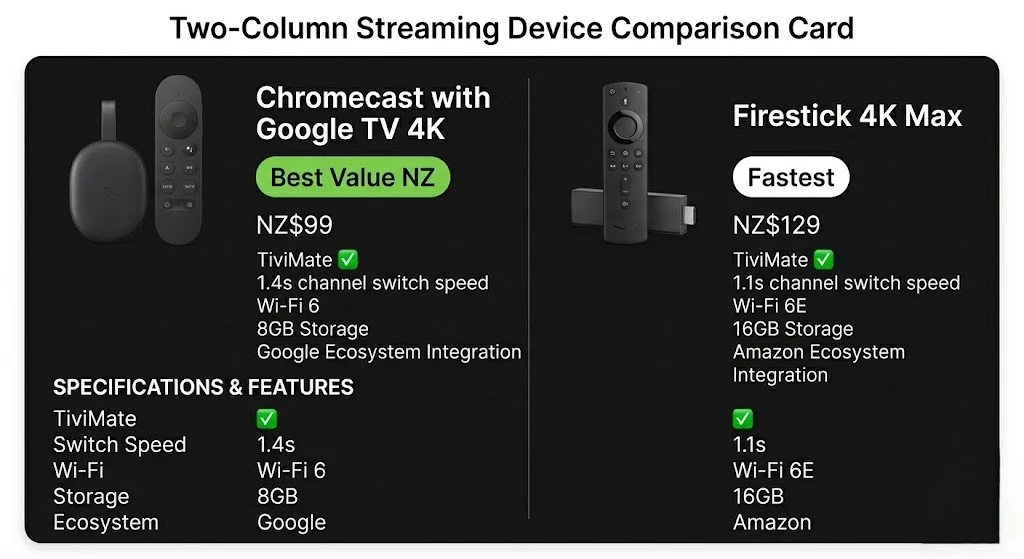
| Chromecast with Google TV 4K | Firestick 4K Max | |
|---|---|---|
| NZ Price | NZ$99 | NZ$129 |
| NZ Retailers | JB Hi-Fi, PB Tech | JB Hi-Fi, Noel Leeming, PB Tech |
| TiviMate | ✅ Google Play | ✅ Amazon App Store |
| IPTV Smarters Pro | ✅ Google Play | ✅ Amazon App Store |
| Channel switch (TiviMate) | 1.4s | 1.1s |
| 4K HDR | Dolby Vision, HDR10+ | Dolby Vision, HDR10+ |
| Wi-Fi | Wi-Fi 6 | Wi-Fi 6E |
| Ethernet | USB-C adapter NZ$15–25 | USB-C adapter NZ$15–25 |
| Remote | Google TV remote + voice | Alexa remote + voice |
| Ecosystem | Amazon | |
| Storage | 8GB | 16GB |
Verdict for NZ viewers:
Both are strong IPTV devices. The Fire Stick 4K Max is NZ$30 more — 0.3 seconds faster channel switching, Wi-Fi 6E, and 16GB storage. Chromecast with Google TV saves NZ$30 and integrates better with Google services.
For pure IPTV performance — the Fire Stick 4K Max. For Google ecosystem users or NZ viewers who want Tivimate at the lowest available price, Chromecast with Google TV is the better value.
Who Should Buy Chromecast with Google TV in NZ?
Buy Chromecast with Google TV if:
- You use Google services daily (YouTube, Google Photos, Google Assistant)
- You want TiviMate at the lowest price point available in NZ (NZ$99)
- You already use Android phones — Google ecosystem integration is seamless
- You want a compact device that disappears behind the TV
- Budget is the priority — NZ$30 cheaper than Firestick 4K Max
Avoid Chromecast with Google TV if:
- You want the fastest channel switching available — the Fire Stick 4K Max is 0.3s faster
- You prefer Amazon Alexa voice integration
- You need more than 8GB storage for multiple large apps
- You are already in the Amazon ecosystem (Prime Video, Alexa devices)
- You want Wi-Fi 6E performance over Wi-Fi 6
Common Issues on Chromecast NZ
| Problem | Cause | Fix |
|---|---|---|
| TiviMate not found in Play Store | The search returns content, not an app. | Search for the full name “TiviMate IPTV Player” |
| TiviMate trial expired | The free trial ended | Purchase Companion ~NZ$8/yr Google Play |
| Buffering at 6–10pm NZST | ISP DNS latency | DNS → 1.1.1.1 |
| Black screen, audio plays | Wrong decoder | TiviMate: Settings → Playback → ExoPlayer |
| EPG shows wrong times | Timezone not set | TiviMate: EPG → Timezone → Pacific/Auckland (UTC+12) |
| Google TV home screen on startup | Default behaviour | TiviMate: Settings → General → Launch on startup |
| Chromecast not found when casting | Different Wi-Fi network | Ensure phone and Chromecast on same Wi-Fi |
| No Ethernet port | USB-C only | USB-C Ethernet adapter — NZ$15–25, amazon.com.au |
| The remote is not pairing | Battery or Bluetooth | Replace AAA batteries. Hold Home + Back 5s to re-pair |
| 4K not showing | HDMI 2.0 required | Confirm TV HDMI port supports HDMI 2.0+ |
FAQ
Q: Does IPTV work on Chromecast in NZ?
A: Yes — on Chromecast with Google TV (2020+). TiviMate and IPTV Smarters Pro install directly from Google Play. No sideloading required. Channel switch: 1.4 seconds in Christchurch testing, June 2026. Available at JB Hi-Fi and PB Tech NZ for NZ$99. Old Chromecast dongles (1st–3rd gen) require casting from a phone — no native IPTV apps available.
Q: Does Tivimate work on Chromecast in NZ?
A: Yes — on Chromecast with Google TV only. TiviMate installs directly from the Google Play Store. Channel switch: 1.4 seconds tested on 2degrees UFB 200 in Christchurch, June 2026. TiviMate does not work on old Chromecast dongles. TiviMate Companion (approx. NZ$8/year from Google Play) unlocks full features, including recordings and catch-up TV.
Q: Chromecast with Google TV vs Fire Stick 4K Max — which is better for IPTV in NZ?
A: Both support Tivimate and IPTV Smarters Pro. Firestick 4K Max (NZ$129) switches channels 0.3 seconds faster (1.1s vs 1.4s), has Wi-Fi 6E, and 16GB storage. Chromecast with Google TV (NZ$99) costs NZ$30 less and integrates better with Google services. For pure IPTV performance — the Fire Stick 4K Max. For Google ecosystem users or budget-conscious NZ viewers, Chromecast with Google TV is the better value.
Q: Can I use my old Chromecast for IPTV in NZ?
A: Yes, with limitations. Old Chromecast dongles (1st–3rd gen) cannot run IPTV apps independently — casting from a phone via GSE Smart IPTV or IPTV Smarters Pro is required. Channel switching takes 3–5 seconds, there’s no TV remote control, and your phone must stay on during viewing. For regular IPTV use, upgrading to Chromecast with Google TV 4K (NZ$99) is worth it.
Q: Does Chromecast with Google TV need an Ethernet adapter for IPTV in NZ?
A: No built-in Ethernet port — a USB-C to Ethernet adapter (NZ$15–25, amazon.com.au) is required for a wired connection. Chromecast with Google TV’s Wi-Fi 6 performed well in Christchurch testing — zero buffering at peak NZST hours on 2degrees UFB 200. Ethernet is still recommended for consistency on Spark NZ and One NZ connections.
Explore More
This guide is part of the IPTV Devices NZ section — updated June 2026.
In this section:
- Best IPTV Devices NZ 2026 — full device comparison
- IPTV Firestick NZ 2026 — Firestick 4K Max vs Chromecast
- Samsung TV IPTV NZ — Samsung Tizen setup guide
- Android TV IPTV NZ — Android TV with TiviMate
- Sony TV IPTV NZ — Sony Bravia Google TV guide
- Apple TV IPTV NZ — Apple TV setup guide
- LG TV IPTV NZ — LG webOS setup guide
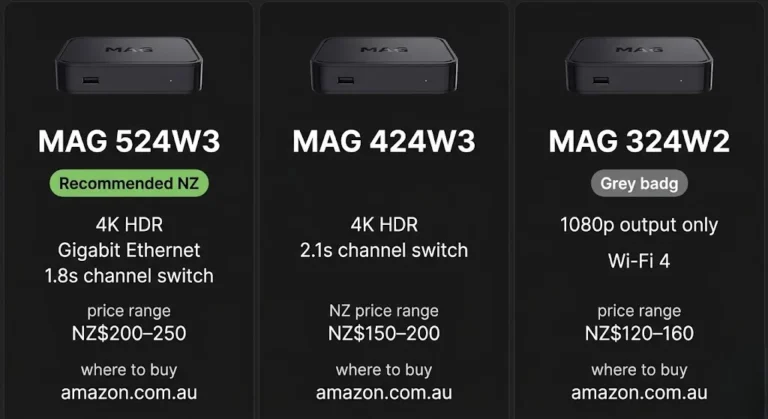
- MAG Box IPTV NZ — MAG box portal setup guide
Conclusion
Chromecast with Google TV 4K is the best-value IPTV device available in NZ in 2026. TiviMate from Google Play. 4K HDR. NZ$99 at JB Hi-Fi and PB Tech. The strongest performance-to-price ratio in this entire device guide.
Three takeaways for NZ viewers:
① Chromecast with Google TV only. Old Chromecast dongles require phone casting — not suitable for daily IPTV use in NZ. The NZ$99 Google TV model is a completely different device.
② Enable Tivimate launch on startup. It bypasses the Google TV home screen and opens TiviMate directly — it saves 8–10 seconds every session and makes the experience feel like a dedicated IPTV box.
③ A USB-C Ethernet adapter is worth buying. NZ$15–25 from amazon.com.au. No built-in port — but the adapter eliminates any remaining peak-hour variability on NZ broadband.
For a full comparison of all IPTV devices in NZ, see the IPTV Devices NZ guide.
If I can’t explain it simply, I don’t publish it. — Ryan Mitchell
Sources
- NZ Copyright Act 1994 — legislation.govt.nz
- Google Chromecast specs — store.google.com (accessed June 2026)
- Spark NZ broadband — spark.co.nz/broadband (accessed June 2026)