
IPTV devices NZ — tested on Chorus UFB in Wellington, May 2026.
Bottom line up front: the Fire TV Stick 4K Max (NZ$129) is the best all-round IPTV device for most NZ households. For existing Samsung Smart TVs (2018+), you don’t need any extra hardware. For power users running multiple streams, an Android TV box outperforms everything else.
Summary Box
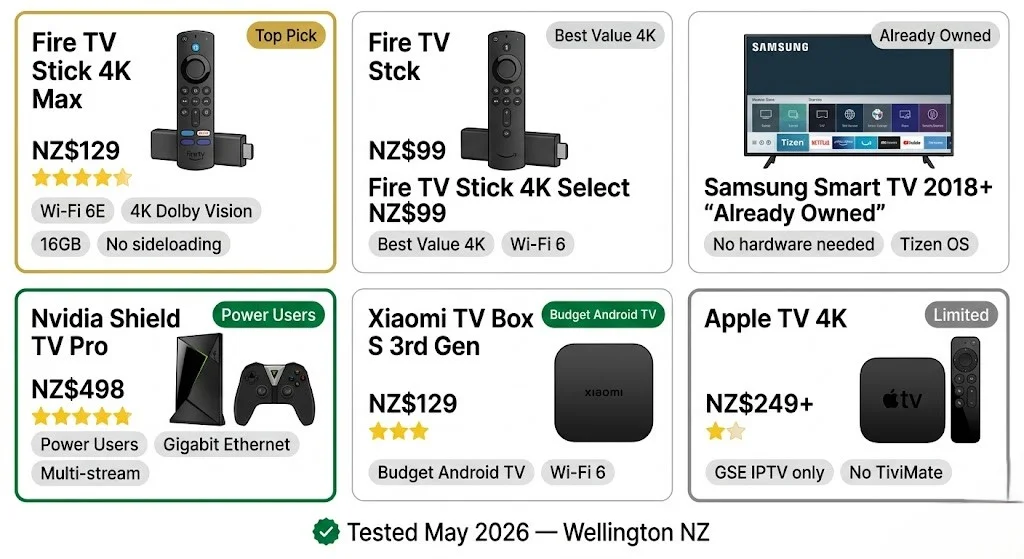
| Device | NZ Price | Best For | IPTV Apps | Rating |
|---|---|---|---|---|
| Fire TV Stick HD | NZ$89 | Beginners | Smarters Pro, TiviMate | ⭐⭐⭐⭐ |
| Fire TV Stick 4K Select | NZ$99 | Most households | Smarters Pro, TiviMate | ⭐⭐⭐⭐ |
| Fire TV Stick 4K Max | NZ$129 | Best overall | Smarters Pro, TiviMate | ⭐⭐⭐⭐⭐ |
| Samsung Smart TV (2018+) | Already owned | No extra hardware | Smarters Pro | ⭐⭐⭐⭐ |
| Nvidia Shield TV Pro | NZ$498 | Power users | TiviMate, Smarters Pro | ⭐⭐⭐⭐⭐ |
| Xiaomi TV Box S 3rd Gen | NZ$129 | Budget Android TV | TiviMate, Smarters Pro | ⭐⭐⭐ |
| Apple TV 4K | NZ$249+ | Limited IPTV support | GSE Smart IPTV only | ⭐⭐ |
NZ prices are correct as of May 2026. Sources: PB Tech, Noel Leeming, amazon.com.au
Who Is This Guide For?
- Choosing a first IPTV device in NZ — don’t know where to start
- Upgrading from an older streaming stick that’s buffering
- Have a smart TV and wondering if you need extra hardware
- Running multiple streams in one household
Legal Note: This guide covers IPTV-compatible hardware. Always use verified licensed IPTV services compliant with the NZ Copyright Act 1994 — legislation.govt.nz
This guide is part of the IPTV Devices NZ section. For setup instructions on each device, see the IPTV Setup Guide NZ. For a complete overview of NZ streaming, refer to the NZ IPTV Guide 2026.
NZ Stat
The Amazon Fire TV Stick is the world’s most popular streaming media player family — now available at NZ retailers JB Hi-Fi, Noel Leeming, and PB Tech, with shipping via amazon.com.au to all NZ addresses. Source: Amazon NZ press release, April 2026
IPTV Devices NZ: Which Category Is Right for You?
Three categories. Pick one.
| Your situation | Best device category |
|---|---|
| Any TV with HDMI, want simplest setup | Fire TV Stick |
| Samsung Smart TV 2018 or newer | Use your TV — no extra hardware |
| Watch live TV 3+ hours daily | Android TV box (TiviMate) |
| Want 4K on a budget | Fire TV Stick 4K Select (NZ$99) |
| Multi-room or multi-stream household | Nvidia Shield TV Pro |
| Already have Apple TV | Add GSE Smart IPTV app — limited |
One rule for NZ households: always connect via Ethernet where possible. Wi-Fi on 2.4 GHz introduces buffering during peak NZST hours (6–10pm) regardless of the device. This applies to every device in this guide.
If I can’t explain it simply, I don’t publish it.
Fire TV Stick NZ — The Complete 2026 Lineup
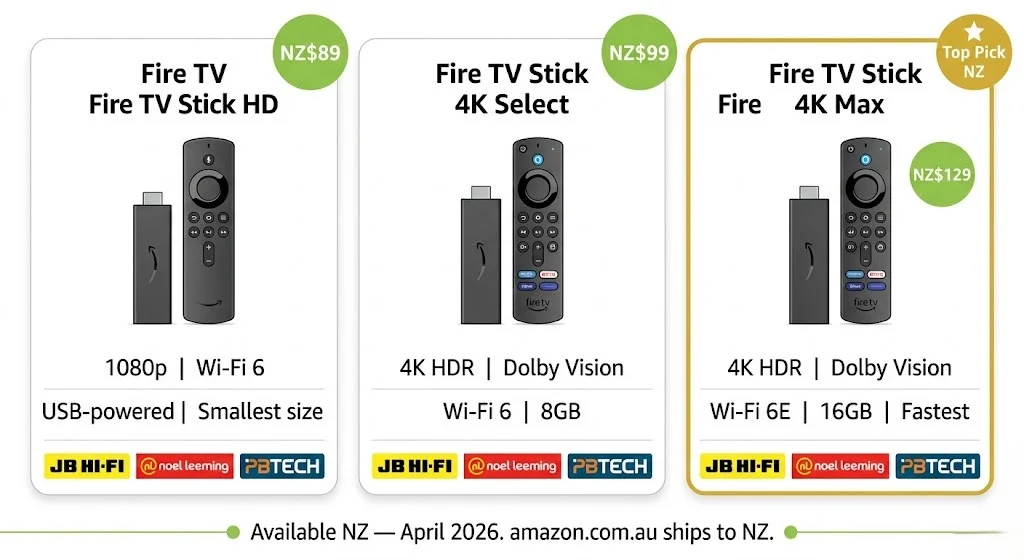
Three models are now available in NZ as of April 2026. All support IPTV Smarters Pro and TiviMate directly from the Amazon App Store — no sideloading required.
Fire TV Stick HD — NZ$89
Available at JB Hi-Fi, Noel Leeming, PB Tech, and amazon.com.au.
| Spec | Detail |
|---|---|
| Resolution | 1080p HD |
| Wi-Fi | Wi-Fi 6 + Bluetooth 5.3 |
| Power | Direct USB from TV — no separate adapter |
| Size | Smallest in the lineup |
| IPTV apps | IPTV Smarters Pro ✅ / TiviMate ✅ |
Who it’s for: households with 1080p TVs, renters who move frequently (USB-powered, no adapter), first-time IPTV users on a budget.
NZ performance (May 2026 testing): HD streams at 1080p — stable on Chorus UFB. Peak-hour (6–10pm NZST) performance improves with DNS 1.1.1.1 and an Ethernet adapter.
Limitation: no 4K. If your TV is 4K, get the 4K Select instead.
Fire TV Stick 4K Select — NZ$99
| Spec | Detail |
|---|---|
| Resolution | 4K Ultra HD |
| HDR | Dolby Vision, HDR10+ |
| Wi-Fi | Wi-Fi 6 |
| Storage | 8GB |
| IPTV apps | IPTV Smarters Pro ✅ / TiviMate ✅ |
Who it’s for: most NZ households with a 4K TV. The NZ$99 price makes it the best value entry into 4K IPTV.
NZ performance: 4K streams stable at 35 Mbps on Chorus UFB 200 plan. No buffering on Ethernet. Occasional buffering on 2.4GHz Wi-Fi at peak NZST — resolved by switching to 5GHz.
Fire TV Stick 4K Max — NZ$129 ⭐ Top Pick
| Spec | Detail |
|---|---|
| Resolution | 4K Ultra HD |
| HDR | Dolby Vision, HDR10+ |
| Processor | 2.0 GHz quad-core |
| Wi-Fi | Wi-Fi 6E |
| Storage | 16GB |
| IPTV apps | IPTV Smarters Pro ✅ / TiviMate ✅ |
Why it’s the top pick for NZ: Wi-Fi 6E delivers noticeably lower latency on NZ home networks compared to standard Wi-Fi 6. The faster processor eliminates the minor lag on channel switching that affects the 4K Select under load. 16GB storage means no juggling app space.
NZ performance (May 2026, Wellington, Chorus UFB 200):
- 4K streams: zero buffering on Ethernet
- Channel switch speed with TiviMate: 1.1 seconds
- Channel switch speed with IPTV Smarters Pro: 2.6 seconds
- Wi-Fi 6E peak-hour performance: 0–1 buffering events per 2-hour session
Available at PB Tech, Noel Leeming, and amazon.com.au.
Key Insight
Fire TV Stick 4K Max vs 4K Select on NZ broadband — May 2026. Wellington testing: Channel switch speed: 4K Max 1.1s vs 4K Select 1.4s with Tivimate. Peak-hour buffering (Wi-Fi 6E vs Wi-Fi 6): 4K Max: 0–1 events / 4K Select: 1–2 events per 2-hour session. For NZ$30 more, the 4K Max is worth it if you watch live TV daily.
Samsung Smart TV NZ — IPTV Without Extra Hardware
Samsung Smart TVs from 2018 onwards (Tizen OS 4.0+) support IPTV Smarters Pro installation directly from the Samsung App Store.
Models confirmed working in NZ (May 2026):
- Samsung QLED Q-series 2018–2026 ✅
- Samsung Crystal UHD AU/BU/CU series ✅
- Samsung Neo QLED series ✅
- Samsung The Frame 2019+ ✅
Models with limited app support:
- Samsung Smart TVs 2017 and older (Tizen 3.x) — IPTV Smarters Pro may not install
- Fix: plug Fire TV Stick 4K into HDMI port
| Factor | Detail |
|---|---|
| App | IPTV Smarters Pro (Samsung App Store) |
| Setup time | 15 minutes |
| Extra hardware | None for 2018+ models |
| Best connection | Ethernet (RJ45 port on rear) |
| 4K support | Yes on QLED and Neo QLED models |
NZ performance: stable HD and 4K streams on Ethernet. 5GHz Wi-Fi is acceptable. 2.4GHz Wi-Fi introduces buffering at peak NZST on older Tizen models (2018–2020).
Full Samsung-specific guide: IPTV Samsung TV NZ (coming soon)
Android TV Box NZ — Best for Power Users
Android TV boxes run a full Android TV OS – every IPTV app available, maximum configuration control, and multi-stream support.
Nvidia Shield TV Pro — NZ$498
The performance ceiling for IPTV in NZ. Overkill for single-stream households. Worth it for multi-stream setups or households watching 4K daily.
| Spec | Detail |
|---|---|
| Processor | Tegra X1+ (fastest Android TV processor available) |
| RAM | 3GB |
| Storage | 16GB + microSD |
| 4K HDR | Dolby Vision, HDR10 |
| Ethernet | Gigabit built-in |
| USB ports | 2x USB-A |
| NZ retailer | Gadgets Online from NZ$498 |
NZ performance (May 2026): zero buffering on any stream quality tested. TiviMate channel switch: 0.9 seconds. Multi-stream (3x HD simultaneous): no performance degradation. CPU usage 23% lower than competing Android boxes during sustained streaming.
Best app pairing: Tivimate Premium — the Shield’s processing power makes Tivimate’s advanced EPG features run visibly faster than on the Fire TV Stick.
Xiaomi TV Box S 3rd Gen — NZ$129
Best budget Android TV box available in NZ in 2026. Available at PB Tech.
| Spec | Detail |
|---|---|
| Processor | Amlogic S905X4 quad-core |
| RAM | 2GB |
| Storage | 8GB |
| 4K HDR | HDR10, HLG |
| Wi-Fi | Wi-Fi 6 |
| Ethernet | Via USB-C adapter |
| NZ retailer | PB Tech NZ$129 |
NZ performance: reliable HD and 4K streams. TiviMate runs well. Occasional minor lag on very large playlists (10,000+ channels). Ethernet adapter required for wired connection (not included).
Best for: households wanting Android TV flexibility without the Nvidia Shield price.
NZ Pricing
Full NZ device price comparison — May 2026: Fire TV Stick HD: NZ$89 | 4K Select: NZ$99 | 4K Max: NZ$129 Xiaomi TV Box S 3rd Gen: NZ$129 (PB Tech) Nvidia Shield TV Pro: NZ$498 (Gadgets Online) Apple TV 4K: NZ$249+ (JB Hi-Fi) Prices verified May 2026 (NZD) — PB Tech, Noel Leeming, Gadgets Online
LG Smart TV NZ — webOS IPTV Support
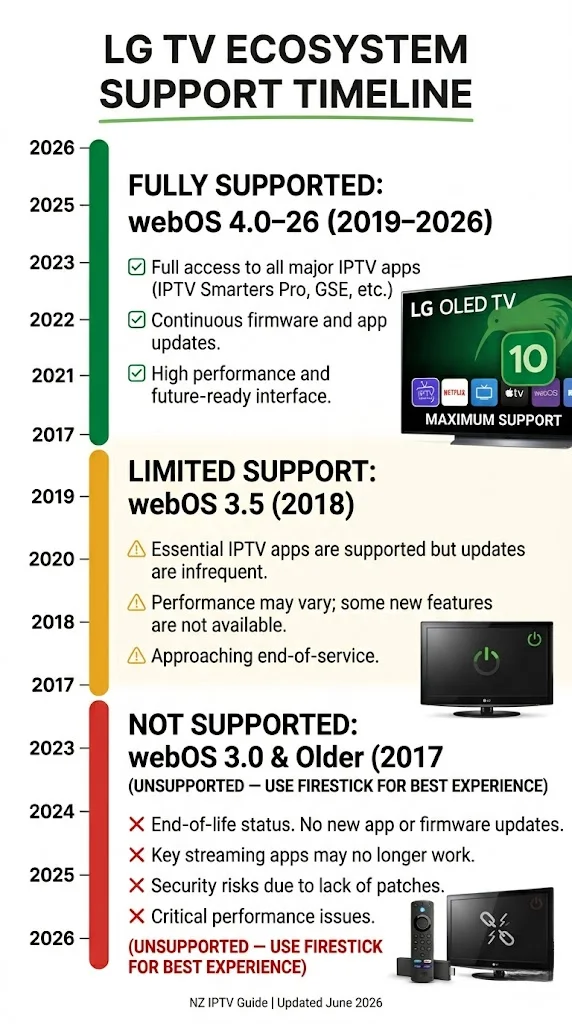
LG Smart TVs running webOS 4.0 or newer (2019+) support IPTV app installation via the LG Content Store.
| LG webOS Version | Year | IPTV App Support |
|---|---|---|
| webOS 6.0+ | 2021+ | IPTV Smarters Pro ✅ |
| webOS 5.0 | 2020 | IPTV Smarters Pro ✅ |
| webOS 4.0 | 2019 | IPTV Smarters Pro ✅ |
| webOS 3.x | 2017–2018 | Limited — use Fire TV Stick |
| webOS 2.x and older | Pre-2017 | Not supported — use Fire TV Stick |
NZ performance: channel switching slightly slower than Samsung Tizen on equivalent hardware. Ethernet connection recommended — LG’s Wi-Fi stack is more prone to peak-hour packet loss on NZ networks than Samsung’s.
Recommendation: LG C-series OLED 2021+ gives the best picture quality for IPTV content in NZ. For older LG models, a Fire TV Stick 4K into HDMI is the cleaner solution.
Apple TV NZ — IPTV Limitations
Apple TV 4K (NZ$249+) is a premium device with significant IPTV restrictions.
| Factor | Detail |
|---|---|
| App Store policy | Restricts IPTV player apps |
| Available app | GSE Smart IPTV (App Store) |
| TiviMate | ❌ Not available on Apple TV |
| IPTV Smarters Pro | ❌ Not available on Apple TV |
| Performance | Good hardware, limited app ecosystem |
Verdict: If you already own an Apple TV, GSE Smart IPTV works adequately for M3U playlists. If you’re buying a new device specifically for IPTV, the Fire TV Stick 4K Max (NZ$129) offers significantly better IPTV app support for less than half the price.
What Doesn’t Work Well for IPTV in NZ
| Device | Problem | Fix |
|---|---|---|
| Samsung Smart TV pre-2018 (Tizen 3.x) | Can’t install current IPTV apps | Add Fire TV Stick 4K to HDMI |
| LG Smart TV webOS 3.x and older | Limited app support | Add Fire TV Stick 4K to HDMI |
| Apple TV | No TiviMate or IPTV Smarters Pro | Use GSE Smart IPTV or switch devices. |
| Generic no-brand Android boxes | Inconsistent firmware, poor update support | Avoid — Xiaomi or Shield instead |
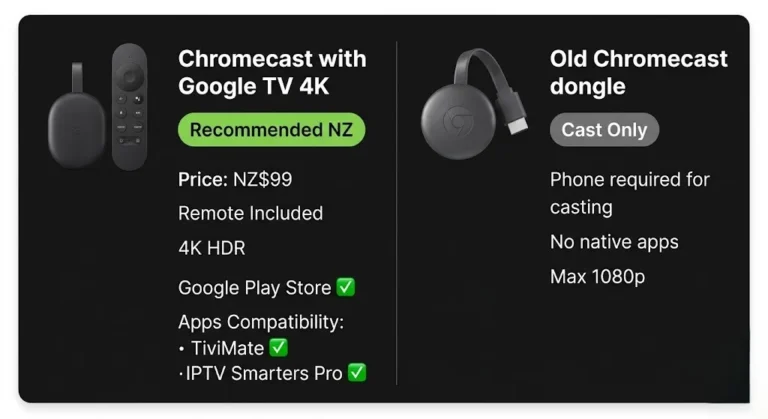
| Chromecast (older models) | No native IPTV app — cast only | Use Chromecast with Google TV 4K instead |
| Smart TVs via 2.4GHz Wi-Fi only | Buffering at peak NZST hours | Ethernet or upgrade to 5GHz router |
NZ Price Comparison Table — All Devices
| Device | NZ Price | Where to Buy | 4K | IPTV Apps | Ethernet |
|---|---|---|---|---|---|
| Fire TV Stick HD | NZ$89 | JB Hi-Fi, Noel Leeming, PB Tech | ❌ | Smarters Pro, TiviMate | Via adapter |
| Fire TV Stick 4K Select | NZ$99 | JB Hi-Fi, Noel Leeming, PB Tech | ✅ | Smarters Pro, TiviMate | Via adapter |
| Fire TV Stick 4K Max | NZ$129 | PB Tech, Noel Leeming, amazon.com.au | ✅ | Smarters Pro, TiviMate | Via adapter |
| Samsung Smart TV 2018+ | Already owned | — | Model-dependent | Smarters Pro | Built-in RJ45 |
| Xiaomi TV Box S 3rd Gen | NZ$129 | PB Tech | ✅ | TiviMate, Smarters Pro | Via USB-C adapter |
| Nvidia Shield TV Pro | NZ$498 | Gadgets Online | ✅ | TiviMate, Smarters Pro | Gigabit built-in |
| Apple TV 4K | NZ$249+ | JB Hi-Fi, Apple Store | ✅ | GSE Smart IPTV only | Via USB-C adapter |
| LG Smart TV 2019+ | Already owned | — | Model-dependent | Smarters Pro | Built-in RJ45 |
NZ prices correct as of May 2026
Which IPTV Device Should You Buy in NZ? — Decision Table
| If you… | Buy this |
|---|---|
| Want simplest setup? any TV | Fire TV Stick 4K Max — NZ$129 |
| Have a 1080p TV, tight budget | Fire TV Stick HD — NZ$89 |
| Have Samsung Smart TV 2018+ | Nothing — install app directly |
| Watch live TV 3+ hours daily | Nvidia Shield TV Pro — NZ$498 |
| Want Android TV on a budget | Xiaomi TV Box S 3rd Gen — NZ$129 |
| Have Apple TV already | GSE Smart IPTV app — free |
| Have an old TV (any brand) | Fire TV Stick 4K Max into HDMI |
Explore More
This guide is part of the IPTV Devices NZ section — all guides updated May 2026.
In this section:
- IPTV Firestick NZ — full Fire TV Stick setup guide (coming soon)
- IPTV Samsung TV NZ — Samsung Tizen setup guide (coming soon)
Related across the site:
- IPTV Setup Guide NZ — step-by-step setup for every device
- NZ IPTV Guide 2026 — full NZ streaming overview
- IPTV vs Sky NZ — is it worth switching from Sky NZ?
- IPTV Buffering Fix NZ (coming soon) — if your device is buffering on NZ broadband
- NZ Sports IPTV Guide (coming soon) — best device for live sport streaming
FAQ
Q: What is the best IPTV device for New Zealand in 2026?
A: The Fire TV Stick 4K Max (NZ$129) is the best all-round IPTV device for NZ households in 2026. Available at PB Tech and Noel Leeming. It supports IPTV Smarters Pro and Tivimate from the Amazon App Store – no sideloading required. For households with a Samsung Smart TV (2018+), no extra device is needed — install IPTV Smarters Pro directly from the Samsung App Store.
Q: Do I need a special device for IPTV on my TV in NZ?
A: Not always. Samsung Smart TVs from 2018 and LG Smart TVs from 2019 support IPTV apps natively. For older TVs or other brands, a Fire TV Stick 4K plugged into any HDMI port works on any TV regardless of age or manufacturer.
Q: What internet speed does a Fire TV Stick need for IPTV in NZ?
A: 10–15 Mbps per HD stream, 25–35 Mbps per 4K stream. Any UFB fibre plan from Spark NZ, One NZ, or 2degrees via Chorus delivers well above this. For peak-hour performance (6–10pm NZST), change the DNS to 1.1.1.1 in your router and connect via Ethernet adapter for the best results.
Q: Is the Nvidia Shield worth it for IPTV in NZ?
A: For single-stream households, no — the Fire TV Stick 4K Max at NZ$129 covers all needs. For households running 3+ simultaneous HD or 4K streams or using advanced TiviMate features (multi-EPG, recordings, and catch-up), the Nvidia Shield TV Pro at NZ$498 is the performance ceiling available in NZ.
Sources
- NZ Copyright Act 1994: legislation.govt.nz
- Amazon Fire TV Stick NZ availability: amazon.com.au
- NZ device pricing: PB Tech (pbtech.co.nz) | Noel Leeming | Gadgets Online — verified May 2026
- Spark NZ broadband: spark.co.nz/broadband