
People typing Is IPTV safe NZ into a search box are usually asking four different questions at once: is my money safe, is my personal information safe, is the app or box safe, and is the whole thing a scam? They have different answers, which is why a single yes or no is never useful.
This guide takes them one at a time and leaves the separate matter of broadcast rights to is IPTV legal in NZ. For the wider picture of how this kind of viewing works here, start with the Kiwi IPTV guide.
Quick Answer
Delivering television over the internet is not what makes IPTV risky. The risk comes from four specific things: the app, the device, the seller and the payment method. Each of them can be checked before you pay or install anything.
Is IPTV Safe NZ? Separating the Technology From the Service
Streaming television over the internet is not dangerous in itself; licensed platforms such as TVNZ+, ThreeNow and Netflix use it every day. What makes an IPTV arrangement unsafe is usually the app, the device, the seller or the payment method attached to it, and each of those can be checked separately.
Why the Technology Isn’t the Problem
IPTV simply means television delivered over an internet connection instead of an aerial or satellite dish. That description covers licensed services and unlicensed ones equally, so it says nothing about whether a particular arrangement is safe.
It also helps to keep two things apart that are often blurred. A player app, such as TiviMate or IPTV Smarters Pro, is software that displays whatever it is pointed at and supplies no channels of its own. A service or provider is the party that supplies the content, takes your money and holds your details.
Most of the risk in this guide attaches to the second one, and the best IPTV app NZ guide covers the first.
Where the Risk Actually Sits
| Layer | What can go wrong | What to check |
|---|---|---|
| The seller | Takes payment, then stops responding or cannot be traced | Who they are, how to contact them, what happens if you need help |
| The payment | Money sent by a route that is hard to reverse | Whether a card or other traceable method is accepted |
| The app | Software from outside an official store that does more than it claims | Where it was downloaded from |
| The device | A box that arrives with unknown software already installed | Who made it and whether it can be traced |
| Your data | Details collected by a seller you know nothing about | What is asked for and why |
Verify each layer separately: passing one check says nothing about the others.
Is It Safe to Pay for IPTV in NZ?
A card payment may let you dispute the charge through your bank, depending on the issuer’s conditions, but it does not make a seller trustworthy and does not guarantee a refund. Consumer Protection advises avoiding bank transfers, gift cards and direct payments. Whichever you use, act quickly, because chargebacks have strict time limits.
Why the Payment Method Matters
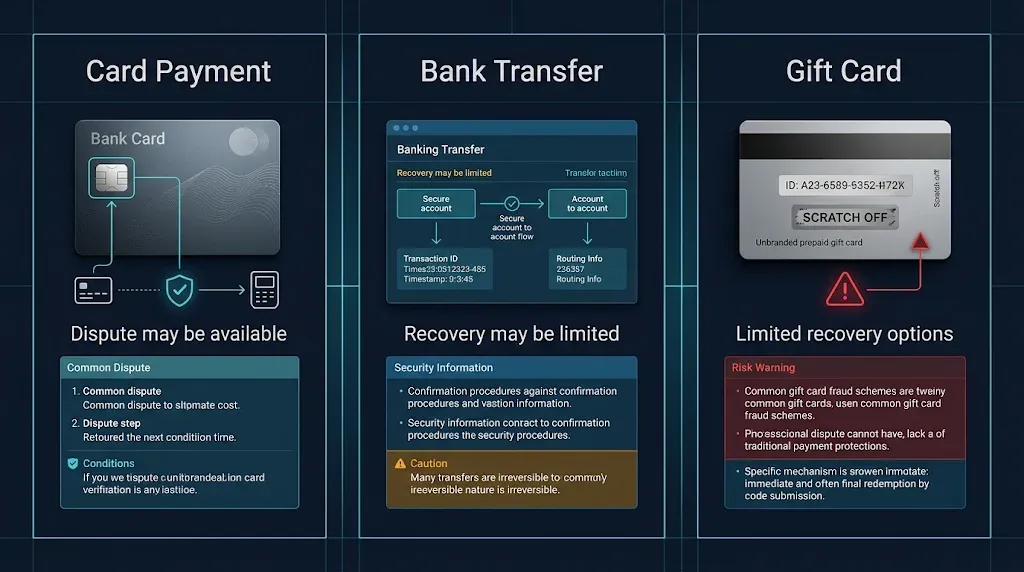
A chargeback is a request, made through your bank, to reverse a card payment. Consumer Protection’s guidance on online purchases says it “may allow your bank to reverse the payment” if what you paid for does not arrive or is significantly different from what was advertised, and that chargebacks have strict time limits.
Whether one succeeds depends on your bank’s and card issuer’s conditions, so it is a dispute process, not a guarantee.
The other methods are not all alike, and none is as established. Consumer Protection’s check before you buy online page recommends paying by credit or debit card and avoiding bank transfers, gift cards and direct payments.
A bank may sometimes be able to reverse a transfer if you act at once, but that is limited and depends on the bank. For gift cards and cryptocurrency, this guide found no official guidance describing a dependable recovery route, so do not assume one exists.
Key takeaway: How you pay affects what you may be able to dispute; a card payment can open a dispute route, but it never makes an unknown seller trustworthy.
What If You’ve Already Paid?
If you have already paid and something feels wrong, contact your bank first, then report the incident, and only after that consider the Disputes Tribunal. These are three separate steps with different purposes, and none of them guarantees you will get your money back.
Your bank. Ask whether a chargeback or payment reversal is possible for the way you paid. Whether it is depends on the payment method and the bank’s conditions, and the time limits mean waiting costs you options.
A report. Reporting does not recover money, but it helps others and can lead to action. The National Cyber Security Centre takes reports of scams and security incidents, and Consumer Protection also lists the platform where it happened, the Police and Netsafe as places to report.
The Disputes Tribunal. Consumer Protection notes that the Tribunal remains an option even if the seller is based overseas but trading in New Zealand.
That is not the same as a dependable way to recover money from an overseas operator: it applies only where its jurisdiction conditions are met, and a seller who cannot be identified is difficult to bring to any process.
What Happens to Your Personal Data?
Whoever sells or supplies the service may hold your name, email address, payment details and viewing activity. The Privacy Act 2020 sets rules for handling that information, and the Privacy Commissioner says it can reach overseas organisations that carry on business in New Zealand, though enforcing it against an anonymous operator is hard.
What the Privacy Act 2020 Covers
The Privacy Act 2020 is New Zealand’s law on how organisations collect, store and use personal information, and the Office of the Privacy Commissioner is the body that oversees it.
Its guidance on whether the Act applies to overseas organisations says it can, when an organisation carries on business in New Zealand, even without a physical presence here.
Two cautions keep that in proportion. Whether the Act applies to a particular seller depends on how that seller actually operates, and a legal right is only useful if there is a real organisation to hold to it. For a seller who gives no name and no way to be contacted, the practical protection is not handing over much in the first place.
What to Share and What to Hold Back
Share the minimum the service needs. Use a password you do not use anywhere else, because a seller’s database is only as secure as the seller.
Do not supply identity documents for a television subscription. Consider an email address kept separate from your banking and main accounts. And treat a seller with no identifiable business name, no contact details and no privacy statement as having told you something about how your information will be handled.
Can IPTV Apps and Boxes Carry Malware?
Yes, any app or device can, and the risk rises when software comes from outside an official store or when a box arrives with unknown software already installed.
Official app stores screen submissions, which is a filter rather than a guarantee, while sideloaded files and unbranded boxes bypass that check entirely.
Official App Stores vs Sideloaded Apps
Sideloading means installing an app file directly instead of through the device’s store. It skips the screening an official store applies, so you are relying entirely on whoever supplied the file.
Install methods also differ by device: some platforms are built around their own store and do not accept this kind of file at all, which the Firestick guide covers in detail. Where a player app is available from an official store, that is the safer source.

Pre-Loaded Boxes
A box that arrives with software already installed is harder to assess than an app you chose, because you cannot see what it shipped with. An unbranded device from a seller you cannot trace sits on the same home network as your phones and computers.
The best IPTV devices NZ guide covers what to look for in a device from a known maker.
If You Think a Device Is Compromised
Two situations call for different responses, and the official guidance treats them separately.
If someone has had remote access to your device, the government’s get help now guidance advises disconnecting it from the internet and restarting it to stop that access, and hanging up on anyone who asks for remote access. Contact your bank straight away if your banking details or accounts may be exposed, and report the incident to the NCSC.
If you suspect malware is installed, restarting is not a fix. Own Your Online’s guide to removing malware describes disconnecting from the internet, carefully backing up essential files only, then using either a factory reset or an antivirus scan, reconnecting and updating, and resetting your account passwords.
It suggests an IT professional if you need help and reporting to the NCSC if you still suspect an infection.
Key takeaway: An official store adds a screening step that sideloaded files skip; that does not make a sideloaded app harmful, but it removes a check you would otherwise have.
How Do You Spot an IPTV Scam?
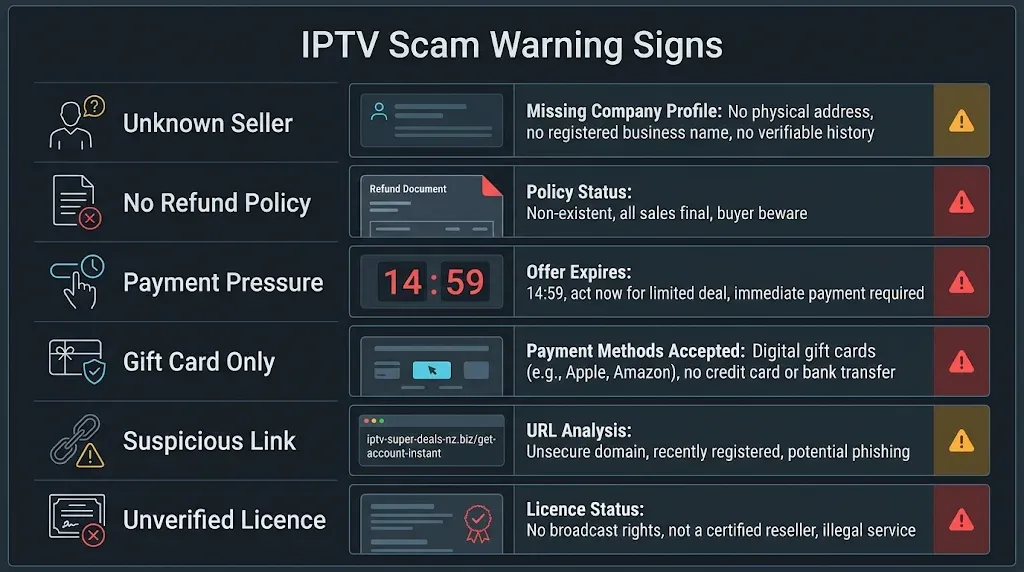
Look for pressure and for payment methods that cannot be reversed. A seller who demands gift cards or cryptocurrency, promises everything for a trivial price, hides who they are, or pushes you to pay before you can check anything is showing the usual signs. Verify who the seller is before sending any money.
| Warning sign | Why it matters | What to do |
|---|---|---|
| Payment only by gift card, cryptocurrency or transfer to a person | Consumer Protection advises avoiding these; recovery is far less certain | Walk away, or ask to pay by card |
| No business name, location or working contact | You cannot hold anyone to anything; a .co.nz address alone proves nothing | Look for who actually operates it |
| Unclear refund and return terms | You cannot tell what happens if it does not work | Do not pay until the terms are clear |
| Extreme price or “everything included” claims | A figure with no stated basis is a marketing claim, not a fact | Treat it as a reason to check more, not less |
| Countdown timers and pressure to pay now | Pressure replaces the time you need to verify | Wait; legitimate offers survive a day |
| An unexpected message with a link or payment request | Consumer Protection’s scam guidance warns against clicking and paying without verifying | Check the message directly with the sender |
| Claims about being “licensed” with no detail | A claim is not evidence | See is IPTV legal in NZ |
A distinction worth keeping in mind: a service that is down for an evening is a technical problem, covered in the IPTV service down guide. One that stops answering after you prepaid is a different problem, and the first thing the two have in common is that neither is resolved by paying again.
Does a VPN Make IPTV Safe?
No. A VPN encrypts the connection between your device and the VPN provider, but it does not change what a malicious app does once installed, recover a payment, or make a service licensed. It solves a different problem, and the VPN and IPTV guide covers what it does and does not do.
The Five-Minute Safety Check
Five checks before paying or installing take a few minutes and reduce some of the avoidable risks covered above. They do not make an unknown seller trustworthy, but they stop you walking into the obvious problems.
| Check | How |
|---|---|
| Who is the seller? | Find a business name, location and working contact details, and read the refund terms before paying |
| How will I pay? | Prefer a card; avoid bank transfers, gift cards and direct payments |
| Where does the app come from? | Use an official store where one is available |
| Where did the device come from? | Prefer a known maker you can trace |
| What am I handing over? | Give the minimum; use a unique password |
Know in advance where you would report a problem. The NCSC reporting form and your bank are the first two places.
When the Official Route Is the Better Choice
If you cannot verify the seller, if the household shares devices or includes children, or if you would rather not manage apps and payments at all, a licensed platform is the better choice, and nothing in this guide is a reason to feel otherwise.
If the honest answer to “Is IPTV safe NZ?” for a particular seller is “I can’t tell”, that is the answer. TVNZ+ and ThreeNow are free; paid options are compared in IPTV vs Sky NZ and IPTV vs Netflix NZ, and how to choose an IPTV service in NZ sets out what to weigh first.
Key takeaway: Five checks reduce avoidable risk, and an official platform is a legitimate answer when any of them fails.
Is Safe the Same as Legal?
No. A service can treat your money and data well and still lack the rights to carry what it sells, and a licensed one can still mishandle your data. Safety is about what happens to you; legality is about broadcast rights, which are covered in is IPTV legal in NZ.
This article is for educational and comparison purposes only. Verify the licensing status of any streaming service and ensure compliance with New Zealand copyright law before subscribing.
Explore More
Is IPTV Legal in NZ? · How to Choose an IPTV Service NZ · Kiwi IPTV Guide · Best IPTV Devices NZ
Bottom Line
The short answer to “Is IPTV safe NZ?” depends on which of three situations you are in:
If you are considering a service you found online — Verify who runs it, read the refund terms, and prefer a card, which may allow a dispute, over a bank transfer or gift card. If the seller cannot be identified, a licensed platform is the safer answer.
If you have already paid and something feels wrong — Contact your bank straight away, because chargebacks have strict time limits, then report it to the NCSC. Treat the Disputes Tribunal as a later option, not a guarantee.
If you are installing an app or buying a box — Use an official store where one exists, and prefer a device from a maker you can trace. A VPN does not substitute for either.
Sources
- Consumer Protection — what to do if something goes wrong with an online purchase — chargebacks, time limits, Disputes Tribunal
- Consumer Protection — check before you buy online — seller checks, payment methods, pressure tactics
- Consumer Protection — report a scam — where to report, warning signs
- Office of the Privacy Commissioner — does the Privacy Act apply to overseas organisations?
- Own Your Online — get help now — remote access, reporting to the NCSC
- Own Your Online — removing malware from your device
- National Cyber Security Centre — incident and scam reporting