
HomeNZ IPTV Guides & Reviews How to Choose an IPTV Service in NZ: 7 Checks That Actually Matter Choosing an IPTV service means checking the provider, not just counting channels.
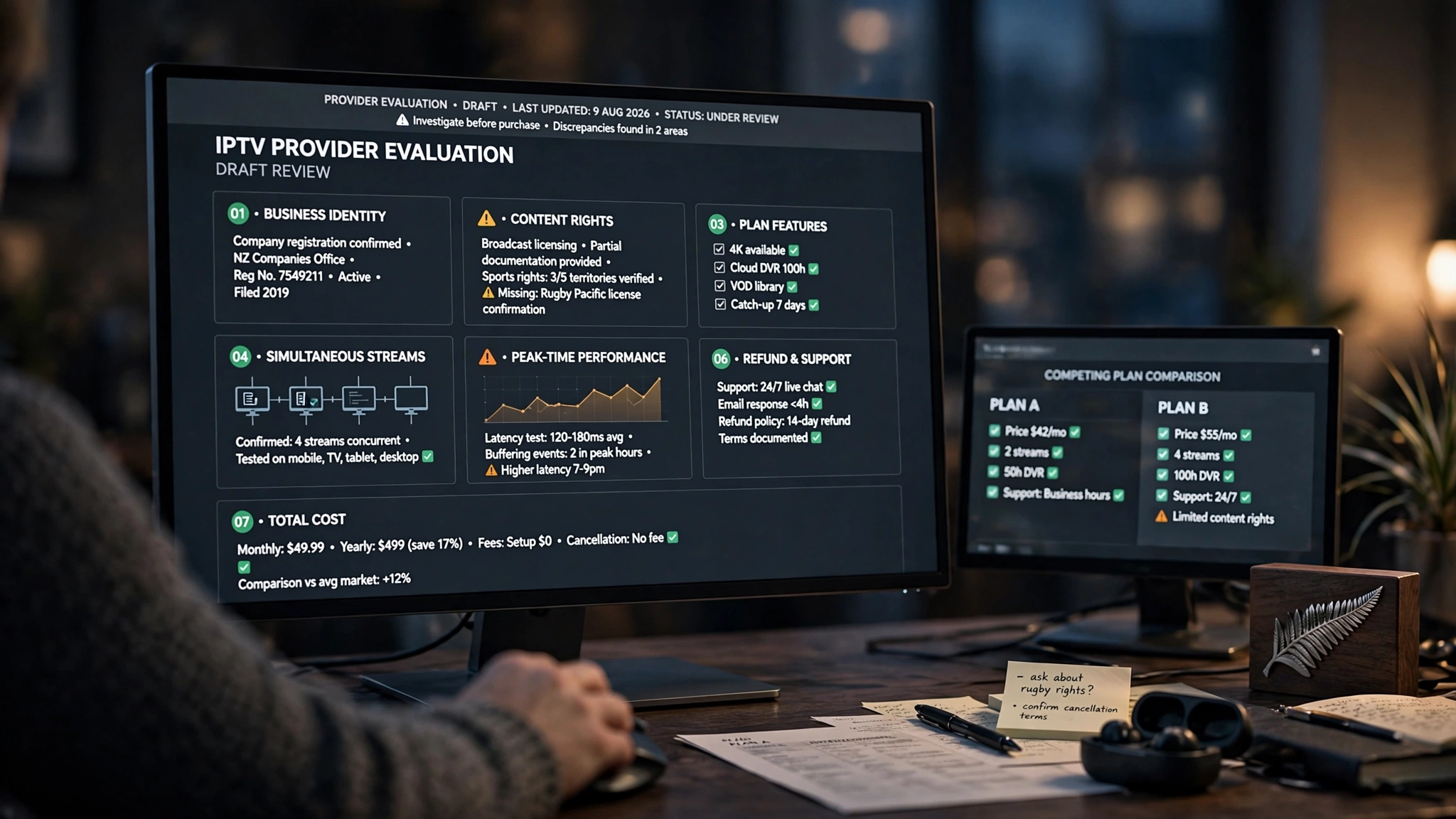
How to choose an IPTV service in NZ is a question most guides answer badly, because most of them are ranking providers rather than teaching you to judge one. This guide takes the opposite approach. It gives you a framework you can apply to any service — including this one — and the questions that separate a business you can hold to account from a subscription that disappears in three months.
Nothing here ranks providers or tells you which to pick. That decision is yours, and it should be based on evidence you gathered rather than a list someone else wrote.
This guide is in the NZ IPTV Guides & Reviews category and is part of the Kiwi IPTV Guide — the complete picture of streaming in New Zealand.
Why a Framework Beats a Ranking
Provider rankings go stale fast, and the ones you find in search results are frequently written by the providers being ranked. A framework does not go stale. The questions below will still be the right ones in two years, regardless of which services exist by then.
They are also questions a provider either answers clearly or does not. That response is itself the most useful data point you will gather, and it costs nothing to collect before you have paid anyone.
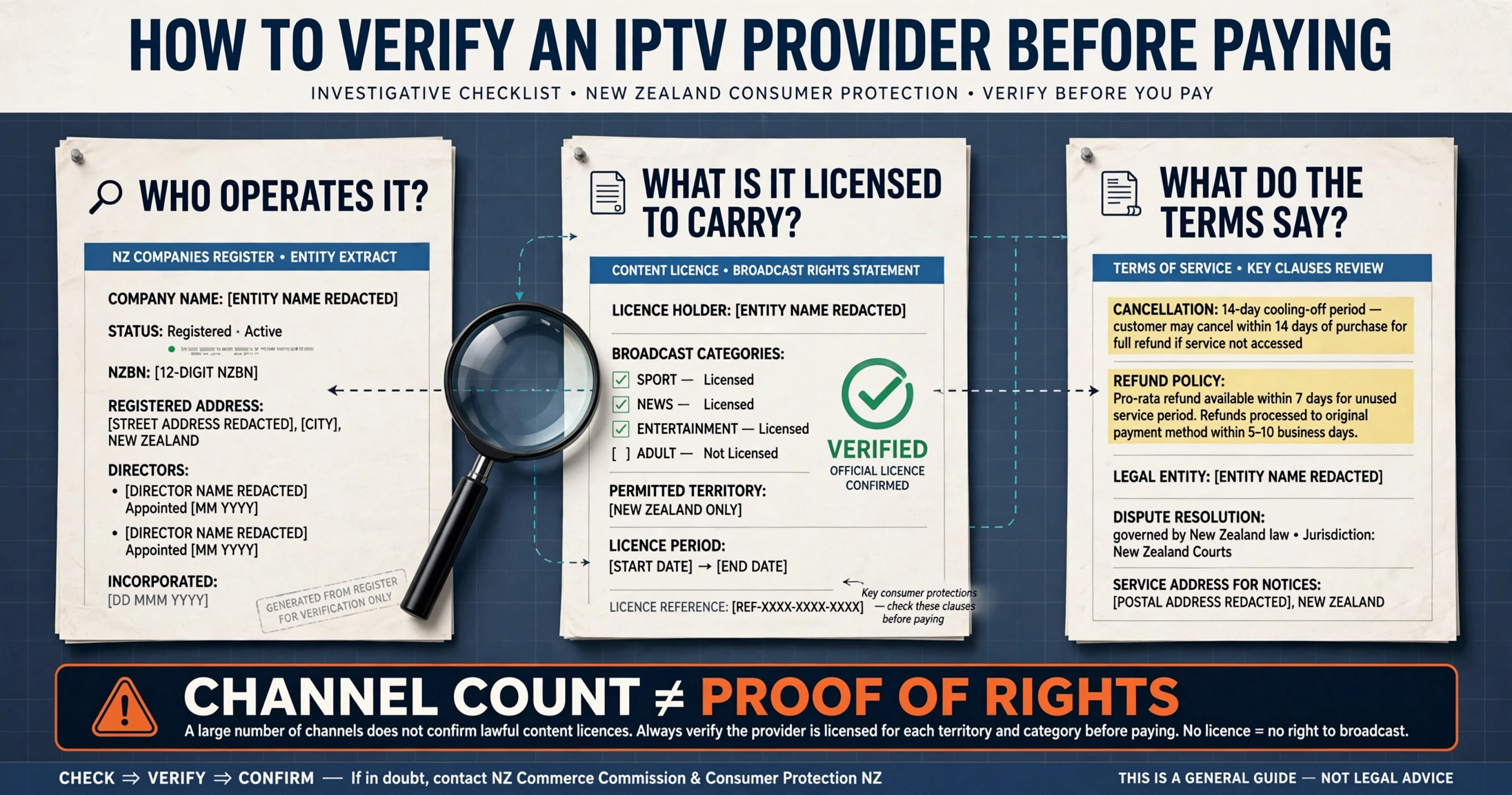
Check 1 — Can You Verify Who Operates the Service?
Start here, because everything else depends on it. If you cannot identify the business behind a service, you cannot hold it to anything.
What to look for: a named company, a registered address, and terms of service naming the legal entity you are contracting with. For a New Zealand company, the Companies Register lets you search a name and see directors, status and filing history. Offshore operators should be identifiable in their jurisdiction’s equivalent register.
What it tells you: New Zealand’s Consumer Guarantees The act gives you rights when a service fails to match its description — but exercising those rights requires a business you can name and reach. Anonymous operation is not a neutral detail. It removes your recourse entirely.
Warning sign: no company name anywhere on the site, no registered address, and terms of service that never identify who you are actually paying.
Check 2 — Can the Provider Explain Its Content Rights?
This enquiry is the question that determines whether a service is legitimate, and it is remarkable how rarely people ask it directly.
What to look for: a clear answer describing what the service is licensed to carry and on what basis. A provider operating properly has something concrete to point to. A provider that does not operate properly will usually change the subject to a channel count.
What it tells you: channel numbers are the most heavily marketed and least meaningful figures in this industry. A service advertising tens of thousands of channels at a very low price is describing an arrangement that does not fund content licensing. The economics are not subtle.
Warning sign: any answer that responds to a licensing question with a feature list. For the full legal position in New Zealand, see “Is IPTV Legal in NZ?”
3 — Does the plan actually include the advertised features? 3 — Does the plan actually include the advertised features?
Features are advertised at the service level and delivered at the plan level, and the gap between those two things is where most disappointment lives.
Catch-up and recording. Catch-up lets you watch something that aired in the past day or two. A recording function lets you save it yourself. These are different things, often confused in marketing copy. Ask which one you are getting, how far back catch-up reaches, and whether it applies to all channels or a subset.
EPG accuracy. A programme guide that shows incorrect times is worse than none at all, because you plan around it. Ask specifically whether the guide shows New Zealand time correctly, and verify it during a trial rather than just trusting the answer.
On-demand libraries. A large advertised library means little if the titles are unavailable, duplicated, or poorly organised. Look at what is actually there for content you would genuinely watch.
Warning sign: features listed prominently on the homepage but absent from the plan comparison page, or present only on a tier above the one you were considering.
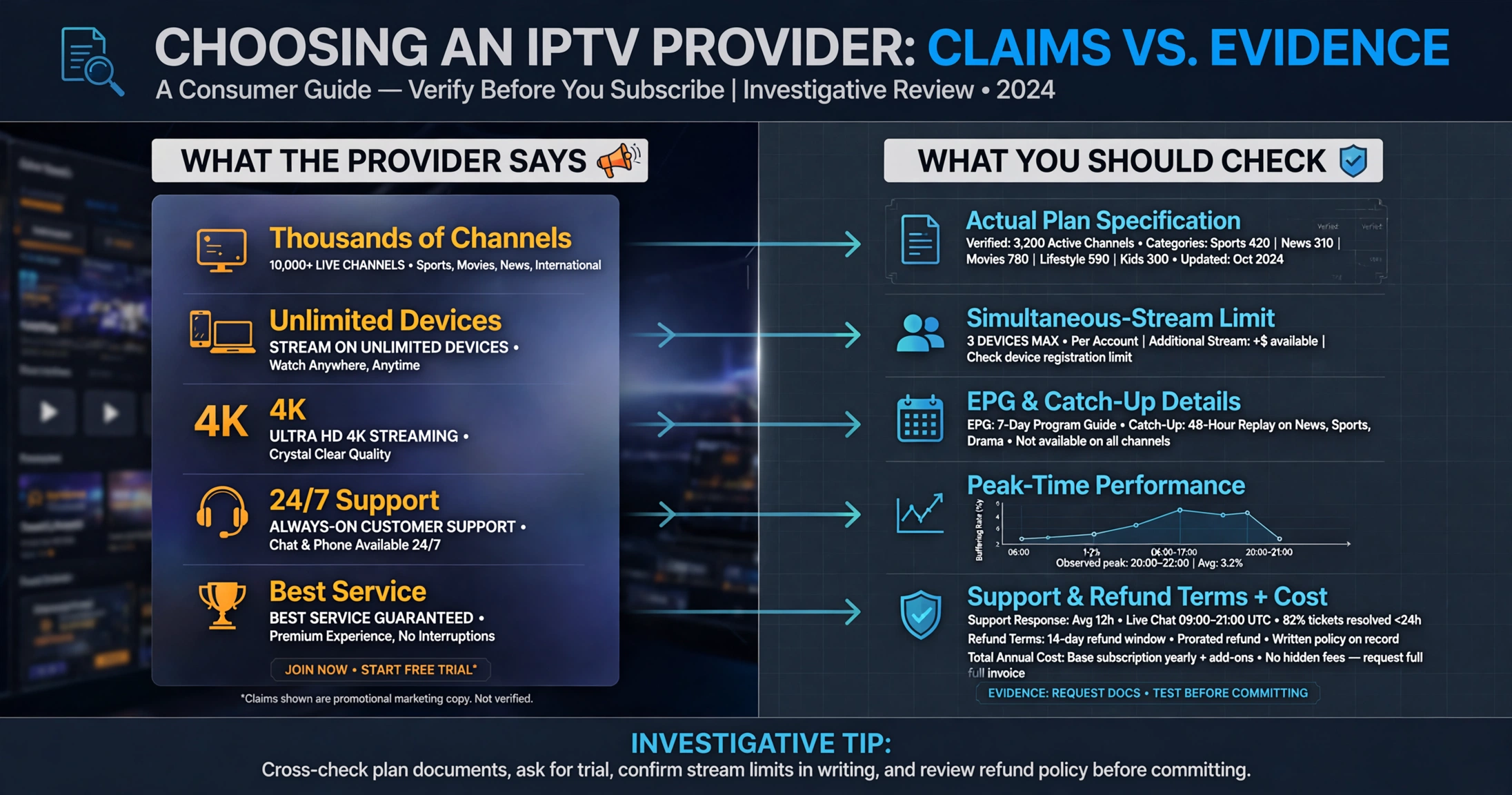
Check 4 — How Many Devices Can Stream at the Same Time?
This detail trips up more households than any other single detail, because three different numbers are quoted interchangeably.
- Devices you can install the app on — usually generous, but largely irrelevant.
- Devices that can be signed in — sometimes limited, sometimes not.
- Streams that can run simultaneously — this is the number that matters, and it is often one.
A household where two people want to watch different things at the same time needs to know that third number before subscribing, not after an argument on a Saturday night. Ask it explicitly, in those words.
Warning sign: marketing that emphasises “unlimited devices” but never states a limit on simultaneous streams.
Check 5 — What Happens at Peak Times?
Performance claims are easy to make and test, so this check has the best evidence-to-effort ratio.
Test during the hours you actually watch. New Zealand evening viewing is when both household bandwidth and provider capacity come under pressure. A service that runs cleanly at midday on a Tuesday has told you nothing about Saturday at 8pm.
Test the specific content you care about. Channel one in the list is usually the one kept in best condition. Test the sport, the international channels, or any other content you are actually subscribing to.
Test on your real device. Performance on a laptop over Wi-Fi is not a prediction of performance on the television you will use every night.
More generally, higher resolutions require more headroom, with 4K needing considerably more than HD. Rather than working from a figure quoted in a guide, check what your provider states as its requirement and compare that with a real speed test on your connection at the time of day you watch.
Warning sign: a provider that will not offer any trial period and asks for a long prepayment upfront. That is a request to trust them without evidence.
6 — What Are the Cancellation, Refund and Support Terms? 6 — What Are the Cancellation, Refund and Support Terms?
The moment you need these is the moment it is too late to research them.
Support before you pay. Send a genuine question before subscribing and see what comes back, how fast, and whether it answers what you asked. Pre-sale responsiveness is the most honest preview of post-sale support you will get.
Written terms. Cancellation conditions and refund position should be readable on the site before payment, not explained in a chat message afterwards. If they are not written down anywhere, treat that as the answer.
Continuity. Ask what happens if a channel you subscribed to disappears mid-term. A provider with a considered answer has thought about it. One without has not.
Warning sign: support that only becomes responsive once payment has cleared.
Check 7 — Does the Total Cost Make Sense for Your Household?
Price is the last check, not the first, and the useful figure is rarely the monthly one.
Work out the annual total including any renewal price change, then set it against what you would otherwise pay for the same content. That comparison often looks different from the monthly one — and for households following only a seasonal sport, a shorter commitment or an official platform’s short-term pass can genuinely beat an annual IPTV subscription.
Also weigh what you already get for nothing. New Zealand has more genuinely free viewing than most people account for, and paying for content already available free-to-air is the most common avoidable expense in this whole area. For the broader cost picture against traditional subscription television, see IPTV vs Sky NZ.
Warning sign: pricing so low it cannot fund licensed content, presented as a bargain rather than a question.
How to Choose an IPTV Service in NZ — What This Framework Is Not
It is not a guarantee. A service can pass all seven checks and still disappoint you, and no checklist substitutes for a trial period on your connection.
It is also not a legality test. These checks help you judge whether a business is accountable and whether its answers hold up. The legal position of any specific service depends on its actual licensing arrangements, which is why Check 2 matters more than the other six combined.
Applying This to Us
It would be inconsistent to publish a framework for evaluating providers and then exempt ourselves from it.
So please apply all seven checks here as well. Ask us about licensing and see whether you get a straight answer. Send a question to support before you pay anything and time the response. Take the trial, run it at eight on a Saturday evening on the television you actually use, on the channels you really want. Read the terms before subscribing rather than after.
If any of that comes back weak, it’s useful information, and you should act on it as this guide suggests. A provider asking you to verify everyone else while trusting them on faith has not understood the point.
Common Misconceptions
“More channels means a better service.” Channel count is the least informative number in IPTV marketing. Reliability during the hours you watch, guide accuracy, and support responsiveness all matter more, and none of them appear on a homepage banner.
“A free trial proves a service is legitimate.” It proves the streams work today. Licensing status is a separate question, and Check 2 is the one that addresses it.
“If it is cheap, it is a bargain.” Below a certain price, the arithmetic of content licensing stops working. That is a signal about the business model rather than a discount.
“I can always reverse the payment if it goes wrong.” This option is sometimes possible, depending on your bank, how recently you paid, and how clearly the service failed. It is a fallback, not a plan.
“A VPN makes a service legitimate.” That claim is not true. It changes what your connection looks like to your ISP and has no effect whatsoever on whether the content is licensed. This guide does not treat it as a compliance measure.
Legal Note
Services streaming content without valid licensing agreements are in breach of the Copyright Act 1994. Consumer Guarantees Act protections apply in practice only where there is an identifiable business to hold accountable, which is why Checks 1 and 2 come first. The Commerce Commission enforces the Fair Trading Act, which prohibits misleading conduct in trade, including inaccurate claims about licensing. For the full legal picture, see Is IPTV Legal in NZ?
The Bottom Line
Choosing an IPTV service in New Zealand depends on whether you can verify the information you receive. Who runs it? What it is licensed to carry. What the plan actually includes. How many people can watch at once? How it performs when you use it. What happens when something goes wrong? You should check whether the annual total makes sense against the alternatives.
Seven questions, all answerable before you pay anyone. A provider that answers them clearly has earned a trial. One that deflects has answered the most important question without meaning to.
Related NZ Streaming Guides
- Kiwi IPTV Guide — the complete NZ streaming picture
- Is IPTV Legal in NZ? — the legal position in detail
- IPTV vs Sky NZ — household cost comparison
- Best IPTV Devices NZ — device comparison
- IPTV Setup Guide NZ — once you have chosen
Sources
- New Zealand Companies Register: companies.govt.nz
- Consumer rights and the Consumer Guarantees Act: consumer protection. govt.nz
- Fair Trading Act enforcement: Commerce Commission
- NZ Copyright Act 1994: legislation.govt.nz