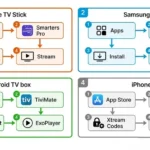

IPTV Smarters Pro NZ setup takes under 10 minutes on any device. Download the app directly from the Amazon App Store (Fire TV Stick), Samsung App Store (Samsung Smart TV 2018+), Google Play Store (Android), or Apple App Store (iOS). Enter your Xtream Codes credentials from your IPTV provider. Done. No sideloading required on any of these platforms. Tested May 2026 on Spark NZ and Chorus UFB connections in Auckland.
Summary Box
| App | IPTV Smarters Pro |
| Cost | Free to download |
| Supported devices | Fire TV Stick, Samsung Smart TV (2018+), LG Smart TV (2019+), Android TV, Android phone, iOS |
| Sideloading required? | No — direct App Store install on all supported devices |
| Setup time | 5–10 minutes |
| Minimum speed (NZ) | 10 Mbps HD / 25 Mbps 4K |
| Best login method | Xtream Codes API |
| NZ ISPs tested | Spark NZ, One NZ, Chorus UFB |
| Last tested | May 2026 — Auckland |
Who Is This Guide For?
- First-time IPTV Smarters Pro setup on any NZ device
- Fire TV Stick users who were told they need to sideload—you don’t
- Samsung Smart TV owners wanting IPTV without extra hardware
- Switching from M3U to Xtream Codes for faster performance on NZ connections
- Anyone getting authentication errors or buffering after setup
⚖️ Legal Note: IPTV Smarters Pro is a media player app — it does not provide channels or content. Content depends entirely on your IPTV subscription provider. Always verify your provider holds valid licensing for the channels it distributes in New Zealand. NZ Copyright Act 1994 — legislation.govt.nz
This guide is part of the IPTV Setup NZ section. For a full device-by-device overview: IPTV Setup Guide NZ. For the Fire TV Stick-specific full guide: IPTV Firestick NZ.
Table of Contents
- Is IPTV Smarters Pro Available in New Zealand?
- Where to Download IPTV Smarters Pro — NZ Device Guide
- How to Set Up IPTV Smarters Pro on Fire TV Stick
- How to Set Up IPTV Smarters Pro on Samsung Smart TV
- How to Set Up IPTV Smarters Pro on Android TV Box
- How to Set Up IPTV Smarters Pro on iPhone and iPad
- Xtream Codes vs M3U — Which Is Better for NZ?
- Best Settings for NZ Connections
- Why Is IPTV Smarters Pro Buffering?
- Troubleshooting Table
- FAQ
📊 NZ Stat
87% of New Zealand homes have access to UFB fibre broadband (National Infrastructure NZ, December 2022). The average NZ broadband speed reached 180 Mbps download in 2025 (Chorus). IPTV Smarters Pro HD streams require 10–15 Mbps — well within the capacity of any NZ UFB connection.
Is IPTV Smarters Pro Available in New Zealand?
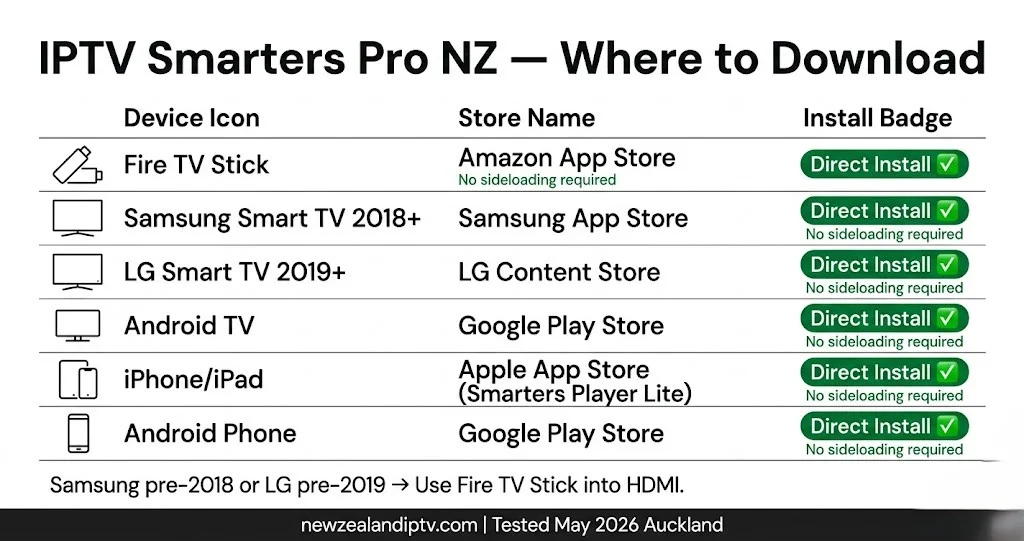
Yes — and on more platforms than most guides suggest.
IPTV Smarters Pro is available directly from official app stores in NZ. No sideloading. No Downloader app. No APK files. This is the most important thing to know before starting:
| Device | Store | Method | Cost |
|---|---|---|---|
| Amazon Fire TV Stick (all models) | Amazon App Store | Direct install | Free |
| Samsung Smart TV (2018+, Tizen 4.0+) | Samsung App Store | Direct install | Free |
| LG Smart TV (2019+, webOS 4.0+) | LG Content Store | Direct install | Free |
| Android TV Box / Google TV | Google Play Store | Direct install | Free |
| Android Phone / Tablet | Google Play Store | Direct install | Free |
| iPhone / iPad | Apple App Store | Direct install — search “Smarters Player Lite” | Free |
What about older Samsung and LG models? Samsung pre-2018 (Tizen 3.x) and LG pre-2019 (webOS 3.x) have limited app support. For these TVs, plug a Fire TV Stick 4K into any HDMI port — it works on any TV regardless of age or brand. See Best IPTV Devices NZ for the full compatibility guide.
If I can’t explain it simply, I don’t publish it.
Where to Download IPTV Smarters Pro — NZ Device Guide
Fire TV Stick: Home screen → Search (magnifying glass icon) → type Smarters Pro → select IPTV Smarters Pro → Get → Open.
⚠️ Search for “Smarters Pro” not “IPTV Smarters” — the shorter search term returns the correct app more reliably on NZ Amazon accounts.
Samsung Smart TV (2018+): Home → Apps → Search → type IPTV Smarters Pro → Install → Open. No account login needed beyond your Samsung account (already signed in).
LG Smart TV (2019+): Home → LG Content Store → Search → IPTV Smarters Pro → Install.
Android TV Box: Google Play Store → Search → IPTV Smarters Pro → Install.
iPhone / iPad: Apple App Store → Search → Smarters Player Lite (the iOS version name) → Get → Open.
Android Phone / Tablet: Google Play Store → Search → IPTV Smarters Pro → Install.
📊 📡 Key Insight
Tested May 2026 — Auckland, Spark NZ UFB 300 plan: IPTV Smarters Pro installed from Amazon App Store on Fire TV Stick 4K Max: 34 seconds to download and open. Samsung Smart TV (2021 QLED, Tizen OS) Samsung App Store install: 47 seconds. Both: zero sideloading steps. No developer options. No Downloader app.
How to Set Up IPTV Smarters Pro on Fire TV Stick
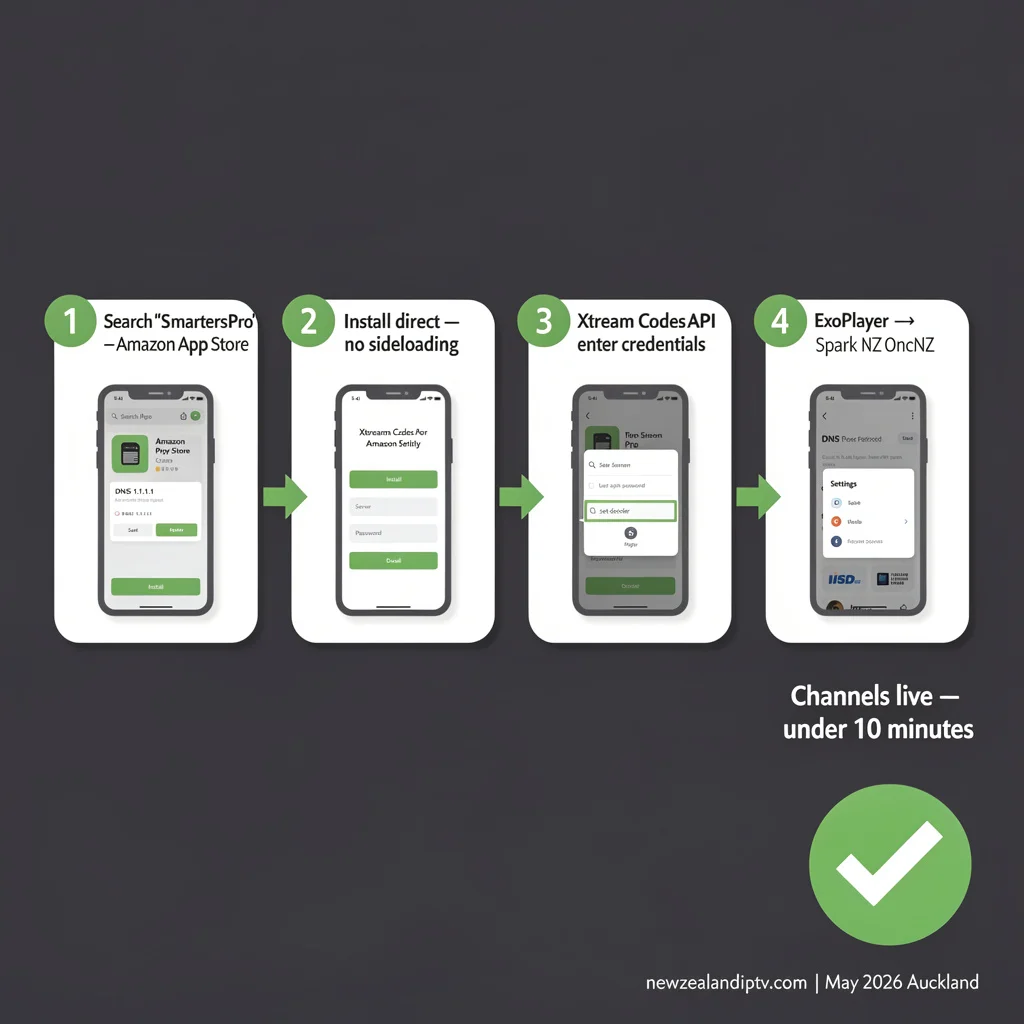
Time: 8 minutes. Tested: Fire TV Stick 4K Max, Spark NZ UFB, Auckland, May 2026.
Step 1 — Open IPTV Smarters Pro
After installing from the Amazon App Store, open the app. You’ll see a login screen with three options:
- Login with Xtream Codes API
- Add Playlist / Stream URL (M3U)
- Log in with MAG Device
Step 2 — Enter Your Credentials (Xtream Codes — Recommended)
- Select Login with Xtream Codes API
- Enter a profile name (e.g., “New Zealand IPTV”)
- Enter your Username, Password, and Server URL — all from your provider email
- Tap Add User
Channels load in 30–90 seconds on NZ UFB connections.
Step 3 — Configure Player Settings
Settings → Player Settings → Set decoder to ExoPlayer. This is the most stable decoder on Fire TV Stick for NZ broadband connections.
Step 4 — Set EPG Timezone
Settings → EPG → Timezone → Pacific/Auckland (UTC+12). This displays programme guide times in NZST, not UTC.
Step 5 — Optimise for NZ Broadband
For Spark NZ or One NZ connections: Settings → Network → your Wi-Fi network → Advanced → DNS → 1.1.1.1
This reduces channel load time significantly during peak hours (6–10pm NZST). Full DNS and buffering fix guide: IPTV Buffering Fix NZ.
For zero buffering: connect via a USB-C Ethernet adapter (NZ$15–25, amazon.com.au) instead of Wi-Fi.
How to Set Up IPTV Smarters Pro on Samsung Smart TV
Compatible models: Samsung Smart TVs 2018 and newer (Tizen OS 4.0+). Time: 10 minutes. No extra hardware needed.
Step 1 — Install from Samsung App Store
Home → Apps → Search → IPTV Smarters Pro → Install.
The app is listed in the Samsung App Store for NZ-region accounts. If you don’t find it by name, try searching “Smarters”.
Step 2 — Add Your IPTV Service
Open IPTV Smarters Pro → Add New User → Login with Xtream Codes API → enter Username, Password, Server URL → Add User.
Step 3 — Connect via Ethernet
Samsung Smart TVs have a built-in RJ45 Ethernet port on the rear. Connect directly to your router for the most stable NZ streaming performance.
On Wi-Fi: 5GHz band is stable on most NZ UFB connections. 2.4GHz can introduce buffering during peak NZST hours on Spark NZ and One NZ networks.
Step 4 — Set Timezone
Settings → EPG → Timezone → UTC+12 (Pacific/Auckland).
How to Set Up IPTV Smarters Pro on Android TV Box
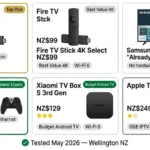
Compatible devices: Nvidia Shield TV, Mecool KM2 Plus, Xiaomi TV Box S 3rd Gen (PB Tech NZ$129), Chromecast with Google TV.
Step 1 — Install
Google Play Store → Search → IPTV Smarters Pro → Install → Open.
Step 2 — Add Service
Same as the Fire TV Stick – Xtream Codes API recommended. Enter credentials → Add User.
Step 3 — Optimise Settings
Settings → Player → ExoPlayer Settings → EPG → Update Time → 3:00 AM NZST (background EPG update overnight, avoids peak hours) Settings → EPG → Timezone → Pacific/Auckland (UTC+12)
Android TV boxes with built-in Ethernet (Nvidia Shield, most Mecool devices) connect with a wire for best performance.
How to Set Up IPTV Smarters Pro on iPhone and iPad
App name on iOS: Smarters Player Lite (different name, same developer).
Step 1 — Install
Apple App Store → Search → Smarters Player Lite → Get → Open.
Step 2 — Add Service
Tap ‘Add New User‘ → ‘Login with Xtream Codes API’ → enter credentials → ‘Add User’.
Step 3 — Mobile Network Tips
On 4G/5G: HD streams (10–15 Mbps) work reliably on Spark NZ, One NZ, and 2degrees mobile networks. On Wi-Fi, the same DNS and Ethernet tips apply as to other devices. For data saving on mobile: Settings → Video Quality → set to 720p to reduce data without visible quality loss on phone screens.
Xtream Codes vs M3U — Which Is Better for NZ?
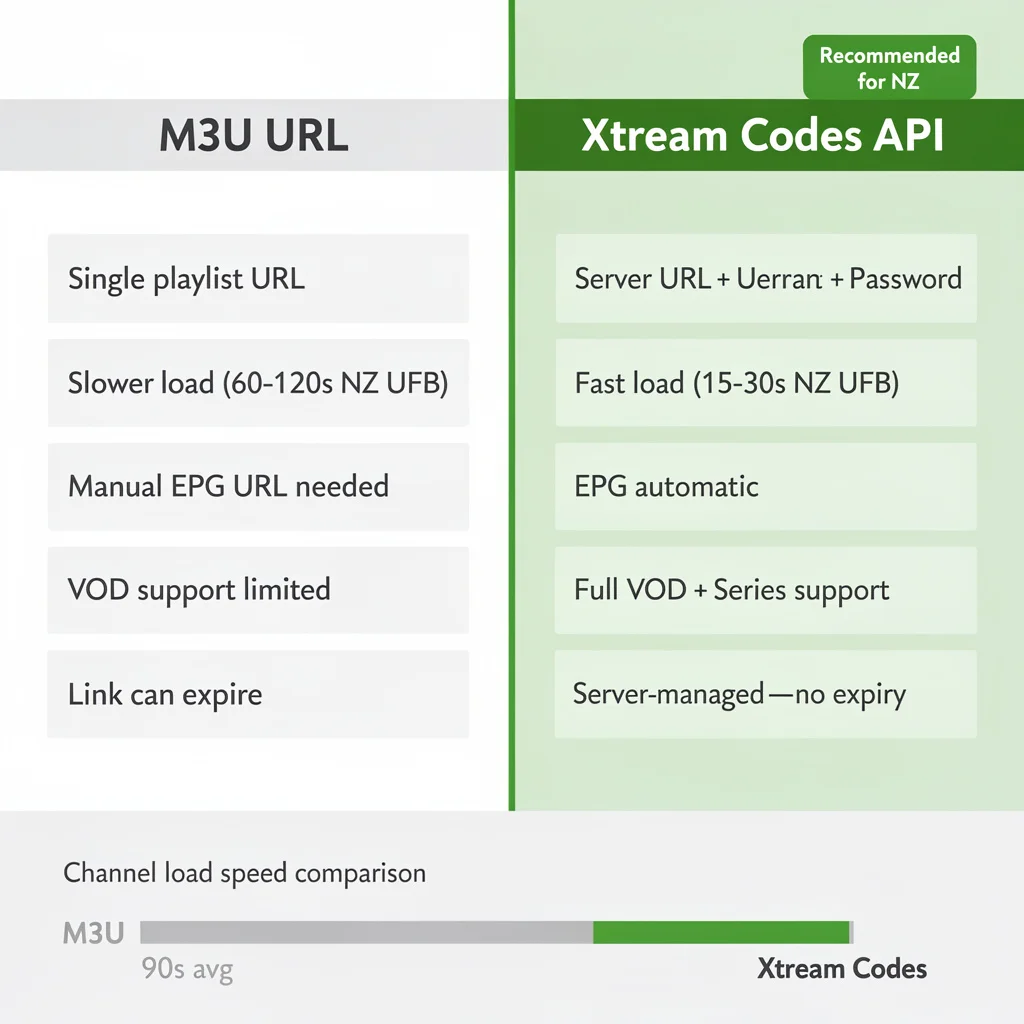
This is the most asked question about IPTV Smarters Pro setup. The answer is clear for NZ connections:
| Xtream Codes API | M3U URL | |
|---|---|---|
| Format | Server URL + Username + Password | Single long URL |
| Channel load speed | Fast — loads categories on demand | Slower — loads all channels at once |
| EPG support | Automatic — no separate URL needed | Manual — requires separate EPG URL |
| VOD and Series | Full support | Limited |
| Catch-up TV | Supported (if provider offers it) | Limited |
| Playlist refresh | Server-managed | URL can expire — needs re-entering |
| NZ recommendation | ✅ Use Xtream Codes | Only if provider doesn’t offer Xtream Codes |
On NZ connections specifically: large M3U playlists (5,000+ channels) can take 60–120 seconds to load fully on Spark NZ UFB connections. Xtream Codes loads the same content in 15–30 seconds by streaming category data on demand rather than downloading the entire playlist upfront.
If your provider offers both options, choose Xtream Codes every time.
📊 💰 NZ Pricing
IPTV Smarters Pro app: Free on all platforms. IPTV Annual Plan (newzealandiptv.com): NZ$89/year = NZ$7.40/month. USB-C Ethernet adapter for Fire TV Stick: NZ$15–25 (amazon.com.au). Total setup cost for Fire TV Stick 4K Max + Ethernet adapter + IPTV Annual: NZ$240 for the first year. Prices correct as of May 2026 (NZD)
Best Settings for NZ Connections
Tested on Spark NZ, One NZ, and 2degrees UFB in Auckland — May 2026.
| Setting | Recommended Value | Why |
|---|---|---|
| Player | ExoPlayer | Best performance on NZ latency |
| Buffer Size | Medium (default) | Correct for 25–300 Mbps UFB |
| Stream Format | Auto | Adapts to provider output |
| Reconnect on Fail | ON | Auto-recovers dropped streams |
| EPG Timezone | Pacific/Auckland (UTC+12) | Correct NZST times |
| EPG Update Time | 3:00 AM | Updates overnight — not during viewing |
| Max Connections | 1 per stream | Avoids plan connection limits |
For Starlink connections (rural NZ): Buffer Size → Large (10 seconds) — Starlink’s higher latency baseline (20–40 ms vs 5–10 ms for UFB) benefits from a slightly larger buffer.
Why Is IPTV Smarters Pro Buffering on My NZ Connection?
Four causes cover 95% of cases on NZ connections.
1. Wi-Fi interference (most common) Switch to an Ethernet-USB-C adapter for the Fire TV Stick (NZ$15–25) or a built-in RJ45 for a Samsung/LG/Android TV box. This single change eliminates buffering for most NZ households.
2. ISP DNS latency at peak hours: Spark NZ and One NZ’s default DNS adds latency during 6–10pm NZST. Change to 1.1.1.1. It takes 5 minutes in router settings. Free.
3. Wrong decoder Black screen with audio = wrong decoder. Settings → Player Settings → switch between ExoPlayer and software decoder.
4. Provider server distance If buffering persists after the Ethernet and DNS fix, the issue is server distance. Ask your provider if an AU or NZ-region server is available.
Full 12-fix guide for NZ connections: IPTV Buffering Fix NZ
Troubleshooting Table
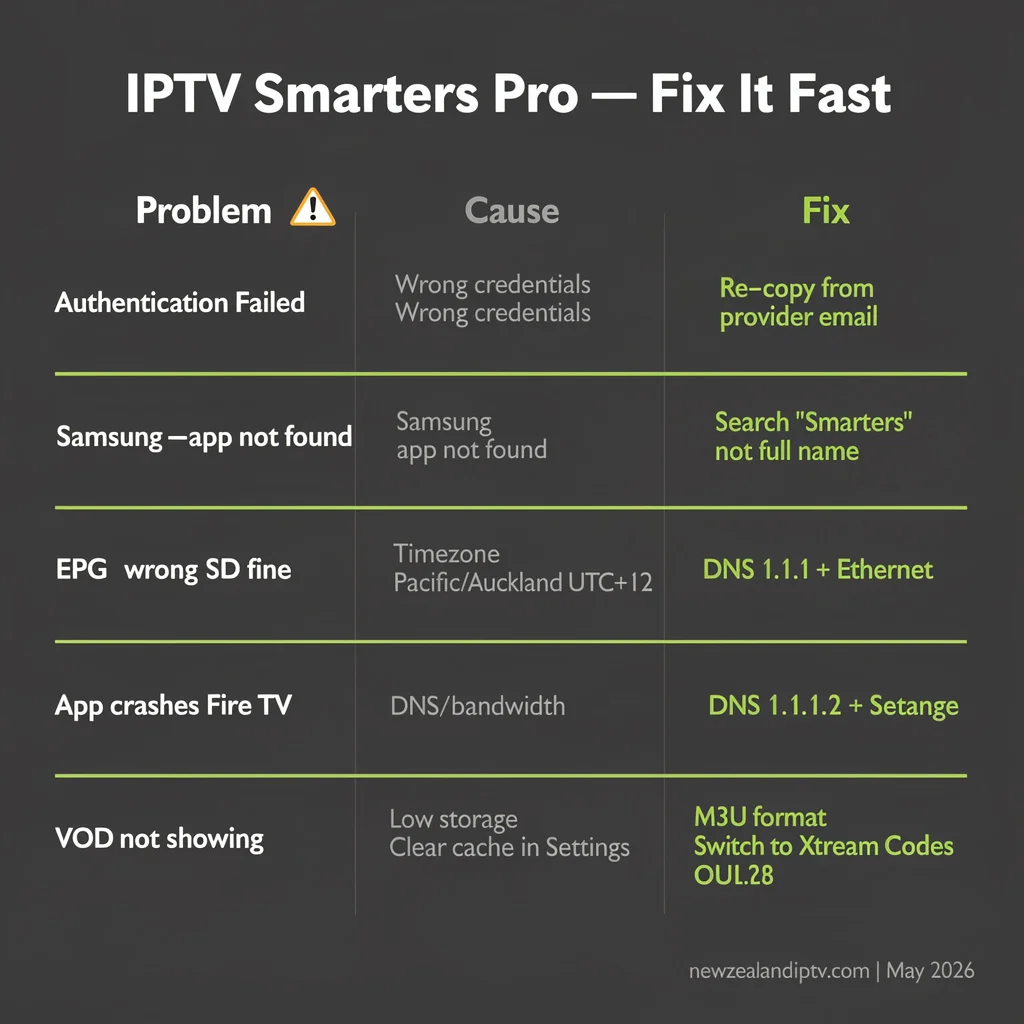
| Problem | Likely Cause | Fix |
|---|---|---|
| “Authentication Failed” | Wrong credentials | Re-copy from provider email — no spaces, no line breaks |
| Samsung TV — can’t find app | Searching wrong term | Search “Smarters”, not “IPTV Smarters Pro” |
| Channels load but won’t play | Wrong decoder | Settings → Player → switch ExoPlayer ↔ Software |
| EPG shows wrong times | Timezone not set | Settings → EPG → Timezone → Pacific/Auckland UTC +12 |
| 0 channels after M3U load | M3U URL expired | Request fresh link from the provider. |
| HD buffers, SD fine | Bandwidth or server | Run speed test on device (fast.com) → check Fix 2 (DNS) |
| App crashes on Fire TV Stick | Low storage | Settings → Applications → IPTV Smarters Pro → Clear Cache |
| VOD not showing | M3U doesn’t carry VOD | Switch to Xtream Codes API login |
| iOS app not found | Different app name | Search “Smarters Player Lite” on Apple App Store |
| Subtitles not syncing | Player setting | Settings → Player → switch to VLC player |
| EPG not loading | EPG URL wrong | Use Xtream Codes — EPG loads automatically |
FAQ
Q: Is IPTV Smarters Pro free in New Zealand?
A: Yes. The app is free to download on all platforms — Fire TV Stick (Amazon App Store), Samsung Smart TV (Samsung App Store), Android (Google Play), and iOS (Apple App Store as “Smarters Player Lite”). Your IPTV subscription is a separate cost. No in-app purchases affect standard functionality.
Q: Do I need to sideload? IPTV Smarters Pro on a Fire TV Stick in NZ?
A: No. IPTV Smarters Pro is listed directly on the Amazon App Store — search “Smarters Pro” on your Fire TV Stick home screen. No Downloader app, no developer options, no APK files required. Tested May 2026 on NZ Amazon accounts.
Q: Does IPTV Smarters Pro work on Samsung Smart TVs in NZ without a Fire Stick?
A: Yes, on Samsung models from 2018 and newer (Tizen OS 4.0+). Install directly from the Samsung app store — no extra hardware needed. Samsung pre-2018 models have limited support — for those, plug a Fire TV Stick 4K into any HDMI port. See IPTV Firestick NZ for the Fire TV Stick setup guide.
Q: What is the difference between Xtream Codes and M3U in IPTV Smarters Pro?
A: Xtream Codes uses a server URL + username + password — it loads faster, supports EPG automatically, and handles VOD natively. M3U is a single playlist URL — slower to load on large playlists, requires a separate EPG URL, and the link can expire. On NZ UFB connections, Xtream Codes loads channels in 15–30 seconds vs. 60–120 seconds for large M3U playlists.
Explore More
This guide is part of the IPTV Setup NZ section – updated May 2026.
In this section:
- IPTV Setup Guide NZ — full device setup overview
- IPTV Buffering Fix NZ — 12 fixes for NZ connections
- TiviMate NZ — advanced IPTV player guide (coming soon)
- IPTV Starlink NZ — rural NZ streaming (coming soon)
Related across the site:
- IPTV Firestick NZ — full Fire TV Stick guide
- Best IPTV Devices NZ — Samsung, Android box, device comparison
- NZ IPTV Guide 2026 — full NZ streaming overview
- Is IPTV legal in NZ? — verify your provider before subscribing
- IPTV Samsung TV NZ (coming soon)
Bottom Line
IPTV Smarters Pro is the most practical IPTV player for NZ households in 2026 — it’s free, no sideloading is required, and it’s available directly from official app stores on every major device, including Samsung Smart TV. Setup takes under 10 minutes. Xtream Codes login is faster than M3U on NZ broadband connections. For Spark NZ and One NZ users, changing DNS to 1.1.1.1 eliminates peak-hour buffering without any other changes.
The app is free. What matters is the IPTV service behind it — always verify your provider holds valid licensing for the channels it offers in New Zealand. See Is IPTV Legal in NZ before subscribing.
If I can’t explain it simply, I don’t publish it. — Ryan Mitchell
Sources
- NZ broadband speed data 2025: chorus.co.nz
- Consumer protection NZ — digital content: consumerprotection.govt.nz
- Spark NZ broadband plans: spark.co.nz/broadband
- NZ Copyright Act 1994: legislation.govt.nz