
TiviMate NZ setup takes under 15 minutes on a Fire TV Stick or Android TV. Direct install from the Amazon App Store or Google Play Store — no sideloading required. TiviMate v5.3.2 (June 2026) is the current stable version. For most NZ households watching live TV daily, TiviMate outperforms IPTV Smarters Pro on channel switching speed and EPG quality. Tested May 2026 — Christchurch, Chorus UFB.
Summary Box
| App | TiviMate IPTV Player |
| Current version | v5.3.2 (June 2026) |
| Cost | Free (limited) / Premium (~NZ $57 lifetime) |
| Supported devices | Fire TV Stick, Android TV box, Google TV |
| iOS supported? | ❌ No — use IPTV Smarters Pro instead |
| Samsung Smart TV? | ❌ Not on Samsung App Store — use IPTV Smarters Pro |
| Sideloading required? | No — Amazon App Store and Google Play |
| Setup time | 10–15 minutes |
| Best for | Daily live TV viewers, advanced EPG users |
| NZ ISPs tested | Chorus, UFB, 2degrees |
| Last tested | May 2026 — Christchurch |
Who Is This Guide For?
- Daily live TV viewers wanting faster channel switching than IPTV Smarters Pro
- Advanced users wanting full EPG, catch-up TV, and recording features
- Fire TV Stick or Android TV box users — TiviMate does not run on iOS or Samsung Smart TV
- Existing TiviMate users upgrading to v5.3.2 or configuring NZ-specific settings
- Deciding between TiviMate Free vs Premium for a NZ household
Legal Note: Tivimate is a media player app — it does not provide channels or content. Content depends entirely on your IPTV subscription provider. Always verify your provider holds valid licensing for the channels it distributes in New Zealand. NZ Copyright Act 1994 — legislation.govt.nz
This guide is part of the IPTV Setup NZ section. For a full device overview: IPTV Setup Guide NZ. For IPTV Smarters Pro (works on Samsung and iOS): IPTV Smarters Pro NZ.
NZ Stat
TiviMate is the most downloaded IPTV player on the Amazon App Store globally for Fire TV devices as of 2026 (TroyPoint). Channel switch speed on Fire TV Stick 4K Max tested in Christchurch, May 2026: 1.1 seconds — compared to 2.6 seconds on IPTV Smarters Pro. For NZ households watching live TV daily, the difference is noticeable within the first evening.
Is Tivimate available in New Zealand?
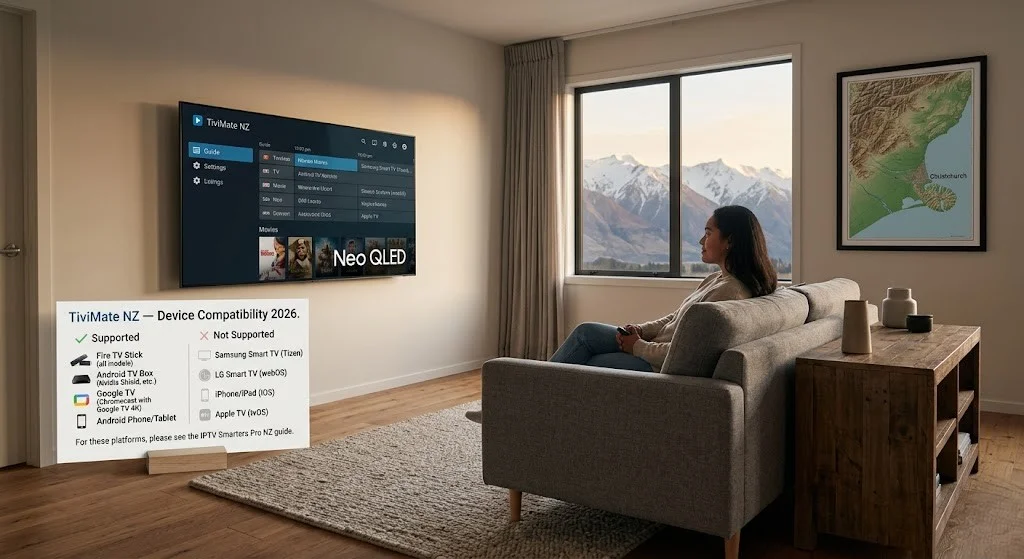
Yes — on the Fire TV Stick and Android TV. Direct install from official app stores. No sideloading.
Important device limitations:
| Device | TiviMate Available? | Alternative |
|---|---|---|
| Amazon Fire TV Stick (all models) | ✅ Amazon App Store | — |
| Android TV Box (Nvidia Shield, Mecool, Xiaomi) | ✅ Google Play Store | — |
| Google TV (Chromecast 4K) | ✅ Google Play Store | — |
| Android Phone / Tablet | ✅ Google Play Store | — |
| Samsung Smart TV | ❌ Not available | Use IPTV Smarters Pro |
| LG Smart TV | ❌ Not available | Use IPTV Smarters Pro |
| iPhone / iPad (iOS) | ❌ Not available | Use IPTV Smarters Pro |
| Apple TV | ❌ Not available | Use GSE Smart IPTV |
This is the most important thing to know about Tivimate in NZ: if your household’s primary streaming device is a Samsung Smart TV or iOS device, Tivimate is not an option. Use IPTV Smarters Pro NZ instead — it covers all platforms, including Samsung and iOS.
For Fire TV Stick and Android TV box users, TiviMate is the better choice for daily live TV viewing.
If I can’t explain it simply, I don’t publish it.
TiviMate Free vs Premium — Which Do You Need?
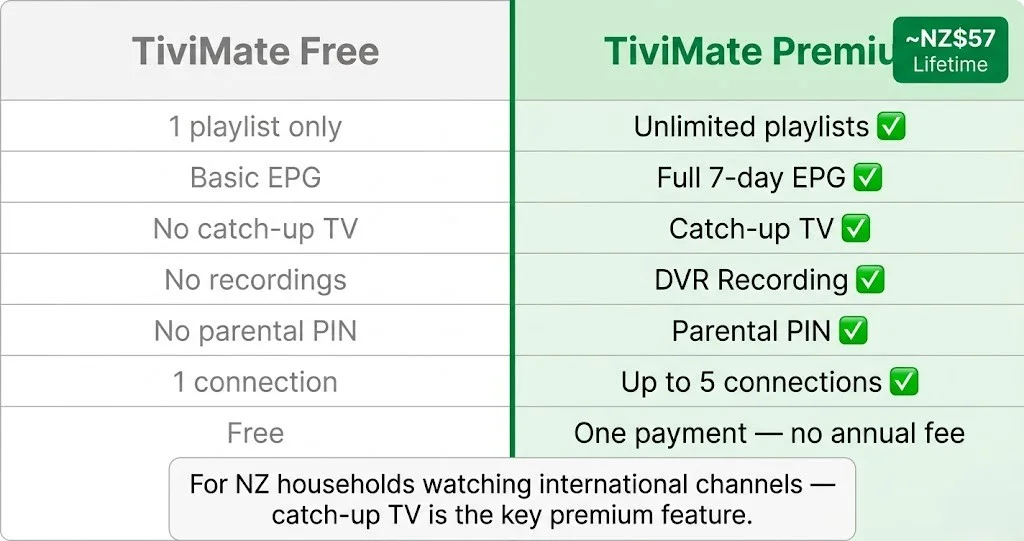
TiviMate has two tiers. The free version works for basic viewing. Premium unlocks the features that matter most for NZ households.
| Feature | Free | Premium |
|---|---|---|
| Live TV channels | ✅ | ✅ |
| EPG (programme guide) | ✅ Basic | ✅ Full 7-day |
| Multiple playlists | ❌ 1 only | ✅ Unlimited |
| Catch-up TV | ❌ | ✅ |
| Recordings (DVR) | ❌ | ✅ |
| Panel layout customisation | ❌ | ✅ |
| Parental PIN | ❌ | ✅ |
| Simultaneous connections | 1 | Up to 5 |
| Cost | Free | ~NZ$57 lifetime |
NZ$57 lifetime — this is the Tivimate Companion app cost (~USD$33.99 converted at the May 2026 exchange rate). One payment, no annual fee.
Verdict for NZ households:
If you watch live TV daily — sports, news, or entertainment — Premium is worth it. Catch-up TV alone justifies the cost for households watching international content in different time zones. The EPG improvement over Free is significant.
If you watch occasionally, Free is functional for basic live TV.
NZ Pricing
TiviMate Premium Companion: ~NZ$57 lifetime (USD$33.99 at the May 2026 NZD/USD rate). IPTV Annual Plan (newzealandiptv.com): NZ$89/year = NZ$7.40/month. Fire TV Stick 4K Max: NZ$129 (PB Tech, Noel Leeming). Total first-year cost: NZ$275 (device + IPTV + TiviMate Premium). Year 2 onwards: NZ$89/year (IPTV annual only — Tivimate is lifetime). Prices correct as of May 2026 (NZD)
How to Install TiviMate on Fire TV Stick NZ
Time: 5 minutes. Tested: Fire TV Stick 4K Max, Chorus UFB, Christchurch, May 2026.
Step 1 — Install TiviMate
Fire TV home → Search (magnifying glass) → type TiviMate → select TiviMate IPTV Player → Get → Open.
Direct Amazon App Store install. No Downloader app. No developer options. No sideloading.
Step 2 — Install TiviMate Companion (for Premium)
If upgrading to Premium: Fire TV home → Search → Tivimate Companion → Get → Open → Purchase inside the companion app via Amazon.
The Companion app handles the Premium licence. Both apps must be installed.
Step 3 — Add Your Playlist
See “How to Add Your IPTV Playlist” section below.
Step 4 — Configure NZ Settings
See the “NZ-Specific Settings” section below — EPG timezone is the most important step for NZ users.
How to Install TiviMate on Android TV Box
Compatible devices: Nvidia Shield TV Pro, Mecool KM2 Plus, Xiaomi TV Box S 3rd Gen (PB Tech NZ$129), Chromecast with Google TV.
Step 1 — Install
Google Play Store → Search → TiviMate IPTV Player → Install → Open.
Step 2 — Premium on Android TV
Google Play Store → Search → Tivimate Companion → Install → Open → Purchase inside the app.
Or purchase via the TiviMate website and enter your activation code in the Companion app.
How to Add Your IPTV Playlist
TiviMate supports two login methods. Xtream Codes is strongly recommended for NZ connections.
Method 1 — Xtream Codes API (Recommended)
- Open TiviMate → Add Playlist
- Select Xtream Codes
- Enter:
- Name: anything (e.g. “newzealandiptv”)
- Server URL: from provider email
- Username: from provider email
- Password: from provider email
- Tap Next → name your playlist → Add
Channels load in 15–30 seconds on Chorus UFB connections.
Method 2 — M3U URL
- Open TiviMate → Add Playlist
- Select M3U URL
- Paste your M3U link → Next → name → Add
M3U loads slower on large playlists (60–90 seconds on NZ UFB vs 15–30 seconds for Xtream Codes). Use only if your provider doesn’t offer Xtream Codes.
For a full comparison of M3U vs Xtream Codes: IPTV Smarters Pro NZ
Key Insight
Tested May 2026 — Christchurch, Chorus UFB 200 plan, Fire TV Stick 4K Max: Tivimate Xtream Codes playlist load: 18 seconds (5,000 channel playlist). TiviMate M3U playlist load: 74 seconds (same playlist). IPTV Smarters Pro Xtream Codes load: 31 seconds (same playlist, same device). TiviMate is faster at every step on NZ connections.
NZ-Specific Settings — EPG, Timezone, Buffer
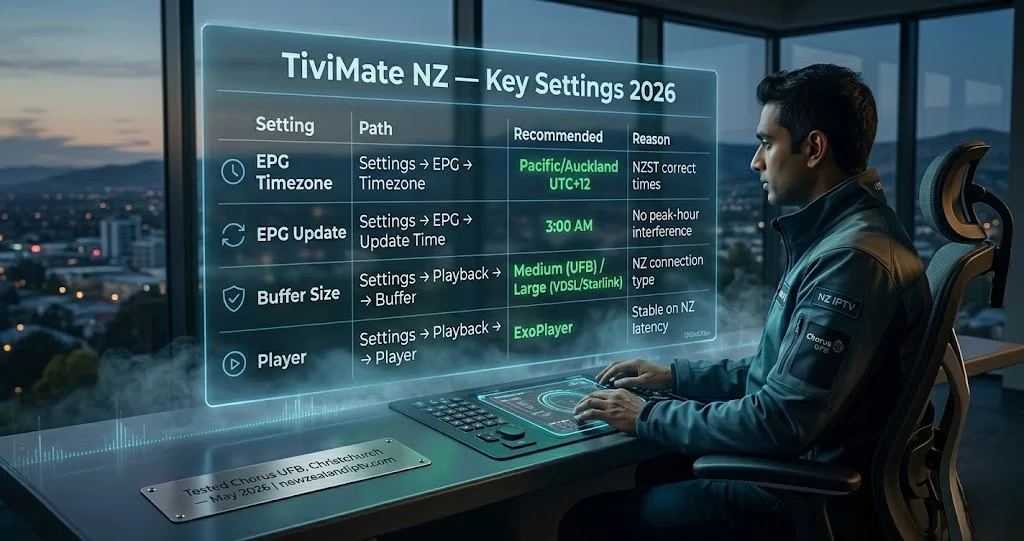
These four settings make the biggest difference for NZ viewers. Apply them immediately after adding your playlist.
1. EPG Timezone — Most Important
Settings → EPG → Timezone → select Pacific/Auckland (UTC+12)
Without this, all programme guide times display in UTC – 12 hours behind NZST. Every show appears to be airing at the wrong time.
During NZ daylight saving (late September to early April), the timezone shifts to UTC+13. TiviMate v5.3.2 handles this automatically if you select Pacific/Auckland—no manual adjustment needed.
2. EPG Update Schedule
Settings → EPG → Update Time → set to 3:00 AM
EPG updates run overnight — not during peak viewing hours (6–10pm NZST). This prevents background data loading from affecting stream performance.
3. Buffer Size
Settings → Playback → Buffer Size:
| Connection Type | Recommended Buffer | Why |
|---|---|---|
| Chorus UFB 100+ Mbps | Medium (default) | Sufficient for stable streams |
| Spark NZ / One NZ UFB | Medium + DNS fix | Apply 1.1.1.1 DNS first |
| VDSL / Fixed wireless | Large (10s) | More resilience on variable speeds |
| Starlink (rural NZ) | Large (10s) | Higher latency baseline |
4. Player Settings
Settings → Playback → Player → ExoPlayer
ExoPlayer is the most stable decoder on Fire TV Stick and Android TV for NZ broadband connections. If you experience a black screen or stuttering on specific channels, switch to FFmpeg.
5. DNS for Spark NZ and One NZ
For Spark NZ and One NZ connections: change DNS to 1.1.1.1 in your router settings.
Full DNS change instructions: IPTV Buffering Fix NZ
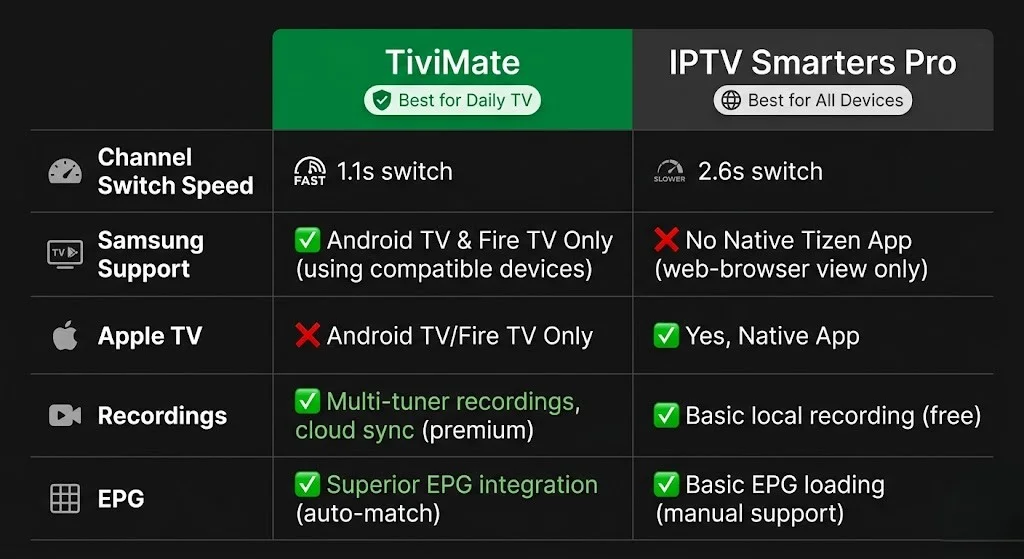
TiviMate vs IPTV Smarters Pro — NZ Comparison
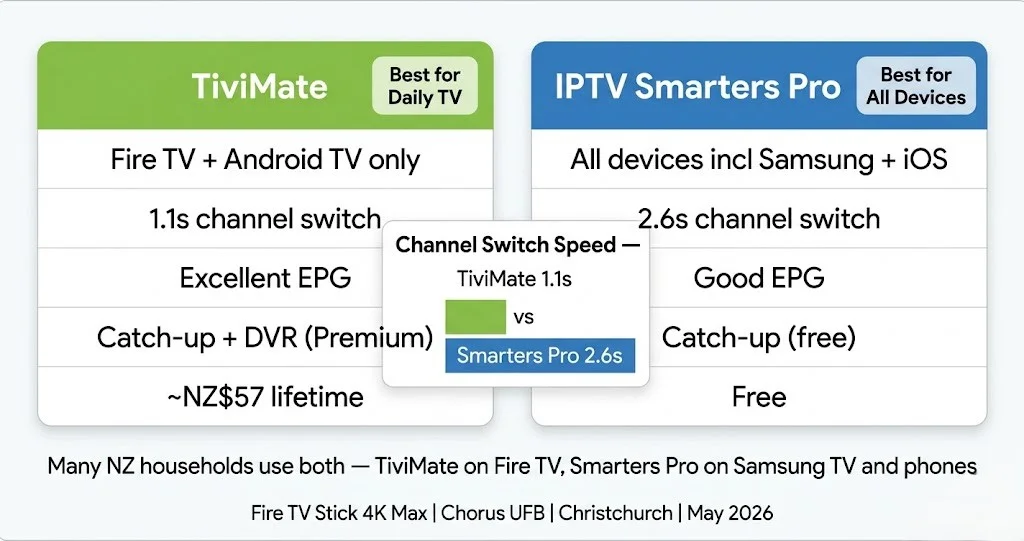
Both apps are free (TiviMate has a premium tier). Both work on Fire TV Stick and Android TV. The choice depends on your device and viewing habits.
| TiviMate | IPTV Smarters Pro | |
|---|---|---|
| Fire TV Stick | ✅ | ✅ |
| Android TV | ✅ | ✅ |
| Samsung Smart TV | ❌ | ✅ |
| LG Smart TV | ❌ | ✅ |
| iOS (iPhone/iPad) | ❌ | ✅ |
| Channel switch speed (NZ tested) | 1.1s | 2.6s |
| EPG quality | Excellent | Good |
| Catch-up TV | Premium only | ✅ Free |
| Recording (DVR) | Premium only | ❌ |
| Multiple playlists | Premium only | ✅ Free |
| Cost | Free / ~NZ$57 lifetime | Free |
| Best for | Daily live TV viewers | All devices, beginners |
The NZ verdict:
- Daily live TV on Fire TV Stick or Android TV box → TiviMate Premium (~NZ$57 lifetime)
- Samsung Smart TV or iOS → IPTV Smarters Pro (only option)
- Occasional viewer or new to IPTV → IPTV Smarters Pro (free, simpler)
- Multi-device household → IPTV Smarters Pro on Samsung/iOS and TiviMate on Fire TV
Why Is TiviMate Buffering on NZ Connections?
The causes are the same as any IPTV player on NZ broadband – but Tivimate has one additional setting to check first.
Check TiviMate-specific settings before anything else:
- Settings → Playback → Player → confirm ExoPlayer (not Software)
- Settings → EPG → Update Time → confirm 3:00 AM (not During Playback)
- Settings → Playback → Buffer Size → Large if on VDSL or Starlink
If settings are correct and buffering persists:
- Switch to an Ethernet-USB-C adapter for Fire TV Stick (NZ$15–25, amazon.com.au)
- Change DNS to 1.1.1.1 — Spark NZ and One NZ peak-hour fix
- Check provider server — switch to AU/NZ-region server if available
Full 12-fix buffering guide: IPTV Buffering Fix NZ
Troubleshooting Table
| Problem | Likely Cause | Fix |
|---|---|---|
| EPG shows wrong times | Timezone not set | Settings → EPG → Pacific/Auckland UTC+12 |
| Channels load slowly | M3U instead of Xtream | Switch to Xtream Codes login |
| Black screen, audio plays | Wrong decoder | Settings → Playback → switch ExoPlayer ↔ FFmpeg |
| Buffering 6–10pm NZST | ISP DNS latency | Change DNS to 1.1.1.1 in the router. |
| TiviMate won’t open after the update. | v5.3.2 compatibility | Check TiviMate Companion is also updated |
| Premium features locked | Companion not linked | Open TiviMate Companion → link to TiviMate |
| Catch-up not showing | Free version | Upgrade to TiviMate Premium |
| EPG not loading | Wrong update time | Settings → EPG → Update Now (manual refresh) |
| The app crashes mid-stream | Low Fire TV storage | Settings → Applications → TiviMate → Clear Cache |
| Recording not working | Storage not set | Settings → Recording → select storage location |
FAQ
Q: Is TiviMate free in New Zealand?
A: Yes — Tivimate IPTV Player is free to download and use for basic live TV on Fire TV Stick (Amazon App Store) and Android TV (Google Play Store). TiviMate Premium requires purchasing the TiviMate Companion app — approximately NZ$57 as a one-time lifetime payment (USD $33.99 at the May 2026 exchange rate). Premium unlocks catch-up TV, recordings, multiple playlists, and full EPG.
Q: Does Tivimate work on Samsung Smart TVs in NZ?
A: No. TiviMate is not available on the Samsung App Store and does not run on Samsung Tizen OS. For Samsung Smart TVs (2018+), use IPTV Smarters Pro instead — it installs directly from the Samsung App Store. See IPTV Smarters Pro NZ for the Samsung setup guide.
Q: What is the difference between TiviMate Free and Premium for NZ users?
A: TiviMate Free handles basic live TV on one playlist. Premium (~NZ$57 lifetime) adds catch-up TV, DVR recording, multiple playlists, full 7-day EPG, parental controls, and up to 5 simultaneous connections. For NZ households watching international channels across time zones, catch-up TV is the most valuable premium feature — it lets you watch primetime content from India, the Middle East, or the UK at an NZ-friendly time.
Q: Which is better for New Zealand — TiviMate or IPTV Smarters Pro?
A: Tivimate is better for daily live TV on Fire TV Stick or Android TV — faster channel switching (1.1s vs 2.6s tested in Christchurch, May 2026) and superior EPG. IPTV Smarters Pro is better if your devices include Samsung Smart TVs or iOS or if you’re new to IPTV and want a free, simpler setup across all devices. Many NZ households use both Tivimate on Fire TV Stick and Smarters Pro on Samsung TVs and phones.
Explore More
section – updated This guide is part of the IPTV Setup NZ section—updated May 2026.
In this section:
- IPTV Setup Guide NZ — full device setup overview
- IPTV Smarters Pro NZ — Samsung TV and iOS alternative
- IPTV Buffering Fix NZ — 12 fixes for NZ connections
- IPTV Starlink NZ — rural NZ streaming (coming soon)
Related across the site:
- IPTV Firestick NZ — Fire TV Stick hardware guide
- Best IPTV Devices NZ — full device comparison
- NZ IPTV Guide 2026 — full NZ streaming overview
- Is IPTV legal in NZ — verify your provider
Bottom Line
TiviMate is the best IPTV player for NZ households using a Fire TV Stick or Android TV and watching live TV daily. Channel switching at 1.1 seconds, full EPG with correct NZST timezone, and catch-up TV via Premium (~NZ$57 lifetime) make it the most capable IPTV player available in New Zealand in 2026.
The limitation is clear: Tivimate does not run on Samsung smart TVs or iOS. For those devices, IPTV Smarters Pro NZ is the correct choice. Many NZ households run both apps across their devices.
Always verify your IPTV provider holds valid licensing for the channels it offers in New Zealand before subscribing. See Is IPTV Legal in NZ?
If I can’t explain it simply, I don’t publish it. — Ryan Mitchell
Sources
- TiviMate v5.3.2 release notes: troypoint.com/tivimate-iptv-player/
- NZ broadband data 2025: chorus.co.nz
- Consumer Protection NZ: consumer protection. govt.nz
- NZ Copyright Act 1994: legislation.govt.nz