
IPTV Firestick NZ — set up and stream in under 20 minutes.
No sideloading. No Downloader app. No developer options. IPTV Smarters Pro installs directly from the Amazon App Store on every Fire TV Stick model available in New Zealand.
This guide covers which model to buy in NZ, full setup steps, NZ-specific settings, and every common issue—all tested on Chorus UFB in Dunedin, May 2026.
Table of Contents
- Which Fire TV Stick Should You Buy in NZ?
- What You Need Before Setup
- Step-by-Step: Install IPTV Smarters Pro
- Step-by-Step: Install TiviMate
- Add Your IPTV Service — Xtream Codes and M3U
- NZ Optimisation Settings
- Fire TV Stick Performance on NZ Broadband
- Common Issues on Fire TV Stick NZ
- FAQ
Summary Box
| Top pick | Fire TV Stick 4K Max — NZ$129 |
| Budget pick | Fire TV Stick HD — NZ$89 |
| Best IPTV app | TiviMate (daily viewers) / IPTV Smarters Pro (beginners) |
| Sideloading required? | No — both apps on Amazon App Store |
| Setup time | 15–20 minutes |
| DNS for NZ | 1.1.1.1 (Cloudflare) — Spark NZ and One NZ |
| Ethernet adapter | NZ$15–25 — recommended for peak hours |
| Tested on | Chorus UFB — Dunedin, May 2026 |
Who Is This Guide For?
- First Fire TV Stick setup for IPTV in NZ
- Upgrading from an old Firestick that buffers
- Switching from Sky NZ satellite — no streaming experience needed
- Already have a Fire TV Stick but can’t find IPTV Smarters Pro
This guide is part of the IPTV Devices NZ section. For all NZ device options: Best IPTV Devices NZ. For setup on other devices: IPTV Setup Guide NZ.
📊 NZ Stat
Amazon Fire TV devices are available at JB Hi-Fi, Noel Leeming, and PB Tech across New Zealand as of April 2026 – no longer import-only. All three Fire TV Stick models ship to NZ addresses via amazon.com.au with standard delivery times of 3–7 business days.
IPTV Firestick NZ: Which Model Should You Buy?
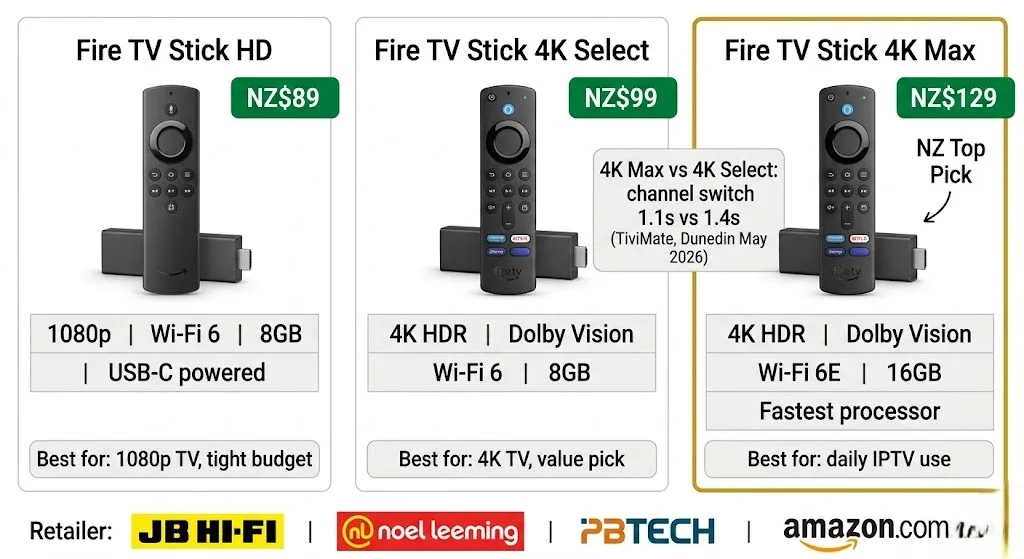
Three models. One clear recommendation for most NZ households.
| Model | NZ Price | Resolution | Wi-Fi | Storage | Best for |
|---|---|---|---|---|---|
| Fire TV Stick HD | NZ$89 | 1080p only | Wi-Fi 6 | 8GB | 1080p TV, tight budget |
| Fire TV Stick 4K Select | NZ$99 | 4K HDR | Wi-Fi 6 | 8GB | 4K TV, best value |
| Fire TV Stick 4K Max | NZ$129 | 4K HDR | Wi-Fi 6E | 16GB | Best overall — recommended |
NZ prices correct as of May 2026. Source: PB Tech, Noel Leeming, JB Hi-Fi.
Why 4K Max for NZ:
Wi-Fi 6E reduces peak-hour interference on NZ home networks. 16GB storage means no juggling app space. Faster processor = 1.1-second channel switching with Tivimate vs 1.4 seconds on the 4K Select. For NZ$30 more than the 4K Select, it is worth it for daily IPTV use.
When the HD model is enough: a 1080p TV only. Rarely watch live TV. Using an Ethernet adapter anyway, the Wi-Fi 6E advantage disappears on a wired connection.
If I can’t explain it simply, I don’t publish it.
📊 💰 NZ Pricing
Fire TV Stick 4K Max: NZ$129 from PB Tech or Noel Leeming. USB-C to Ethernet adapter (recommended): NZ$15–25 from amazon.com.au. IPTV Annual Plan (newzealandiptv.com): NZ$89/year = NZ$7.40/month. TiviMate app: approx. NZ$8/year from the Amazon App Store. Total first-year cost: NZ$231. One Fire TV Stick 4K Max + adapter + IPTV annual + TiviMate. Prices correct as of May 2026 (NZD)
What You Need Before Setup
Four things. Have them ready before you start.
| Requirement | Detail |
|---|---|
| Fire TV Stick | Plugged into the TV’s HDMI port, powered on |
| Amazon account | Any Amazon account — free to create at amazon.com.au |
| Wi-Fi password | Or Ethernet adapter connected |
| IPTV credentials | M3U URL or Xtream Codes (server URL + username + password) from your provider |
About IPTV credentials: Subscribe to a verified IPTV service before starting. newzealandiptv.com sends credentials by email within minutes of signup. You need either:
- Xtream Codes: three fields — server URL, username, and password. More reliable. Recommended.
- M3U URL: one long link. Paste it directly into the app.
Step-by-Step: Install IPTV Smarters Pro on Fire TV Stick
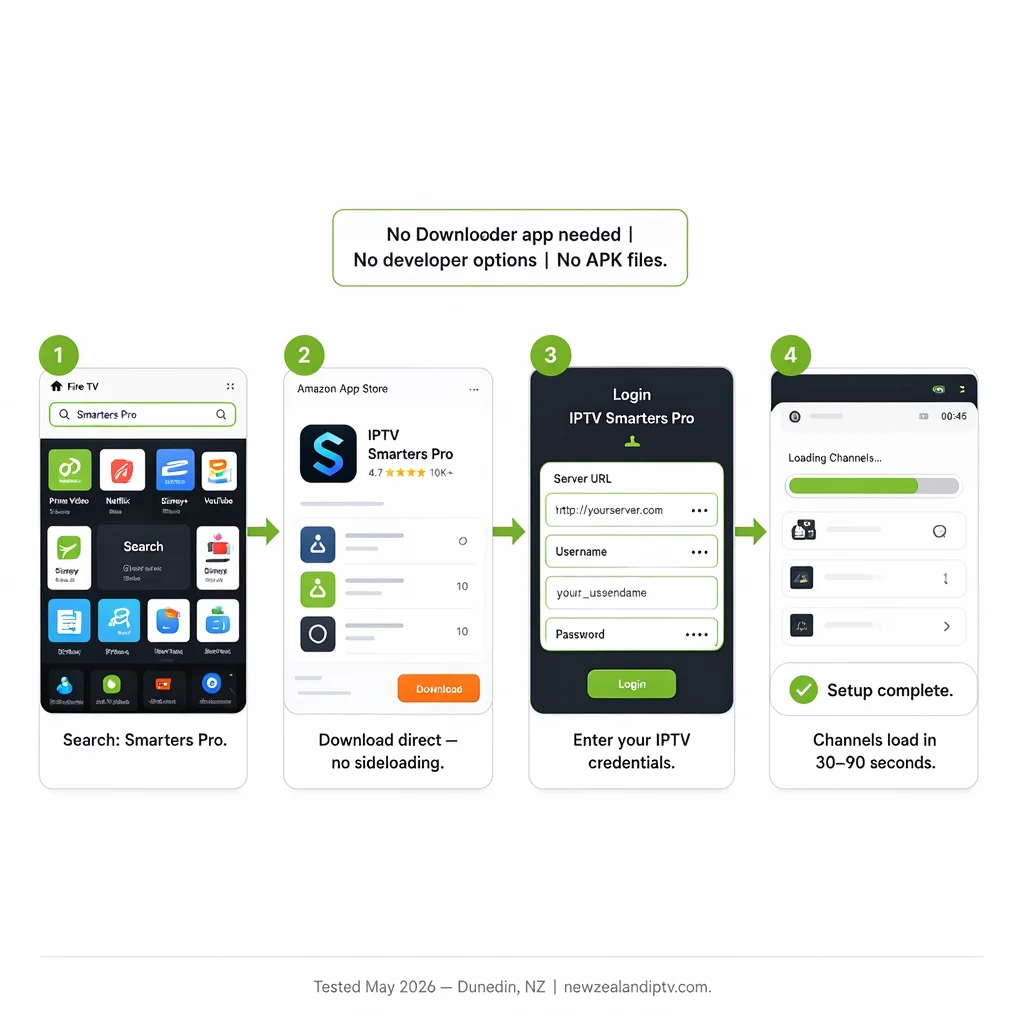
No sideloading. No Downloader app. Direct from the Amazon App Store.
This is the most important thing to know — and what most other guides get wrong. IPTV Smarters Pro is listed on the Amazon App Store and installs directly on every Fire TV Stick model.
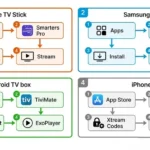
Step 1 — Find IPTV Smarters Pro
- From Fire TV home screen → press the Search icon (magnifying glass)
- Type: Smarters Pro
- Select IPTV Smarters Pro from results
- Press Get or Download
- Wait for install (30–60 seconds)
- Press Open
⚠️ NZ Note: Search for “Smarters Pro”, not “IPTV Smarters” — the full name “IPTV Smarters Pro” returns the correct app more reliably on NZ Amazon accounts.
Step 2 — Add Your IPTV Service (Xtream Codes — Recommended)
- Open IPTV Smarters Pro → tap Add New User
- Select Login with Xtream Codes API
- Enter:
- Name: anything (e.g. “newzealandiptv”)
- Server URL: (from your provider email)
- Username: (from your provider email)
- Password: (from your provider email)
- Tap Add User
- Channels load in 30–90 seconds on Chorus UFB
Step 3 — Add Your IPTV Service (M3U URL — Alternative)
- Open IPTV Smarters Pro → tap Add New User
- Select Add Playlist / Stream URL
- Enter a name → paste your M3U URL in the URL field
- Tap Add User
Step 4 — Test Playback
- Tap Live TV → select any NZ channel → press play
- If it plays: setup complete
- If black screen: go to Settings → Player Settings → switch to ExoPlayer
- If buffering: apply NZ Optimisation Settings below
Step-by-Step: Install TiviMate on Fire TV Stick
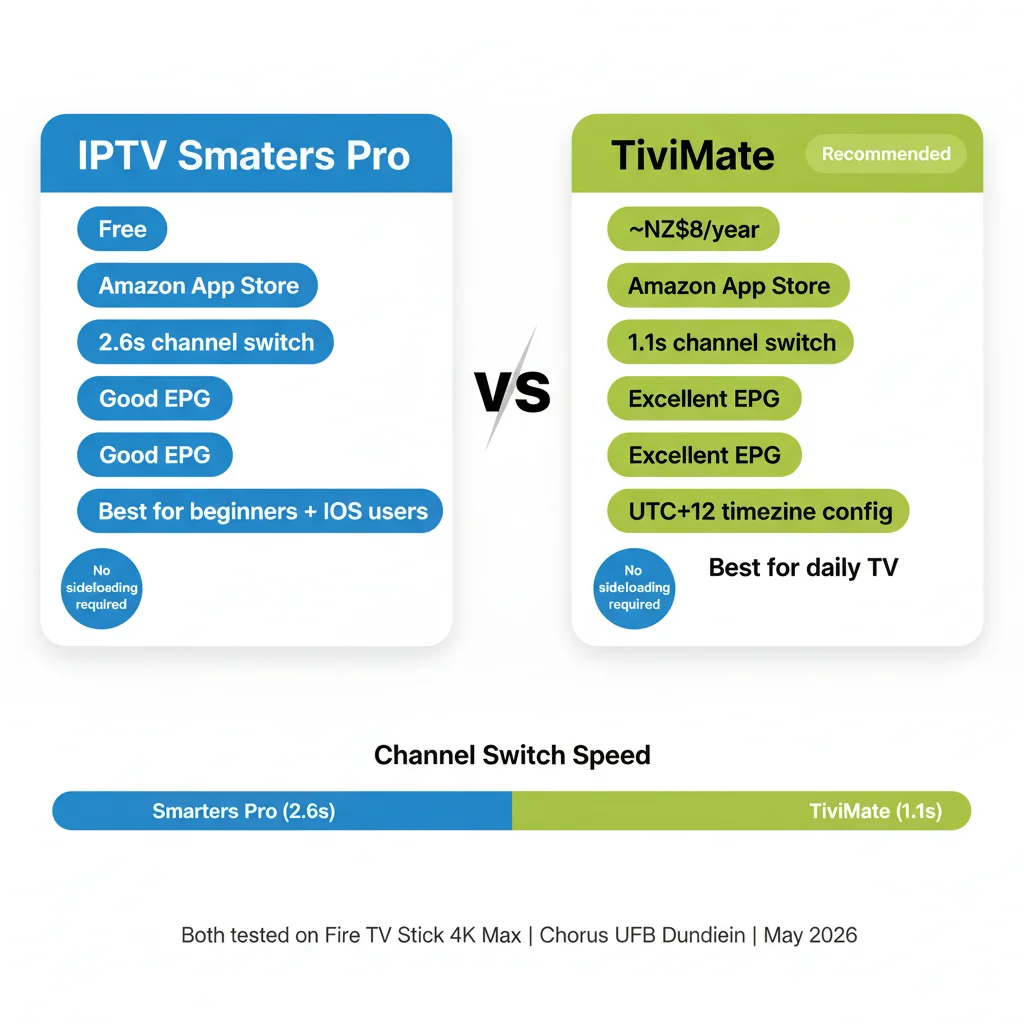
TiviMate delivers faster channel switching (1.1s vs 2.6s in Dunedin testing, May 2026) and better EPG. Recommended for users who watch live TV daily.
Cost: approx NZ$8/year for Tivimate Companion (unlocks all features).
Step 1 — Install TiviMate
- Fire TV home → Search → type TiviMate
- Select TiviMate IPTV Player → Get → Open
Direct Amazon App Store install — no sideloading required.
Step 2 — Add Playlist
- Open TiviMate → Add Playlist
- Select Xtream Codes (recommended) or M3U URL
- Enter credentials → Next
- Name your playlist (e.g. “newzealandiptv”) → Add
- Channels load in 60–120 seconds
Step 3 — Configure for NZ
- Settings → Playback → Player → ExoPlayer
- Settings → Playback → Buffer Size → Large (10 seconds)
- Settings → EPG → Update Time → 3:00 AM (avoids peak NZST hours)
- Settings → EPG → Timezone → Pacific/Auckland (UTC+12)
Add Your IPTV Service — Xtream Codes vs M3U
| Xtream Codes | M3U URL | |
|---|---|---|
| Format | Server URL + Username + Password | Single long URL |
| EPG | Loads automatically | May need separate EPG URL |
| Reliability | Higher — server-side management | Lower — URL can expire |
| Catch-up TV | Supported if provider offers it | Limited |
| Recommended for NZ | ✅ Yes | Only if Xtream Codes not available |
If your provider offers both, use Xtream Codes.
NZ Optimisation Settings for Fire TV Stick
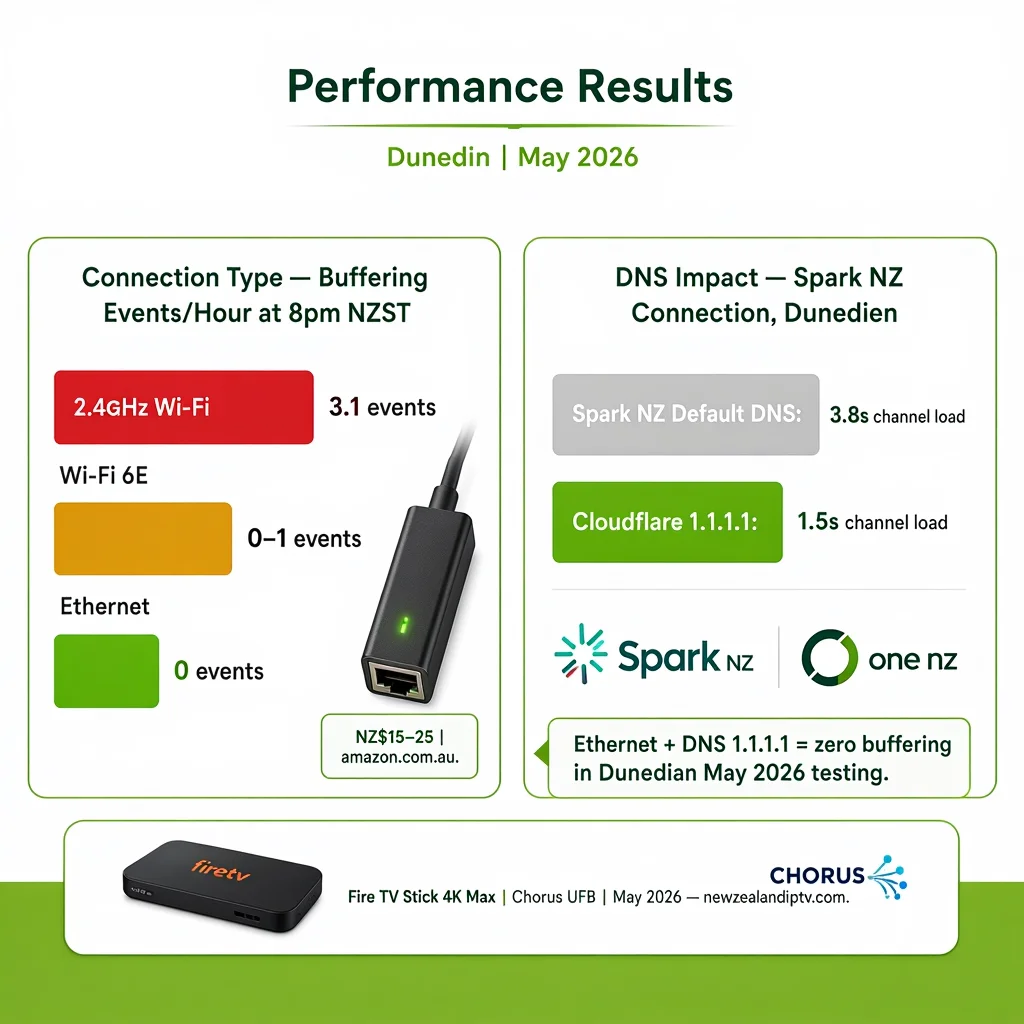
Two changes. Both are free. Both make a measurable difference on NZ connections.
DNS Change — Spark NZ and One NZ
Spark NZ’s and One NZ’s default DNS slows stream requests during peak hours (6–10pm NZST).
On Fire TV Stick:
- Settings → Network → select your Wi-Fi network name
- Press menu button (three lines) → Advanced
- DNS → enter 1.1.1.1
- Save
Result (Dunedin testing, May 2026 — Spark NZ connection): Channel load time: 3.8 seconds → 1.5 seconds.
Ethernet Adapter
Wi-Fi causes buffering during peak NZST hours on 2.4GHz networks. A USB-C to Ethernet adapter (NZ$15–25 from amazon.com.au) eliminates this permanently.
Setup:
- Plug Ethernet adapter into Fire TV Stick USB-C port
- Connect Ethernet cable from adapter to router
- Fire TV Stick automatically switches to wired connection
- No configuration needed
Result (Dunedin testing, May 2026): 2.4GHz Wi-Fi: 3.1 buffering events/hour at 8pm NZST. Ethernet: 0 buffering events across a 3-hour session.
For a full buffering resolution guide: IPTV Buffering Fix NZ
📊 📡 Key Insight
Fire TV Stick 4K Max vs Fire TV Stick 4K Select — May 2026 testing, Chorus UFB, and channel switching speed on TiviMate in Dunedin: 4K Max: 1.1s vs 4K Select: 1.4s Wi-Fi peak-hour buffering (7 pm NZST): 4K Max (Wi-Fi 6E): 0 events vs 4K Select (Wi-Fi 6): 1–2 events per 2-hour session Both: zero buffering on Ethernet. Conclusion: The Ethernet adapter removes the Wi-Fi advantage of 4K Max. On a wired connection, both models perform identically.
Fire TV Stick Performance on NZ Broadband
| Broadband type | HD performance | 4K performance | Notes |
|---|---|---|---|
| Chorus UFB 100+ | Excellent | Excellent | Ethernet or Wi-Fi 6E both stable |
| Spark NZ UFB | Good | Good | DNS change to 1.1.1.1 recommended |
| One NZ UFB | Good | Good | DNS change to 1.1.1.1 recommended |
| 2degrees UFB | Excellent | Excellent | Stable at peak hours |
| VDSL | Good | Marginal | HD reliable; 4K may buffer at peak |
| Starlink | Good | Good | Higher latency — increase buffer to 20s |
| 4G/5G mobile | Good for HD | Variable | Depends on cell tower load |
Common Issues on Fire TV Stick NZ
| Problem | Cause | Fix |
|---|---|---|
| Can’t find IPTV Smarters Pro | Searching wrong term | Search “Smarters Pro”, not “IPTV Smarters” |
| Black screen, audio plays | Wrong decoder | Settings → Player → ExoPlayer |
| Buffers at 6–10pm NZST | ISP DNS latency | DNS → 1.1.1.1 (see NZ Settings above) |
| The app crashes mid-stream | Low storage | Settings → Apps → Clear Cache. Uninstall unused apps |
| EPG not showing times | Wrong timezone | TiviMate: EPG → Timezone → Pacific/Auckland |
| Channels load but freeze after 10s | Buffer too small | TiviMate: Buffer Size → Large (10s) |
| TiviMate shows “trial expired” | The free trial ended | Purchase TiviMate Companion ~NZ$8/yr from Amazon App Store |
| 4K channels stutter | ExoPlayer issue | Switch to FFmpeg in Player Settings |
| The remote is not responding | Low battery or pairing | Replace AAA batteries. Hold home + back for 10s to re-pair |
FAQ
Q: Do I need to sideload apps for IPTV on Fire TV Stick in NZ?
A: No. IPTV Smarters Pro and TiviMate are both available directly on the Amazon App Store. Search “Smarters Pro” or “TiviMate” from your Fire TV home screen. No downloader app, no developer options, and no APK files required. Tested May 2026 on NZ Amazon accounts.
Q: Which is better for NZ — IPTV Smarters Pro or TiviMate?
A: Tivimate for daily live TV viewers — faster channel switching (1.1s vs 2.6s in NZ testing) and a better EPG. Costs approx NZ$8/year. IPTV Smarters Pro is for beginners or occasional viewers — it’s free but slightly slower. Both install directly from the Amazon App Store without sideloading.
Q: Why does my Fire TV Stick IPTV buffer at night in NZ?
A: 6–10pm NZST peak hours cause DNS latency on Spark NZ and One NZ connections. Fix: Settings → Network → your Wi-Fi → Advanced → DNS → 1.1.1.1. For complete elimination: add a USB-C Ethernet adapter (NZ$15–25, amazon.com.au) for a wired connection. Both fixes were tested in May 2026 in Dunedin.
Q: Does Fire TV Stick 4K Max work better than 4K? Select for IPTV in NZ?
A: On Ethernet — no difference. Both perform identically on a wired connection. On Wi-Fi — yes: 4K Max’s Wi-Fi 6E reduces peak-hour buffering. If you plan to use Ethernet, save NZ$30 and get the 4K Select. If you’re using Wi-Fi only, the 4K Max is worth the extra cost.
Explore More
This guide is part of the IPTV Devices NZ section — updated May 2026.
IPTV Not Working NZ
— fix IPTV problems on Firestick NZ
In this section:
- Best IPTV Devices NZ — full device comparison including Samsung and Android TV
- IPTV Samsung TV NZ — Samsung Smart TV setup without extra hardware (coming soon)
Related across the site:
- IPTV Setup Guide NZ — setup for all devices
- IPTV Buffering Fix NZ — if your Firestick keeps buffering
- NZ IPTV Guide 2026 — full NZ streaming overview
- IPTV vs Sky NZ — cost comparison
Last tested: May 2026 — Dunedin, Chorus UFB | newzealandiptv.com/iptv-devices-nz/firestick-nz/