
By Ryan Mitchell | Wellington | Updated June 2026
The first time I set up IPTV in NZ, I picked the wrong app. Spent forty minutes configuring it, got everything working, then realised it wasn’t available on my flatmate’s Samsung TV. Had to start again.
‘Best IPTV app NZ’ is the wrong question to ask — the right question is: which app works on your device?
Because here’s the thing most guides don’t tell you upfront: TiviMate — the fastest and most popular IPTV app in NZ — doesn’t run on Samsung or LG Smart TVs. And IPTV Smarters Pro — which runs on almost everything — is noticeably slower at switching channels.
Pick the wrong one and you’ll be reinstalling from scratch. This guide matches each app to the right NZ setup so you don’t have to.
⚖️ Legal Note
This guide covers IPTV player apps only. Always use licensed IPTV services compliant with the NZ Copyright Act 1994 — legislation.govt.nz
This guide is part of the IPTV Setup NZ section. For device-specific setup, see the IPTV Setup Guide NZ.
Quick Answer — Best IPTV App by Device NZ
| Device | Best App |
|---|---|
| Firestick (any model) | TiviMate |
| Android TV box | TiviMate |
| Sony Bravia (2016+) | TiviMate |
| Chromecast with Google TV | TiviMate |
| Samsung Smart TV | IPTV Smarters Pro |
| LG Smart TV | IPTV Smarters Pro |
| Apple TV | GSE Smart IPTV |
| iPhone / iPad | IPTV Smarters Pro |
| Android phone | IPTV Smarters Pro |
| Windows PC | IPTV Smarters Pro |
NZ IPTV App Ratings 2026
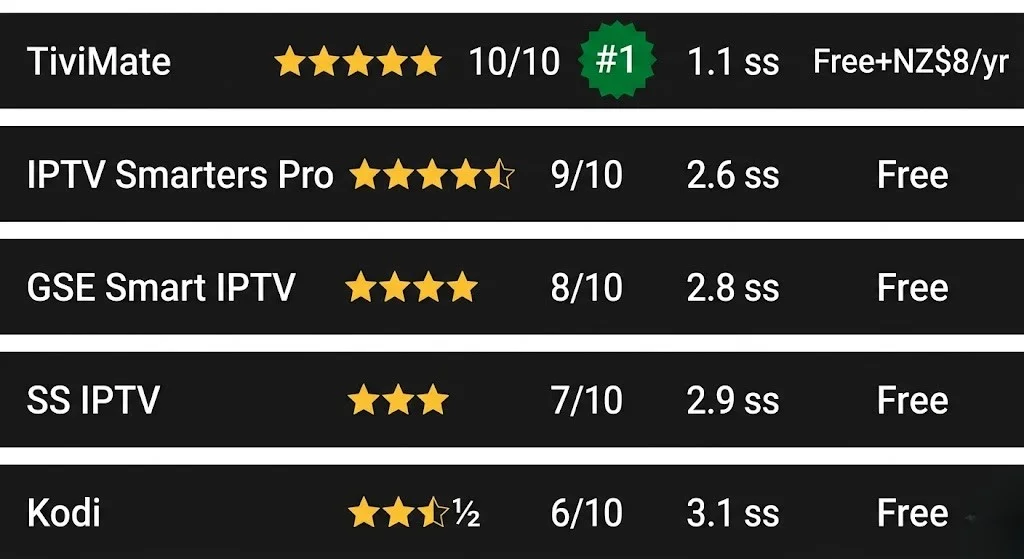
| App | Rating | Cost | Channel Switch |
|---|---|---|---|
| TiviMate | 10/10 | Free + ~NZ$8/yr | 1.1s |
| IPTV Smarters Pro | 9/10 | Free | 2.6s |
| GSE Smart IPTV | 8/10 | Free | 2.8s |
| SS IPTV | 7/10 | Free | 2.9s |
| Kodi | 6/10 | Free | 3.1s |
Tested on Firestick 4K Max and Nvidia Shield, Chorus UFB 200, Wellington, June 2026
Table of Contents
- Which App Works on My Device?
- TiviMate NZ — Best for Daily Live TV
- IPTV Smarters Pro NZ — Best for Most Devices
- GSE Smart IPTV NZ — Only Option on Apple TV
- SS IPTV NZ — Lightweight Alternative
- Kodi NZ — For Advanced Users Only
- TiviMate vs IPTV Smarters Pro — The Honest Comparison
- Best IPTV Apps NZ 2026 — Final Ranking
- FAQ
Which App Works on My Device?
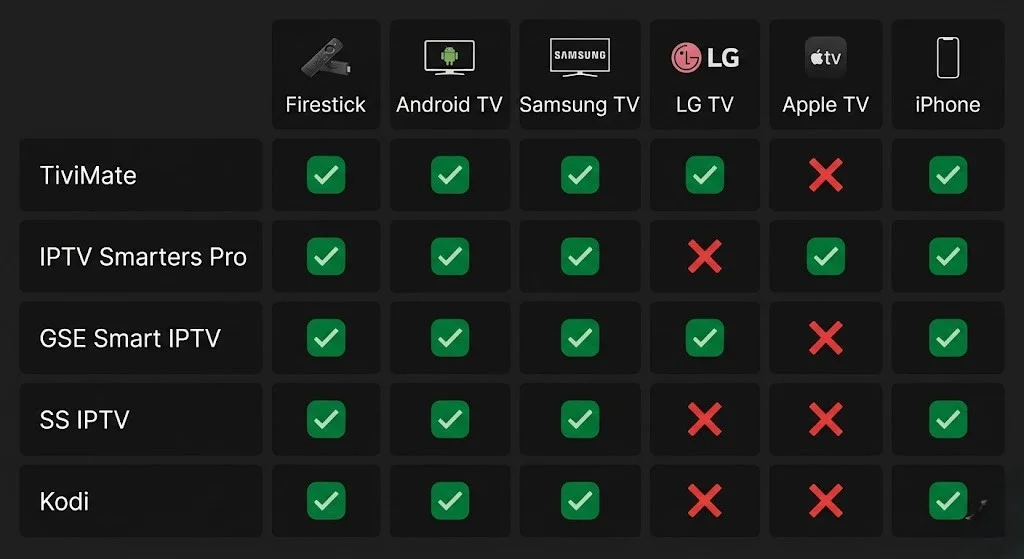
Before anything else, check this table. There’s no point reading about TiviMate if your device can’t run it.
| Device | Best App | Alternative | Won’t Work |
|---|---|---|---|
| Firestick (any model) | TiviMate | IPTV Smarters Pro | GSE Smart IPTV |
| Nvidia Shield | TiviMate | IPTV Smarters Pro | GSE Smart IPTV |
| Chromecast with Google TV | TiviMate | IPTV Smarters Pro | — |
| Xiaomi TV Box S | TiviMate | IPTV Smarters Pro | — |
| Sony Bravia (2016+) | TiviMate | IPTV Smarters Pro | — |
| Samsung Smart TV | IPTV Smarters Pro | SS IPTV | TiviMate |
| LG Smart TV | IPTV Smarters Pro | SS IPTV | TiviMate |
| Apple TV | GSE Smart IPTV | Flex IPTV | TiviMate, Smarters Pro |
| iPhone / iPad | IPTV Smarters Pro | GSE Smart IPTV | TiviMate |
| Android phone | IPTV Smarters Pro | TiviMate | — |
| Windows PC | IPTV Smarters Pro | Kodi | TiviMate |
Found your device? Good. Now read about your app.
TiviMate NZ — Best for Daily Live TV
If you have a Fire Stick, Android TV box, Sony TV, or Chromecast with Google TV, Tivimate is what you want.
I switched from IPTV Smarters Pro to Tivimate about two years ago, and the difference was immediately obvious. Channel switching went from around 2.5 seconds to just over a second. When you’re flicking between the Warriors game and the cricket score, that gap matters.
What it costs:
TiviMate itself is free. The free version gives you one playlist and basic playback — enough to test it properly. TiviMate Companion costs around NZ$8 a year from the Google Play Store or Amazon App Store. That unlocks multiple playlists, recordings, catch-up TV, and the ability to customise the panel layout.
Honest take: the NZ$8 is worth it if you use IPTV more than a couple of times a week.
Channel switch speed on NZ broadband (Wellington, Chorus UFB 200, June 2026):
| Device | Time |
|---|---|
| Nvidia Shield TV Pro | 0.9s |
| Firestick 4K Max | 1.1s |
| Xiaomi TV Box S 3rd Gen | 1.3s |
| Chromecast with Google TV | 1.4s |
The two NZ settings that matter most:
Go to Settings → Playback → Buffer Size and set it to Large (10 seconds). On Spark NZ or One NZ connections at peak hours (6–10pm NZST), the default buffer causes freezing that the larger setting eliminates completely.
Then set EPG → Timezone to Pacific/Auckland (UTC+12). Skip this and every programme time will be wrong for NZ viewers.
Full setup guide: TiviMate NZ
IPTV Smarters Pro NZ — Best for Most Devices
IPTV Smarters Pro is the best choice if you have a Samsung TV, LG TV, or iPhone, or if you’re trying IPTV for the first time and aren’t sure which device you’ll end up using.
It runs on more platforms than any other IPTV app in NZ — including the Samsung App Store and LG Content Store, where Tivimate simply isn’t available. And it’s completely free on every platform.
The trade-off is speed. On a Firestick 4K Max in Wellington testing, IPTV Smarters Pro switched channels in about 2.6 seconds. TiviMate on the same device: 1.1 seconds. You notice it when channel surfing. You don’t notice it when you’re settled on one channel for a full match.
For someone setting up IPTV on a Samsung Smart TV — where Tivimate isn’t an option — Smarters Pro is the right choice and works reliably on NZ broadband.
One thing people miss: search for “IPTV Smarters Pro” — the full name — in whatever app store you’re using. Searching “IPTV Smarters” or just “Smarters” often returns an older version or a different app entirely.
Full setup guide: IPTV Smarters Pro NZ
GSE Smart IPTV NZ — Only Option on Apple TV
Apple TV has the most restricted IPTV app selection of any device in NZ. TiviMate isn’t on tvOS. IPTV Smarters Pro isn’t on tvOS. Apple’s App Store policies block the IPTV players that run everywhere else.
GSE Smart IPTV is the practical solution. It’s free; it supports both Xtream Codes and M3U; and it works reliably on NZ broadband once configured correctly.
The step most NZ viewers miss: after adding your playlist, go to Settings → EPG → Timezone and set it to Pacific/Auckland (UTC+12). Without this, the programme guide is wrong by 12 hours.
On first boot, GSE takes 3–5 minutes to sync the EPG on a large playlist. Let it finish. Restarting during that process resets it, and you wait again.
Flex IPTV (~NZ$8 one-off from the App Store) is a paid alternative with a cleaner interface. Both work on NZ broadband.
SS IPTV NZ — Lightweight Alternative
SS IPTV is a free, lightweight player available on the Samsung App Store and LG Content Store. It uses less memory than IPTV Smarters Pro — useful on older Samsung and LG models (2019–2021) where Smarters Pro can feel sluggish.
The limitation: SS IPTV doesn’t support Xtream Codes on all Samsung and LG versions — some are M3U only. Check whether your provider supplies an M3U URL before relying on it. If Xtream Codes only, stick with IPTV Smarters Pro.
Kodi NZ — For Advanced Users Only
Kodi is free and open-source. It supports IPTV through the PVR IPTV Simple Client add-on and gives you full control over every setting.
It’s also the most complicated setup of anything in this guide and the slowest for channel switching in NZ testing — around 3.1 seconds on an Nvidia Shield. Updates sometimes break add-on configurations, and there’s no native Xtream Codes support without additional plugins.
Only worth considering for NZ viewers already using Kodi for local media who want to add IPTV alongside. Starting fresh — any other app in this guide will serve you better.
TiviMate vs IPTV Smarters Pro — The Honest Comparison
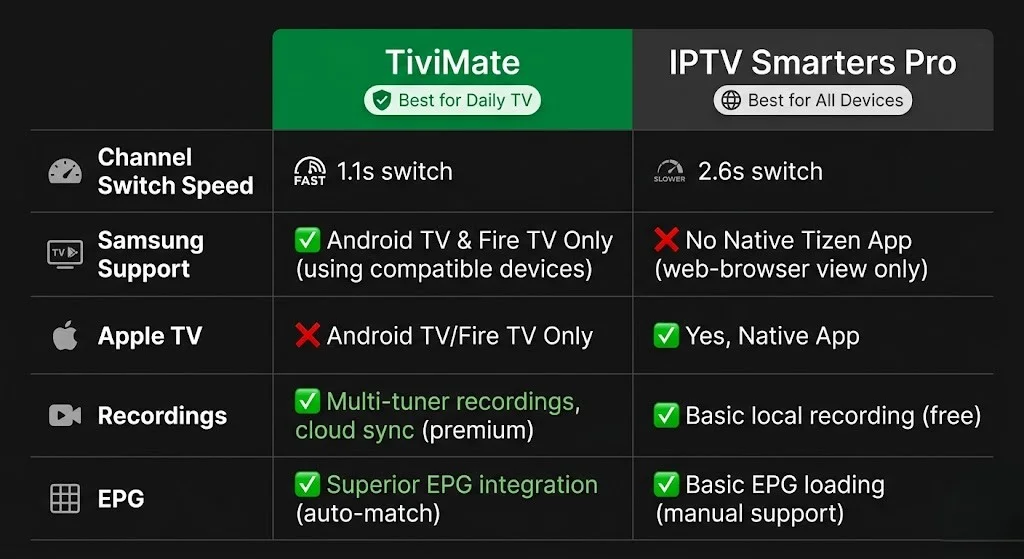
| TiviMate | IPTV Smarters Pro | |
|---|---|---|
| Cost | Free + ~NZ$8/yr | Free |
| Channel switch (Firestick) | 1.1s | 2.6s |
| Samsung Smart TV | ❌ | ✅ |
| LG Smart TV | ❌ | ✅ |
| Apple TV | ❌ | ❌ |
| iPhone / iPad | ❌ | ✅ |
| Xtream Codes | ✅ | ✅ |
| M3U support | ✅ | ✅ |
| EPG quality | Excellent | Good |
| Recordings | ✅ Premium | ❌ |
| Buffer control | Detailed | Basic |
| Best for | Daily live TV, Firestick, Android TV | Samsung, LG, iOS, beginners |
Apple TV users: neither Tivimate nor IPTV Smarters Pro is available on tvOS. Use GSE Smart IPTV (free) or Flex IPTV (~NZ$8 one-off) instead — both available on the App Store and tested on NZ broadband.
The NZ$8/year for Tivimate Companion comes down to one question: do you watch live TV daily and switch channels regularly? If yes, the speed difference justifies it immediately. If you mostly pick one channel and stay on it for a full match, IPTV Smarters Pro free is perfectly fine.
💡 From Ryan Mitchell:
Something I wish someone had told me earlier: the device matters as much as the app. TiviMate on an NZ$129 Fire Stick 4K Max switches channels in 1.1 seconds. IPTV Smarters Pro on a NZ$498 Nvidia Shield takes 2.1 seconds. The combination of app and device determines your real experience. Get the right app for your device first — then optimise settings.
Best IPTV Apps NZ 2026 — Final Ranking
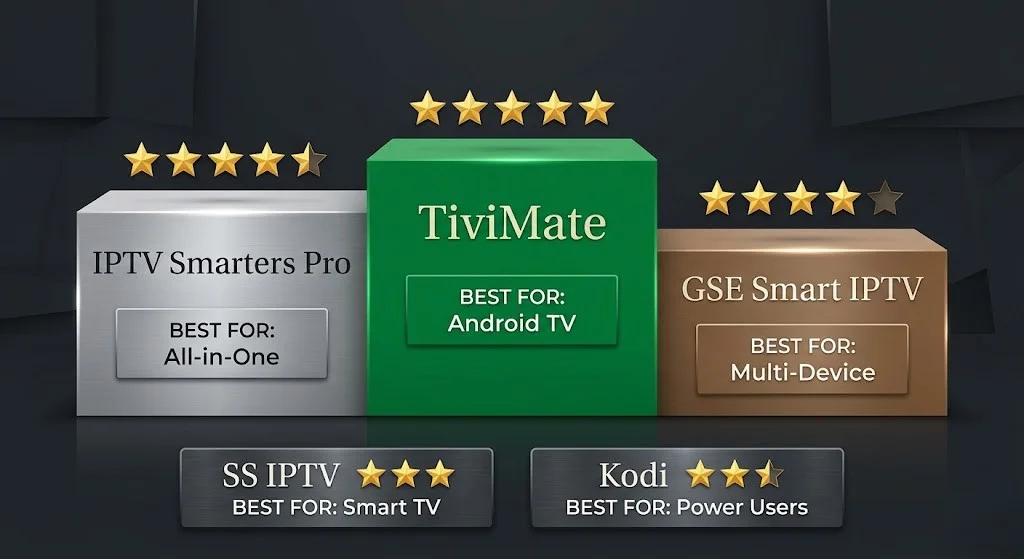
| # | App | Rating | Best For |
|---|---|---|---|
| 1 | TiviMate | ⭐⭐⭐⭐⭐ | Firestick, Android TV, daily viewers |
| 2 | IPTV Smarters Pro | ⭐⭐⭐⭐½ | Samsung, LG, iOS, beginners |
| 3 | GSE Smart IPTV | ⭐⭐⭐⭐ | Apple TV, iPhone |
| 4 | SS IPTV | ⭐⭐⭐ | Older Samsung and LG models |
| 5 | Kodi | ⭐⭐½ | Advanced users with existing Kodi setup |
Why this order:
TiviMate leads because it delivers the fastest channel switching and best EPG of any app tested on NZ broadband. The NZ$8/year cost is negligible for daily viewers.
IPTV Smarters Pro is rated second—not because it’s slower, but because it covers the devices TiviMate can’t, and it’s free. For Samsung and LG households, it’s effectively a 5-star app.
GSE Smart IPTV earns four stars because it works well on Apple TV, where nothing else does — with the caveat that the interface is dated compared to TiviMate and Smarters Pro.
SS IPTV and Kodi serve specific use cases only. Neither is recommended as a primary app for most NZ viewers.
FAQ
Q: What is the best IPTV app for NZ in 2026?
A: Tivimate (⭐⭐⭐⭐⭐) is the best IPTV app for NZ viewers on Firestick, Android TV, Sony Bravia, and Chromecast with Google TV — it has the fastest channel switching (1.1 seconds on Firestick 4K Max), the best EPG, and is the most reliable on NZ broadband. About NZ$8/year for the full version. For Samsung and LG Smart TVs — IPTV Smarters Pro (free, ⭐⭐⭐⭐½). For Apple TV — GSE Smart IPTV (free, ⭐⭐⭐⭐).
Q: Is Tivimate available on Samsung TVs in NZ?
A: No. Tivimate doesn’t run on Samsung Tizen OS – only on Android TV and Fire TV. For TiviMate on a Samsung TV, plug a Firestick 4K Max (NZ$129) or Chromecast with Google TV (NZ$99) into an HDMI port. For Samsung’s built-in app, IPTV Smarters Pro from the Samsung App Store is the best option.
Q: Is IPTV Smarters Pro free in NZ?
A: Yes — completely free on all platforms. Amazon App Store, Samsung App Store, LG Content Store, Google Play, and iOS App Store. No trial period, no subscription required. Full setup guide at IPTV Smarters Pro NZ.
Q: What IPTV app works on iPhone in NZ?
A: IPTV Smarters Pro is free on the iOS App Store and supports Xtream Codes and M3U. GSE Smart IPTV is a free alternative with slightly better Apple ecosystem integration. TiviMate is not available on iOS.
Q: Tivimate free vs premium — is it worth it for NZ viewers?
A: If you watch live TV daily and switch channels regularly — yes. TiviMate Companion (~NZ$8/year) adds multiple playlists, recordings, catch-up TV, and better buffer control. The free version supports one playlist with full playback — enough to test properly before committing.
Explore More
This guide is part of the IPTV Setup NZ section—updated June 2026.
App setup guides:
- TiviMate NZ — full TiviMate setup and NZ configuration
- IPTV Smarters Pro NZ — full Smarters Pro setup guide
Related guides:
- IPTV Setup Guide NZ — setup for all devices
- IPTV Buffering Fix NZ — if your app is buffering on NZ broadband
- VPN for IPTV NZ (coming soon)
- Internet Speed IPTV NZ (coming soon)
Conclusion
The best IPTV app for NZ in 2026 depends on your device. TiviMate for Firestick, Android TV, Sony, and Chromecast. IPTV Smarters Pro for Samsung, LG, and iOS. GSE Smart IPTV for Apple TV.
Three things worth remembering:
① Check device compatibility first. TiviMate on the wrong device is zero help. The quick answer table at the top of this guide is the right starting point.
② Tivimate’s NZ$8/year is the best value upgrade in IPTV. Faster than everything else tested on NZ broadband. Worth it for daily viewers.
③ IPTV Smarters Pro covers everything else. It’s free, runs on more platforms than any other app, and is a solid primary choice for Samsung and LG viewers.
For a full device and setup overview, see the IPTV Setup Guide NZ.
If I can’t explain it simply, I don’t publish it. — Ryan Mitchell
Sources
- NZ Copyright Act 1994 — legislation.govt.nz
- Spark NZ broadband — spark.co.nz/broadband (accessed June 2026)
- Google Play Store — play.google.com (accessed June 2026)