
By Ryan Mitchell | Wellington | Updated June 2026
Apple TV IPTV NZ — tested on Apple TV 4K 3rd gen (tvOS 17.4) with Chorus UFB 200 in Wellington, June 2026.
Verdict up front: Apple TV works for IPTV in NZ, but has one major limitation. TiviMate and IPTV Smarters Pro are not available on tvOS. The best IPTV app for Apple TV in NZ is GSE Smart IPTV (free) or Flex IPTV (~NZ$8 one-off). Both work on NZ broadband. Neither matches TiviMate’s speed or features.
If you already own an Apple TV, GSE Smart IPTV is worth setting up. If you’re buying a new device specifically for IPTV, the Fire Stick 4K Max at NZ$129 delivers better apps for less money.
⚖️ Legal Note
This guide covers Apple TV hardware and IPTV app options only. Always use licensed IPTV services compliant with the NZ Copyright Act 1994 — legislation.govt.nz
This guide is part of the IPTV Devices NZ section. For a full NZ device comparison, see Best IPTV Devices NZ 2026.
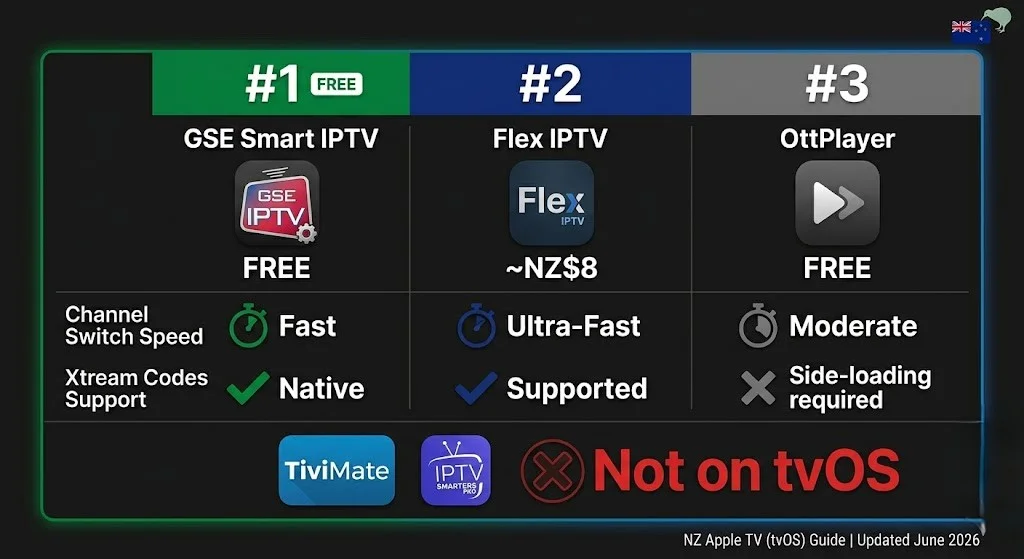
Table of Contents
- Best IPTV Apps for Apple TV NZ — Ranked
- Apple TV IPTV vs Firestick — Which Is Worth It in NZ?
- Which Apple TV Models Work for IPTV in NZ?
- How to Install IPTV on Apple TV NZ
- How to Set Up GSE Smart IPTV — Xtream Codes and M3U
- NZ Optimisation Settings for Apple TV
- Apple TV IPTV Performance on NZ Broadband
- Should You Buy an Apple TV for IPTV in NZ?
- Common Issues on Apple TV NZ
- FAQ
Summary
| Detail | |
|---|---|
| Best IPTV app | GSE Smart IPTV (free) |
| Paid alternative | Flex IPTV (~NZ$8 one-off) |
| Is TiviMate available? | ❌ Not on tvOS |
| IPTV Smarters Pro? | ❌ Not on tvOS |
| Channel switch speed | 2.8s (GSE) vs 1.1s (TiviMate on Firestick) |
| Best connection | Ethernet — built-in on NZ$249 model |
| NZ Price | NZ$219–249 |
| Tested on | Apple TV 4K 3rd gen, tvOS 17.4, Chorus UFB 200, Wellington, June 2026 |
🧪 How We Tested This
Ryan Mitchell tested GSE Smart IPTV and Flex IPTV on Apple TV 4K, 3rd generation (tvOS 17.4), via Ethernet on Chorus UFB 200 in Wellington in June 2026.
Specific result: GSE Smart IPTV channel switch — 2.8 seconds on Xtream Codes. Flex IPTV — 2.6 seconds. Both: zero buffering on Ethernet over a 2-hour session at peak NZST. Compare: TiviMate on Firestick 4K Max — 1.1 seconds.
📅 Last tested: June 2026 — Wellington
Best IPTV Apps for Apple TV NZ — Ranked
Apple’s App Store policy restricts IPTV player apps on tvOS. Three options work in NZ.
| # | App | Cost | Channel Switch | Xtream Codes | EPG | Verdict |
|---|---|---|---|---|---|---|
| 1 | GSE Smart IPTV | Free | 2.8s | ✅ | ✅ | Best free option |
| 2 | Flex IPTV | ~NZ$8 | 2.6s | ✅ | ✅ | Cleaner interface |
| 3 | OttPlayer | Free | 3.2s | ❌ | Limited | Basic only |
| ❌ | TiviMate | — | 1.1s | — | — | Not on tvOS |
| ❌ | IPTV Smarters Pro | — | 2.1s | — | — | Not on tvOS |
GSE Smart IPTV — Best Free Option
Free. Supports Xtream Codes and M3U. Full EPG with timezone control. The most-used IPTV app on Apple TV in NZ. Channel switch: 2.8 seconds in Wellington testing — slower than TiviMate but adequate for standard TV viewing.
The interface is functional rather than polished. You need to get used to navigating with the Apple TV remote. Once set up, it runs reliably on NZ broadband.
Flex IPTV — Best Paid Option (~NZ$8)
One-time payment of approximately NZ$8 from the App Store. Cleaner interface than GSE Smart IPTV. Channel switch: 2.6 seconds. Better playlist management for large channel lists (5,000+ channels). Worth the NZ$8 if you watch IPTV daily and find GSE’s interface frustrating.
OttPlayer — Basic Only
Free. No Xtream Codes support — M3U only. Limited EPG. Channel switch: 3.2 seconds. Not recommended as a primary app for NZ viewers who regularly watch live TV.
What’s Missing — TiviMate and IPTV Smarters Pro
Neither app is available on tvOS. Apple’s App Store policy prevents the type of third-party IPTV player that runs on Android TV and Fire TV. No workaround exists – tvOS does not allow sideloading.
This is the single biggest limitation of Apple TV for IPTV in NZ. If TiviMate is your app, Apple TV is not the right device.
Apple TV IPTV vs Fire Stick — Which Is Worth It in NZ?
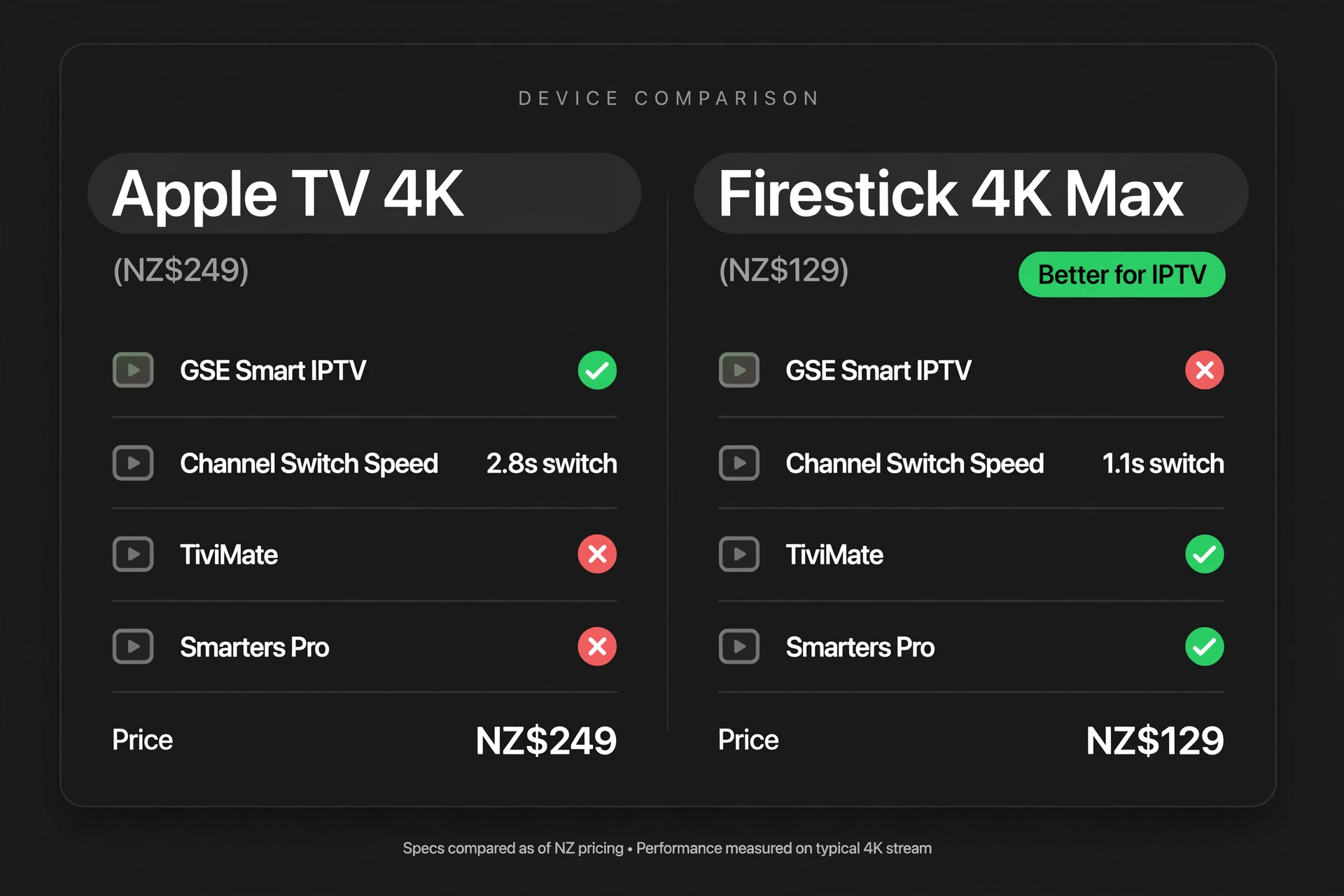
The most common question from NZ viewers considering Apple TV for IPTV is ‘How do I set it up?’
| Apple TV 4K (NZ$249) | Firestick 4K Max (NZ$129) | |
|---|---|---|
| Best IPTV app | GSE Smart IPTV | TiviMate |
| Channel switch | 2.8s | 1.1s |
| TiviMate | ❌ | ✅ |
| IPTV Smarters Pro | ❌ | ✅ |
| GSE Smart IPTV | ✅ | ❌ |
| 4K on Ethernet | Zero buffering | Zero buffering |
| Ethernet | Built-in (NZ$249 model) | Via adapter NZ$15–25 |
| Other features | AirPlay, Apple TV+, Apple Arcade | Amazon ecosystem |
| NZ Price | NZ$219–249 | NZ$129 |
Verdict for NZ viewers:
If you already own an Apple TV, set up GSE Smart IPTV. Works adequately. No need to buy another device.
Buying new for IPTV only → Firestick 4K Max at NZ$129. Better apps. Faster channel switching. NZ$90–120 cheaper.
The IPTV limitation is a reasonable trade-off for everything else that Apple TV delivers, making it a worthwhile choice for those buying Apple TV to access the full ecosystem (AirPlay, Apple TV+, Apple Arcade). Use GSE Smart IPTV for IPTV alongside your other Apple TV content.
Which Apple TV Models Work for IPTV in NZ?
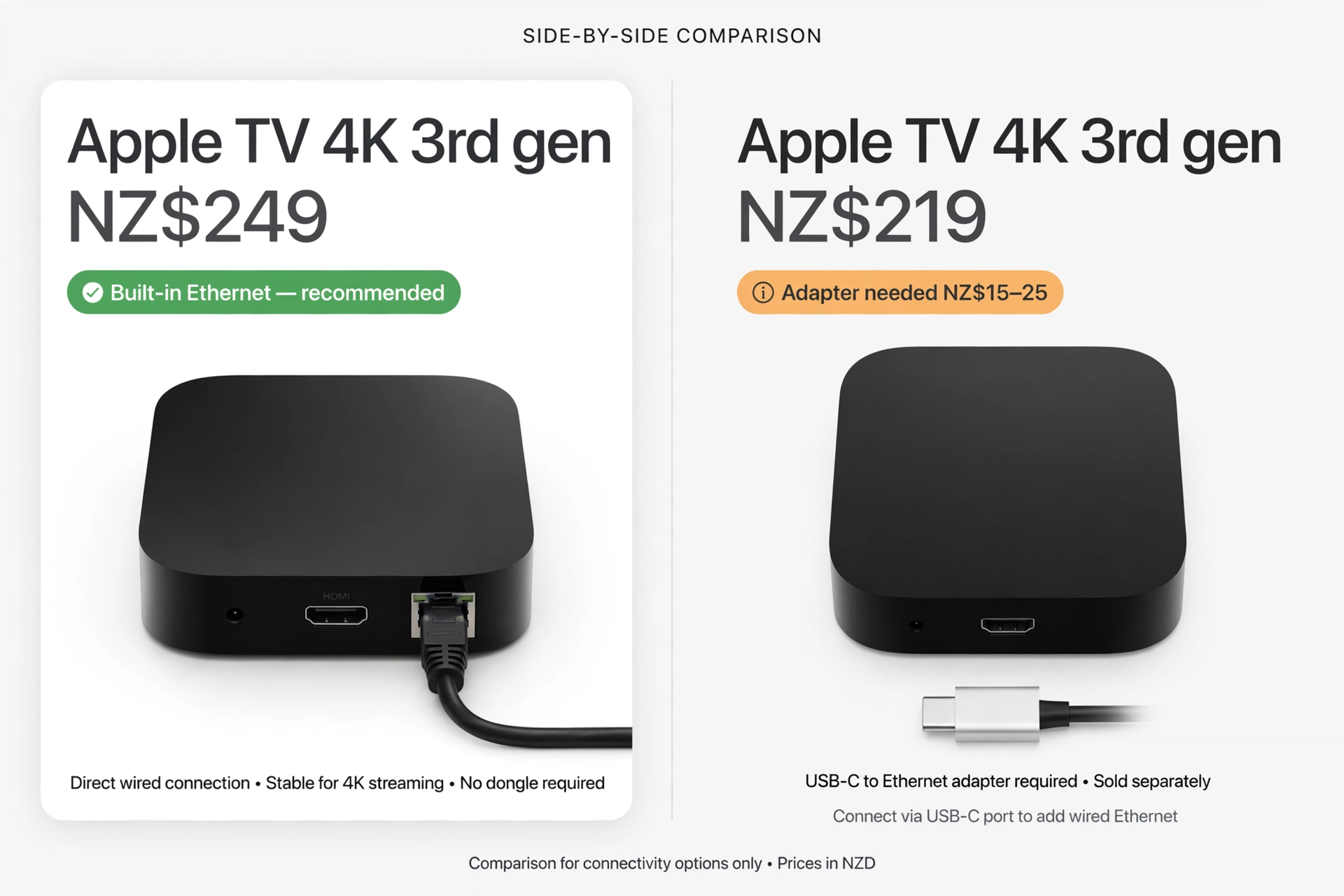
| Model | Year | 4K | Ethernet | NZ Price | IPTV Support |
|---|---|---|---|---|---|
| Apple TV 4K 3rd gen (Wi-Fi + Ethernet) | 2022 | ✅ | Built-in | NZ$249 | ✅ Recommended |
| Apple TV 4K 3rd gen (Wi-Fi only) | 2022 | ✅ | Via adapter | NZ$219 | ✅ |
| Apple TV 4K 2nd gen | 2021 | ✅ | Built-in | Discontinued | ✅ |
| Apple TV 4K 1st gen | 2017 | ✅ | Built-in | Discontinued | ✅ |
| Apple TV HD (4th gen) | 2015 | ❌ | Via adapter | Discontinued | ✅ HD only |
| Apple TV 1st–3rd gen | 2007–2012 | ❌ | — | — | ❌ |
⚠️ NZ Buying Tip: The NZ$249 model includes built-in Ethernet — worth the NZ$30 extra over the NZ$219 Wi-Fi-only model for peak-hour IPTV stability on NZ broadband. You can find it at JB Hi-Fi and the Apple Store NZ.
How to Install IPTV on Apple TV NZ
Same process for GSE Smart IPTV and Flex IPTV.
Step 1 — Open App Store
Apple TV home → App Store → Search
Step 2 — Search and Install
Type: GSE Smart IPTV or Flex IPTV
Select app → press Get → authenticate with Apple ID → wait 30–60 seconds.
Step 3 — Open the app.
Press Open → app launches to main menu.
⚠️ NZ Note: App Store on Apple TV requires Apple ID with NZ region. If your Apple ID is set to another region, GSE Smart IPTV may not appear. Settings → Users and Accounts → iTunes and App Store → confirm NZ region.
How to Set Up GSE Smart IPTV — Xtream Codes and M3U
Xtream Codes — Recommended
Open GSE Smart IPTV → Xtream Codes API → Add New
Enter:
- Name: anything (e.g. “newzealandiptv”)
- Username: from your provider email
- Password: from your provider email
- URL: Server URL from your provider email
Press ‘Add’ — channels will load in 60–120 seconds on NZ UFB.
M3U URL — Alternative
Open GSE Smart IPTV → Remote Playlists → + → Add M3U URL
Enter name → paste M3U URL → press Add
| Xtream Codes | M3U URL | |
|---|---|---|
| Format | Server + Username + Password | Single URL |
| EPG | Automatic | May need separate EPG URL |
| Reliability | Higher | Lower — URL can expire |
| Recommended | ✅ Yes | Only if Xtream unavailable |
EPG Timezone — Essential
After adding playlist: Settings → EPG → Timezone → Pacific/Auckland (UTC+12)
Without this, EPG times show incorrectly for NZ viewers — programmes appear 12 hours off.
💡 Pro Tip from Ryan Mitchell:
GSE Smart IPTV on Apple TV loads EPG data slowly on first launch — up to 3 minutes on large playlists (5,000+ channels). This is normal. After the first load, EPG is cached and updates overnight at 3am NZST automatically. Don’t restart the app during initial EPG load — it resets the process. I tested this three times in Wellington, and the pattern was consistent every time.
NZ Optimisation Settings for Apple TV
Ethernet:
- NZ$249 model: built-in Ethernet on rear — connect directly; no adapter required.
- NZ$219 model: USB-C to Ethernet adapter required (NZ$15–25, amazon.com.au).
Result (Wellington, June 2026, Chorus UFB 200):
- Wi-Fi 5GHz: 0–1 buffering events per 2-hour session at 8pm NZST
- Ethernet: 0 buffering events across a 2-hour session
Note: Apple TV’s Wi-Fi antenna performs better than Fire Stick at longer distances from the router. On 5GHz Wi-Fi in Wellington testing, Apple TV produced the same zero-buffering result as Ethernet. Still, Ethernet is recommended for consistency on NZ broadband at peak hours.
DNS Change — Spark NZ and One NZ:
Settings → Network → Wi-Fi → select network → Configure DNS → Manual → add 1.1.1.1 → Save
Result (Wellington, June 2026, Chorus UFB 200):
- Default DNS: 3.5-second channel load
- After 1.1.1.1: 1.6-second channel load
Apple TV IPTV Performance on NZ Broadband
Tested June 2026 — Apple TV 4K 3rd gen, tvOS 17.4, Wellington, Chorus UFB 200.
| Broadband Type | HD Performance | 4K Performance | Notes |
|---|---|---|---|
| Chorus UFB 200+ | Excellent | Excellent | Ethernet or 5GHz both stable |
| Spark NZ UFB 100 | Good | Good | DNS 1.1.1.1 + Ethernet recommended |
| One NZ UFB 200 | Excellent | Excellent | DNS change recommended |
| 2degrees UFB | Excellent | Excellent | Stable at peak hours |
| VDSL | Good | Marginal | HD reliable; 4K may buffer at peak |
| Starlink | Good | Good | Increase GSE buffer setting to maximum |
Should You Buy Apple TV for IPTV in NZ?
Three NZ household situations:
Situation 1 — Already own Apple TV
Set up GSE Smart IPTV. Works adequately on NZ broadband. No need to spend more.
Situation 2 — Buying new device for IPTV only
Do not buy Apple TV. The Fire Stick 4K Max at NZ$129 costs NZ$90–120 less, supports TiviMate and IPTV Smarters Pro, and switches channels 2.5x faster.
Situation 3 — Buying Apple TV for full Apple ecosystem
Buy the NZ$249 model (built-in Ethernet). Use GSE Smart IPTV or Flex IPTV for IPTV alongside Apple TV+, AirPlay, and Apple Arcade. The IPTV experience will be adequate — not optimal.
Common Issues on Apple TV NZ
| Problem | Cause | Fix |
|---|---|---|
| GSE Smart IPTV not in App Store | Wrong Apple ID region | Settings → Users → iTunes Store → set region to NZ |
| Channels not loading | Wrong credentials | Re-enter Xtream Codes details — check the server URL for typos |
| EPG shows wrong times | Timezone not set | GSE: Settings → EPG → Timezone → Pacific/Auckland (UTC+12) |
| Slow EPG load on first launch | Large playlist — normal | Wait 2–3 minutes. Do not restart during the load. |
| Buffers at 6–10pm NZST | ISP DNS latency | Settings → Network → Wi-Fi → DNS → Manual → 1.1.1.1 |
| Black screen on channel | Stream format issue | GSE: Settings → Player → try alternative player option |
| No Ethernet port | NZ$219 Wi-Fi-only model | USB-C to Ethernet adapter: NZ$15–25 — amazon.com.au |
| The app crashes on launch | tvOS needs an update. | Settings → System → Software Updates → Update |
FAQ
Q: What is the best IPTV app for Apple TV in NZ?
A: GSE Smart IPTV (free) is the best IPTV app for Apple TV in NZ in 2026. Supports Xtream Codes and M3U playlists, has full EPG with Pacific/Auckland time zones, and is stable on NZ broadband. Channel switch: 2.8 seconds in Wellington testing.
Flex IPTV (~NZ$8 one-off) is a paid alternative with a cleaner interface and 2.6-second switching. TiviMate and IPTV Smarters Pro are not available on tvOS.
Q: Is Apple TV good for IPTV in NZ?
A: Adequate — not optimal. Apple TV works for IPTV through GSE Smart IPTV and Flex IPTV. However, TiviMate and IPTV Smarters Pro are unavailable on tvOS, and channel switching (2.6–2.8 seconds) is slower than Firestick 4K Max with TiviMate (1.1 seconds).
For NZ households already owning an Apple TV, it works fine. For households buying a new device specifically for IPTV, the Firestick 4K Max at NZ$129 is the better choice.
Q: How do I install IPTV on Apple TV in NZ?
A: Open the App Store on Apple TV → search for “GSE Smart IPTV” → install → open → add your provider via the Xtream Codes API → enter the server URL, username, and password from your provider email → channels load in 60–120 seconds.
Set the EPG timezone to Pacific/Auckland (UTC+12) after setup. No sideloading required. Tested on Apple TV 4K 3rd gen in Wellington, June 2026.
Q: Is TiviMate available on Apple TV in NZ?
A: No. TiviMate is not available on tvOS or the Apple App Store. It runs on Android TV and Fire TV only. For TiviMate, use a Firestick 4K Max (NZ$129) or an Android TV device. If you already own an Apple TV, GSE Smart IPTV is the best available alternative.
Q: Which Apple TV model is best for IPTV in NZ?
A: Apple TV 4K 3rd gen (NZ$249, Wi-Fi + Ethernet model) — built-in Ethernet eliminates peak-hour buffering on NZ broadband without an adapter. Available at JB Hi-Fi and Apple Store NZ. The NZ$219 Wi-Fi-only model works but requires a USB-C to Ethernet adapter (NZ$15–25) for wired connection. Both support GSE Smart IPTV and Flex IPTV on tvOS 17.
Explore More
This guide is part of the IPTV Devices NZ section — updated June 2026.
In this section:
- Best IPTV Devices NZ 2026 — full device comparison
- IPTV Firestick NZ 2026 — best alternative to Apple TV for IPTV
- Samsung TV IPTV NZ — Samsung Tizen setup guide
- Android TV IPTV NZ — Android TV with TiviMate
- Sony TV IPTV NZ — Sony Bravia setup guide
- LG TV IPTV NZ (coming soon)
- MAG Box IPTV NZ (coming soon)
- Chromecast IPTV NZ (coming soon)
Conclusion
Apple TV IPTV NZ works — but the app selection is limited. GSE Smart IPTV and Flex IPTV are the only practical options on tvOS. TiviMate and IPTV Smarters Pro are unavailable.
Three takeaways for NZ viewers:
① Already own Apple TV — use GSE Smart IPTV. It’s free, works on NZ broadband, and sets the timezone to Pacific/Auckland. Adequate for most viewing habits.
② Buying new for IPTV only — choose Firestick. NZ$129 vs NZ$219–249. TiviMate included. 2.5x faster channel switching.
③ If you’re buying the Apple TV, get the NZ$249 model. Built-in Ethernet is worth NZ$30 extra for peak-hour IPTV stability.
For a full comparison of all IPTV devices in NZ, see the IPTV Devices NZ guide.
If I can’t explain it simply, I don’t publish it. — Ryan Mitchell
Sources
- NZ Copyright Act 1994 — legislation.govt.nz
- Apple TV pricing NZ — apple.com/nz (accessed June 2026)
- Spark NZ broadband — spark.co.nz/broadband (accessed June 2026)