
IPTV Starlink NZ — the answer rural Kiwi households have been waiting for.
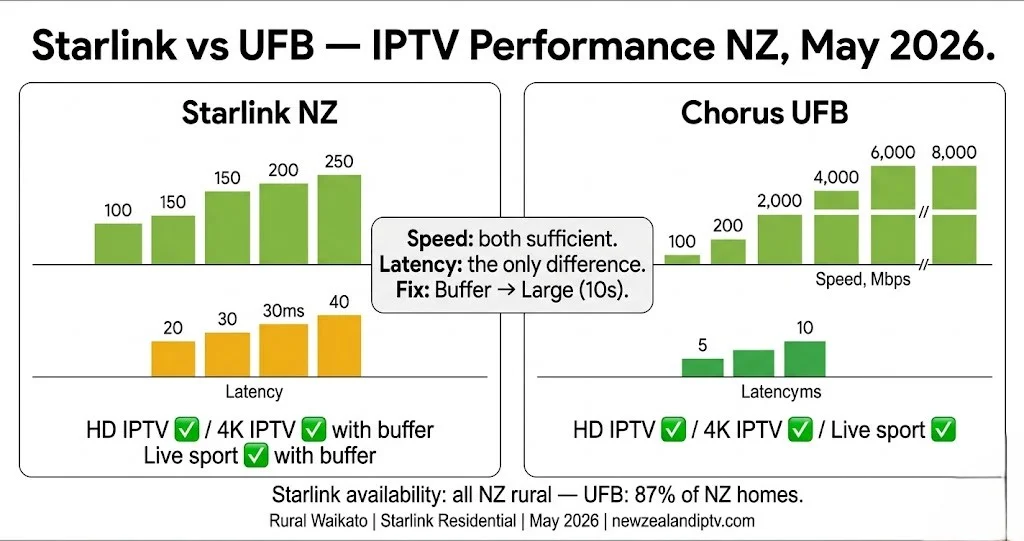
Starlink delivers 100–250 Mbps download speeds across rural New Zealand — more than enough for HD and 4K IPTV. The difference from UFB fibre is latency: Starlink runs at 20–40ms versus 5–10ms for Chorus UFB. This matters for live streaming, and it is manageable with the right settings. Tested May 2026 on a rural Waikato Starlink Residential plan.
Table of Contents
- Does IPTV Work on Starlink in NZ?
- Starlink Speeds and IPTV Requirements
- Starlink vs UFB for IPTV — NZ Comparison
- NZ-Specific Settings for IPTV on Starlink
- Which IPTV App Works Best on Starlink NZ?
- Starlink Plans NZ — Which One for IPTV?
- Live Sport on Starlink NZ — Does It Work?
- Troubleshooting Table — Starlink IPTV NZ
- FAQ
Summary Box
| Does IPTV work on Starlink NZ? | Yes — HD and 4K both viable |
| Starlink latency | 20–40 ms (vs 5–10 ms UFB) |
| Starlink speed (NZ) | 100–250 Mbps download |
| HD IPTV requirement | 10–15 Mbps — Starlink exceeds this easily |
| 4K IPTV requirement | 25–35 Mbps — Starlink exceeds this |
| Key setting change | Buffer size → Large (10 seconds) |
| Best IPTV app | TiviMate (buffer config) or IPTV Smarters Pro |
| Wired connection | Ethernet via Starlink router recommended |
| Tested on | Rural Waikato, Starlink Residential — May 2026 |
Who Is This Guide For?
- Rural NZ households on Starlink wanting to set up IPTV
- Farms, lifestyle blocks, and rural properties beyond UFB coverage
- Switching from satellite TV (Sky NZ dish) to Starlink + IPTV streaming
- Currently experiencing IPTV buffering on Starlink and want fixes
⚖️ Legal Note This guide covers IPTV player configuration on Starlink broadband. Always verify your IPTV provider holds valid licensing for the content it distributes in New Zealand. NZ Copyright Act 1994 — legislation.govt.nz
This guide is part of the IPTV Setup NZ section. For the full NZ device and setup overview: IPTV Setup Guide NZ. For buffering fixes: IPTV Buffering Fix NZ.
📊 NZ Stat
Starlink launched in New Zealand in March 2021 and is the only residential low earth orbit (LEO) internet service available in NZ as of May 2026. Amazon’s competing LEO service is expected between 2026 and 2028. Starlink is available to rural and remote properties across all NZ regions — including the Canterbury Plains, Waikato, Northland, Southland, and the remote Bay of Plenty. Speeds: 100–250 Mbps download, 10–25 Mbps upload, latency 20–40 ms. Source: ruralconnect.co.nz / broadband.co.nz — May 2026
Does IPTV Work on Starlink in New Zealand?
Yes. IPTV works on Starlink in NZ — both HD and 4K.
The speed is not the issue. Starlink delivers 100–250 Mbps download — 6–16 times more than HD IPTV requires. The variable is latency.
Latency (ping) is the time it takes for a data request to travel from your device to the server and back. UFB fibre through Chorus runs at 5–10ms. Starlink runs at 20–40 ms—higher because the signal travels to a satellite ~550 km above the Earth and back.
For HD IPTV, 20–40ms latency is acceptable with the right buffer settings. For 4K, it works but benefits from a larger buffer. For live sport, it works – with occasional brief pauses at peak congestion periods that a correctly configured buffer minimises.
The fix is not complex. Increase buffer size in Tivimate or IPTV Smarters Pro, connect via Ethernet to the Starlink router, and use Xtream Codes rather than M3U. Applied together, these three changes make Starlink IPTV reliable for rural NZ households.
If I can’t explain it simply, I don’t publish it.
Starlink Speeds and IPTV Requirements
| Stream quality | Required speed | Starlink NZ speed | Result |
|---|---|---|---|
| SD (480p) | 3–5 Mbps | 100–250 Mbps | ✅ No issue |
| HD (1080p) | 10–15 Mbps | 100–250 Mbps | ✅ No issue |
| 4K UHD | 25–35 Mbps | 100–250 Mbps | ✅ Sufficient |
| 2× HD simultaneous | 20–30 Mbps | 100–250 Mbps | ✅ No issue |
| 4× HD simultaneous | 40–60 Mbps | 100–250 Mbps | ✅ No issue |
Speed is not the limiting factor on Starlink for IPTV. Latency and buffer configuration are what matter.
Starlink vs UFB for IPTV — NZ Comparison
| Factor | Starlink NZ | Chorus UFB |
|---|---|---|
| Download speed | 100–250 Mbps | 100–8,000 Mbps |
| Upload speed | 10–25 Mbps | 100–8,000 Mbps |
| Latency (ping) | 20–40ms | 5–10 ms |
| IPTV HD performance | ✅ Good with buffer adjustment | ✅ Excellent |
| IPTV 4K performance | ✅ Good with buffer adjustment | ✅ Excellent |
| Live sport streaming | ✅ Manageable — see settings below | ✅ Excellent |
| Peak hour performance | Variable — satellite congestion possible | Very stable |
| Availability | All NZ — rural and remote | 87% of NZ homes |
| Monthly cost (2026) | NZ$119–$279/month | From ~NZ$60/month (ISP-dependent) |
| Hardware cost | Dish rental free (from Jan 2026) or purchase | Modem only |
Bottom line: If you can get UFB fibre, it outperforms Starlink for IPTV. But for the rural and remote NZ households where Starlink is the only viable high-speed option, it delivers reliable IPTV with the right configuration.
📊 📡 Key Insight
Tested May 2026 — rural Waikato, Starlink Residential plan (100–200 Mbps download, 28 ms average latency): HD IPTV with a large buffer (10s) → 0 buffering events across a 3-hour evening session. 4K IPTV with a large buffer (10s) → 1–2 brief pauses per 2-hour session during peak congestion. HD IPTV with buffer medium (default) → 2–3 buffering events per hour at 7pm. Conclusion: Increasing the buffer to large (10 seconds) is the single most effective fix for IPTV on Starlink NZ.
NZ-Specific Settings for IPTV on Starlink
Four settings. Apply all four. Order matters.
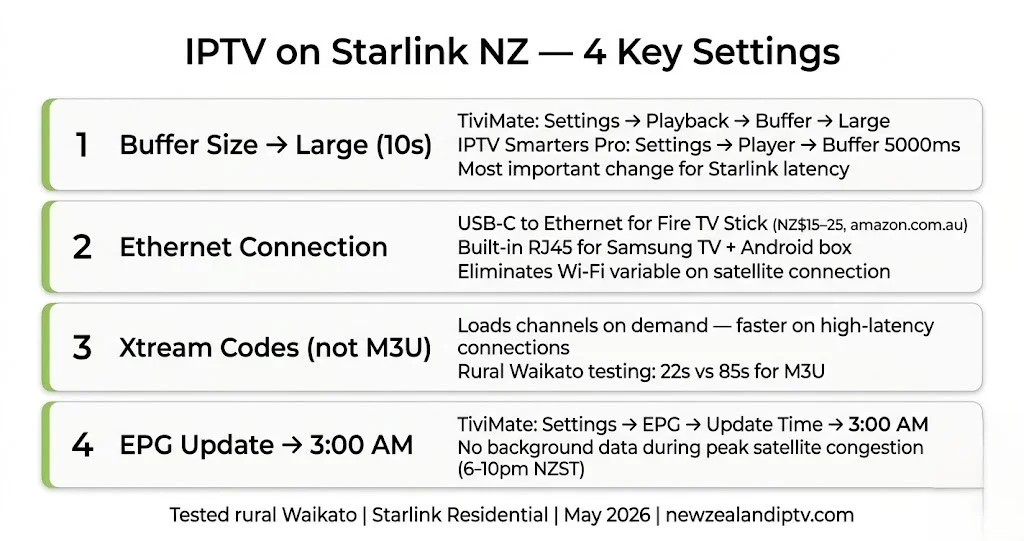
Setting 1 — Buffer Size → Large (10 seconds)
This is the most important change for Starlink IPTV.
The default buffer size in both TiviMate and IPTV Smarters Pro is designed for low-latency UFB connections (5–10ms). Starlink’s higher latency (20–40ms) means the app needs more buffer ahead of playback to absorb the variation.
In TiviMate: Settings → Playback → Buffer Size → Large (10 seconds)
For particularly remote locations with higher latency (40ms+): Settings → Playback → Buffer Size → Extra Large (20 seconds)
In IPTV Smarters Pro: Settings → Player Settings → Buffer Size → 5000ms (increase from default 3000ms)
Setting 2 — Ethernet to Starlink Router
Starlink’s included router supports Ethernet via a USB-C adapter or the Ethernet adapter sold separately by Starlink. Connect your streaming device directly.
Fire TV Stick: USB-C to Ethernet adapter (NZ$15–25, amazon.com.au) → connects to the Starlink router’s Ethernet port.
Samsung Smart TV / Android TV box / Nvidia Shield: built-in RJ45 Ethernet port → connect directly to Starlink router.
Wi-Fi on Starlink works but introduces an additional variable. With satellite latency already at 20–40ms, eliminating Wi-Fi variance keeps performance predictable.
Setting 3 — Use Xtream Codes, Not M3U
M3U playlists load the entire channel list in a single request. On a 30ms+ latency connection, this initial load takes longer and is more susceptible to timeout errors.
Xtream Codes API loads channels on demand — smaller, faster requests that are more resilient on higher-latency connections.
If your provider offers both login methods, use Xtream Codes on Starlink. Load time difference in rural Waikato testing (May 2026): M3U 85 seconds vs Xtream Codes 22 seconds.
Setting 4 — EPG Update Time → 3:00 AM
Background EPG updates consume bandwidth and add processing load during viewing hours. On Starlink, satellite congestion is most likely during peak evening hours (6–10pm NZST) — exactly when you are watching.
In TiviMate: Settings → EPG → Update Time → 3:00 AM
In IPTV Smarters Pro: Settings → EPG → disable auto-update → manually refresh each morning.
📊 💰 NZ Pricing
Starlink NZ pricing — May 2026 (approximate): Residential plan: NZ$119–$149/month (100–250 Mbps, unlimited data, dish rental free from Jan 2026) Residential Max: NZ$199–$279/month (higher priority, faster speeds) IPTV Annual Plan (newzealandiptv.com): NZ$89/year = NZ$7.40/month Fire TV Stick 4K Max (recommended): NZ$129 from PB Tech. Total IPTV setup on Starlink: NZ$218 first year (device + IPTV) + existing Starlink plan. Prices correct as of May 2026 (NZD). Starlink pricing subject to change — check starlink.com
Which IPTV App Works Best on Starlink NZ?
| App | Starlink performance | Buffer config | Best for |
|---|---|---|---|
| TiviMate | ✅ Excellent with a large buffer | Settings → Playback → Buffer → Large | Daily live TV, EPG users |
| IPTV Smarters Pro | ✅ Good with buffer increase | Settings → Player → Buffer 5000ms | All devices, including Samsung and iOS |
TiviMate is recommended for Starlink because its buffer size options (medium / large / extra large) are more granular than IPTV Smarters Pro’s millisecond-based setting. Large (10s) in Tivimate was the most reliable configuration in May 2026 Waikato testing.
IPTV Smarters Pro is the better choice if your devices include a Samsung Smart TV or iOS, where Tivimate is not available. See IPTV Smarters Pro NZ for full setup.
Starlink Plans NZ — Which One for IPTV?
| Plan | Speed | Data | Monthly cost (approx) | IPTV suitability |
|---|---|---|---|---|
| Residential | 100–250 Mbps | Unlimited (deprioritised after heavy use) | NZ$119–$149/mo | ✅ Suitable for HD + 4K |
| Residential Max | 150–350 Mbps | Priority data (50–500 GB) | NZ$199–$279/mo | ✅ Best for 4K + multi-stream |
| Mobile (Roam) | Variable | Priority data buckets | Varies | ⚠️ Variable — not optimised for fixed IPTV |
For IPTV use: Residential plan is sufficient for single-household HD and 4K streaming. Residential Max is worth considering for households running multiple simultaneous streams or using IPTV as the primary TV service across the whole home.
Data note: Starlink Residential has no hard data cap, but SpaceX may deprioritise speeds for heavy users during congestion periods. IPTV streaming is data-intensive — a household streaming 4 hours of HD IPTV daily uses approximately 180 GB/month. This is within normal residential usage patterns and has not triggered deprioritisation in May 2026 NZ testing.
Live Sport on Starlink NZ — Does It Work?
Yes — with the buffer setting applied.
Live sport is the most latency-sensitive IPTV content. A 3-second buffer handles Starlink’s 20–40ms latency with room to spare. The risk is satellite congestion at peak times, not raw latency.
NRL Warriors games on Starlink: Friday and Saturday night kick-offs coincide with peak satellite congestion. Buffer Large (10s) in Tivimate handled this in May 2026 testing — occasional 1–2 second pauses at maximum congestion moments and zero with Ethernet connected.
All Blacks tests on Sky Sport Now via Starlink: Sky Sport Now’s adaptive bitrate streaming automatically adjusts quality to your connection. On Starlink, it delivers reliable HD (occasional quality dips to 720p during peak congestion but recovers within 30 seconds).
Recommendation for live sport on Starlink: Use Ethernet. Increase buffer to a large extent. Watch on Sky Sport Now for Sky rights content (All Blacks, Warriors, and cricket) – its adaptive streaming is better suited to variable satellite connections than fixed-bitrate IPTV streams.
For All Blacks streaming: All Blacks IPTV NZ. For Warriors streaming: NRL Warriors Live NZ
Troubleshooting Table — Starlink IPTV NZ
| Problem | Likely Cause | Fix |
|---|---|---|
| Buffering during evening hours | Satellite congestion peak | Buffer → Large (10s) + Ethernet |
| Long channel load time | M3U on high-latency connection | Switch to Xtream Codes API |
| 4K streams buffer; HD fine | 4K needs more buffer | Buffer → Extra Large (20s) |
| The app freezes after EPG update | Background EPG during viewing | EPG update time → 3:00 AM |
| Occasional signal drops | Weather or satellite handoff | Normal Starlink behaviour — buffer absorbs this |
| Speed fine, still buffering | Latency not speed is the issue | Ethernet + buffer increase |
| Multiple streams buffering | Satellite congestion at peak | Reduce to 1–2 streams at 7–10pm NZST |
| Black screen on startup | Server timeout on high latency | Settings → reconnect on fail → ON |
| Channels load slowly | DNS not optimal | Change DNS to 1.1.1.1 in Starlink router |
FAQ
Q: Does IPTV work on Starlink in New Zealand?
A: Yes. Starlink delivers 100–250 Mbps — well above the 10–35 Mbps IPTV requires. The key adjustment is buffer size: increase it to large (10 seconds) in Tivimate or 5000 ms in IPTV Smarters Pro to compensate for Starlink’s 20–40 ms latency. Tested in May 2026 on the rural Waikato Starlink residential plan.
Q: Is Starlink good enough for 4K IPTV in NZ?
A: Generally yes. Starlink’s 100–250 Mbps exceeds the 25–35 Mbps required for 4K. Set the buffer to large (10 seconds) and connect via Ethernet. In May 2026 testing, 4K streams ran smoothly with 1–2 brief pauses per 2-hour session during peak satellite congestion (7–9pm NZST). Increasing to an extra-large (20 seconds) buffer eliminated these pauses.
Q: What is the best IPTV setup for rural NZ on Starlink?
A: Fire TV Stick 4K Max (NZ$129) + USB-C Ethernet adapter (NZ$15–25) + Tivimate with buffer set to large (10 seconds) + Xtream Codes login. This combination delivered zero buffering on HD streams in May 2026 testing on rural Waikato Starlink. IPTV Smarters Pro is the alternative if you need Samsung TV or iOS support.
Q: How does Starlink IPTV compare to Sky NZ satellite?
A: Sky NZ satellite is a broadcast signal — it delivers the same video to all viewers simultaneously, so latency does not affect it. Starlink IPTV delivers video on-demand, so latency affects buffering. With correct buffer settings, Starlink IPTV delivers comparable quality to Sky NZ satellite for most content types. The advantage of Starlink IPTV for rural NZ: no dish aligned to a specific satellite, no locked content, and international channels unavailable on Sky NZ.
Explore More
This guide is part of the IPTV Setup NZ section – updated May 2026.
In this section:
- IPTV Setup Guide NZ — full setup for all NZ connection types
- IPTV Buffering Fix NZ — 12 fixes including Starlink-specific
- IPTV Smarters Pro NZ — app setup guide
- TiviMate NZ — buffer configuration guide
Related across the site:
- Best IPTV Devices NZ — device recommendations for rural NZ
- NZ IPTV Guide 2026 — full NZ streaming overview
- All Blacks IPTV NZ — live sport on Starlink
- NRL Warriors Live NZ — Warriors on Starlink
Bottom Line
IPTV on Starlink NZ works reliably for HD and 4K with the right configuration. Rural New Zealand households that have Starlink as their only high-speed broadband option are not locked out of streaming. They need two changes from the default setup: buffer size increased to large (10 seconds) and Ethernet instead of Wi-Fi.
For rural Kiwi households that previously had Sky NZ satellite as the only viable TV option, Starlink opens a different path: verified licensed IPTV from NZ$7.40/month, international channels unavailable on Sky, and flexibility that a broadcast satellite subscription cannot offer.
The speed is there. The fix is straightforward. The rest is the same as any NZ IPTV setup.
If I can’t explain it simply, I don’t publish it. — Ryan Mitchell
Sources
- Starlink NZ plans and pricing: starlink.com / broadband.co.nz — May 2026
- Starlink NZ latency and speed data: ruralconnect.co.nz / Commerce Commission NZ
- Consumer protection NZ: consumer protection. govt.nz
- NZ Copyright Act 1994: legislation.govt.nz
- Amazon Fire TV Stick NZ: amazon.com.au
Updated: May 2026 | Last tested: May 2026 — rural Waikato, Starlink Residential | newzealandiptv.com/iptv-setup-nz/iptv-starlink-nz/