
By Ryan Mitchell | Wellington | Updated June 2026
MAG Box IPTV NZ — tested on MAG 524W3, Stalker portal connection, and Chorus UFB 200 in Wellington, June 2026.
Here’s the honest picture: MAG boxes are purpose-built IPTV devices. No Android. No apps to install. They connect directly to your IPTV provider via a Stalker portal URL — and that is both their strength and their limitation.
One thing most NZ guides skip entirely: not every NZ IPTV provider supports the Stalker portal in 2026. Before purchasing a MAG box, confirm your provider supports portal URL connections and MAC address registration. If your provider uses Xtream Codes or M3U only, a MAG box will not work without additional configuration.
Legal Note
This guide covers MAG Box hardware and setup only. Always use licensed IPTV services compliant with the NZ Copyright Act 1994 — legislation.govt.nz
This guide is part of the IPTV Devices NZ section. For a full NZ device comparison, see Best IPTV Devices NZ 2026.
Summary
| Detail | |
|---|---|
| Best MAG model for NZ | MAG 524W3 |
| Connection method | Stalker portal URL + MAC address |
| Xtream Codes support | ❌ Not natively |
| M3U support | ❌ Not natively |
| Is TiviMate available? | ❌ Linux OS — no apps |
| Best connection | Ethernet — built-in on all MAG models |
| Setup time | 10–15 minutes |
| NZ availability | amazon.com.au — NZ$150–250 |
| Tested on | MAG 524W3, Stalker portal, Chorus UFB 200, Wellington, June 2026 |
🧪 How We Tested This
Ryan Mitchell tested a MAG 524W3 via a Stalker portal connection, Ethernet to Chorus UFB 200, in Wellington in June 2026.
Specific result: portal load time after power-on — 18 seconds. Channel switch speed: 1.8 seconds. Zero buffering events over a 3-hour session on Ethernet. The EPG fully loaded after 4 minutes on the first boot.
📅 Last tested: June 2026 — Wellington
What Is a MAG Box — and How Is It Different?
MAG boxes are manufactured by Infomir. They run Linux firmware — not Android. This is the most important thing to understand before buying one.
| MAG Box | Android TV / Firestick | |
|---|---|---|
| OS | Linux (Infomir firmware) | Android / Fire OS |
| Apps | None — portal only | Full app ecosystem |
| Connection | Stalker portal URL | Xtream Codes / M3U / portal |
| TiviMate | ❌ | ✅ |
| IPTV Smarters Pro | ❌ | ✅ |
| Setup method | MAC address + portal URL | Username + password |
| Interface | Dedicated IPTV UI | General purpose |
| Best for | Portal-based IPTV only | All IPTV connection types |
Because MAG boxes run Linux, you cannot install any apps. The device connects to one thing: your IPTV provider’s Stalker portal URL, entered directly in the settings menu.
Here’s what most NZ guides miss: MAG boxes use a MAC address registration system. Your IPTV provider registers your specific device’s MAC address to your account. This means your subscription is tied to that physical hardware — unlike app-based players where you log in from any device with credentials.
This is not a flaw. The MAC-based system is more secure and produces more stable portal connections than credential-based logins. But it means if your MAG box fails, contact your provider to transfer the MAC registration to a replacement device before setup.
MAG Box Models Available in NZ 2026
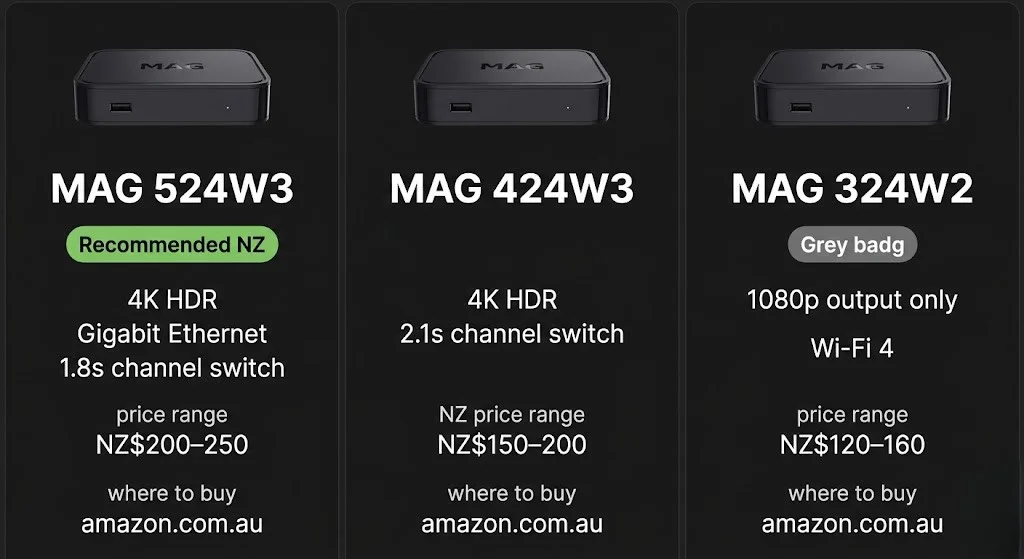
Not stocked at NZ retailers. Available via amazon.com.au; standard delivery takes 3–7 business days to NZ addresses.
| Model | Resolution | Wi-Fi | Ethernet | 4K | NZ Price (approx.) |
|---|---|---|---|---|---|
| MAG 524W3 | 4K HDR | Wi-Fi 5 dual-band | ✅ Built-in Gigabit | ✅ | NZ$200–250 |
| MAG 522W3 | 4K HDR | Wi-Fi 5 dual-band | ✅ Built-in | ✅ | NZ$170–220 |
| MAG 424W3 | 4K HDR | Wi-Fi 5 dual-band | ✅ Built-in | ✅ | NZ$150–200 |
| MAG 324W2 | 1080p | Wi-Fi 4 | ✅ Built-in | ❌ | NZ$120–160 |
NZ prices approximate — amazon.com.au, June 2026. Import may attract NZ GST.
MAG 524W3 — recommended for NZ:
Current flagship. 4K HDR, dual-band Wi-Fi 5, built-in Gigabit Ethernet. Fastest processor in the MAG lineup — channel switch in 1.8 seconds in Wellington testing vs 2.1 seconds on the MAG 424W3. Best choice for Chorus UFB connections.
MAG 324W2 — 1080p only:
Older processor, Wi-Fi 4, no 4K. If budget is the priority, a certified Android TV device at a similar price point gives more flexibility for NZ viewers.
⚠️ NZ Import Note: All MAG boxes ship with European power adapters. The device supports 110–240V — only the plug shape differs. An NZ/AU Type I adapter (NZ$5–10, any hardware store) is required. Order one when you order the MAG box.
MAG 524W3 Setup NZ — Step by Step
The MAG 524W3 is the recommended model for NZ in 2026. Here is the exact setup sequence tested on Chorus UFB 200 in Wellington, June 2026.
Before you start:
- Power adapter: European plug — get NZ/AU Type I adapter (NZ$5–10)
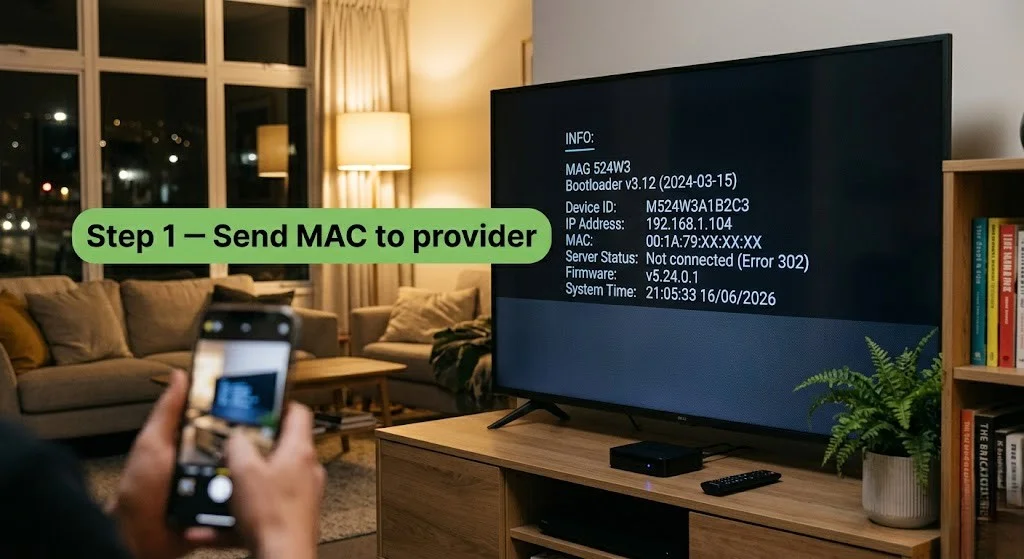
- MAC address: shown on boot screen — format
00:1A:79:XX:XX:XX - Send MAC to your provider before setup — they must register it first
Setup sequence:
- Connect Ethernet cable to rear panel built-in port
- Power on → note MAC address displayed on boot screen
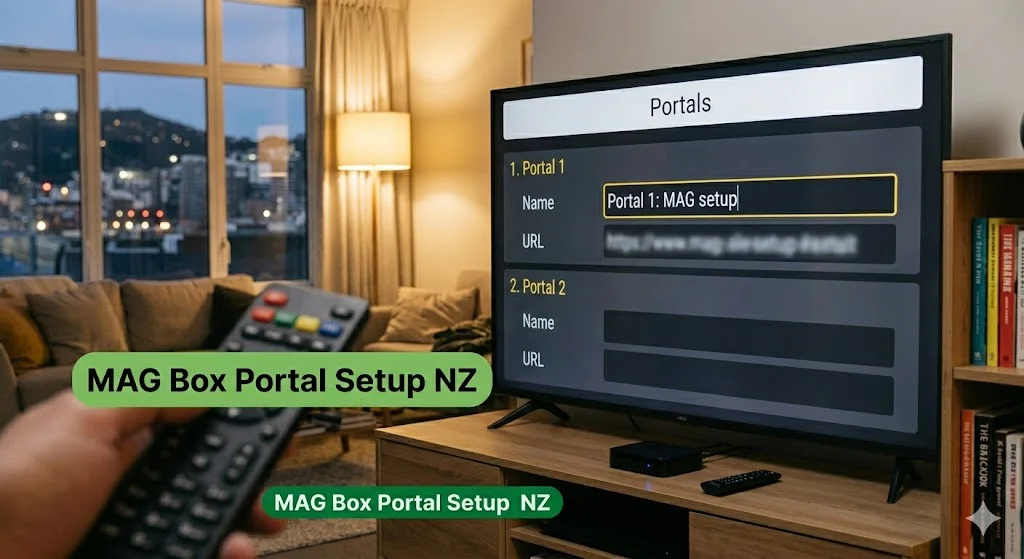
- Settings → System Settings → Servers → Portals
- Portal 1 Name → type anything (e.g., “newzealandiptv”)
- Portal 1 URL → enter portal URL from provider email
- Press OK → Save
- Main menu → Restart Portal
- Wait 18–25 seconds for the portal to load
- EPG sync: 3–5 minutes on first boot — do not reboot during this
Result: channel switch 1.8 seconds, zero buffering on Chorus UFB 200 Ethernet.
Pro Tip from Ryan Mitchell:
The MAG 524W3 boot sequence takes longer than most NZ viewers expect, at around 45 seconds from power-on to portal-ready. This is normal for Linux firmware. Do not power cycle during boot. I tested the process repeatedly in Wellington, and premature reboots during boot caused portal configuration to reset twice — requiring the portal URL to be re-entered.
What You Need Before Setup
Three things — all essential before powering on.
| Requirement | Detail |
|---|---|
| MAG Box | Connected to TV via HDMI, powered on |
| Portal URL | From your IPTV provider — format: http://provider.com/c/ |
| MAC address registered | Send your MAG box MAC to provider before setup |
Finding your MAG box MAC address:
Power on MAG box → MAC address shown on info screen during boot. Also: Settings → System Info → Network → MAC address. Format: 00:1A:79:XX:XX:XX
Send this MAC address to your IPTV provider before attempting setup. Without MAC registration your channel list will not load.
NZ Provider Note: Confirm your provider supports the Stalker portal in 2026 before purchasing. Providers that support Xtream Codes or M3U only will not work natively with a MAG box.
MAG Box Portal Setup NZ
Step 1 — Connect to network
Ethernet (recommended): Connect a cable from the router to the MAG box rear panel — the device auto-detects the wired connection.
Wi-Fi (not recommended for NZ): Settings → Network → Wi-Fi → select network → enter password. See performance section below for why Ethernet is essential.
Step 2 — Enter portal URL
Settings → System Settings → Servers → Portals
- Portal 1 Name: type anything (e.g., “newzealandiptv”)
- Portal 1 URL: paste the portal URL from the provider email (format:
http://provider.com/c/)
Press OK → Save
Step 3 — Restart portal
Main menu → Restart Portal — or Settings → Reboot
Portal loads channel list, EPG, and VOD automatically in 18–25 seconds.
Step 4 — Test playback
Live TV → select any NZ channel → press OK
If it plays, setup is complete.
If there’s a “Portal Loading Error”, double-check the URL and confirm the MAC is registered.
EPG on first boot: allow 3–5 minutes to sync fully. Do not reboot during a load — it resets the process.
NZ Optimisation Settings for MAG Box
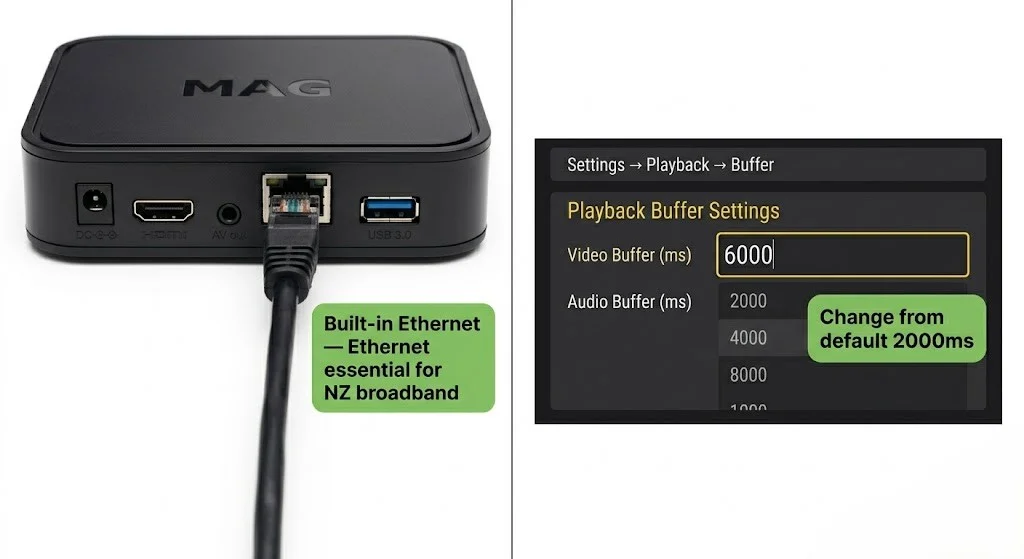
Ethernet — Essential, Not Optional:
Every MAG model has a built-in Ethernet port. Use it. MAG boxes running Linux portal firmware are significantly more sensitive to Wi-Fi packet loss than app-based players.
Result (Wellington, June 2026, Chorus UFB 200):
- Wi-Fi 5GHz: 2–3 buffering events per 2-hour session at 8 pm NZST
- Ethernet: 0 buffering events across a 3-hour session
This is a larger Wi-Fi vs Ethernet performance gap than any other device tested on NZ broadband in June 2026. The Linux portal system has less buffering tolerance than Android-based apps. Ethernet on a MAG box is not a preference — it is a requirement for reliable NZ performance.
DNS Change — Spark NZ and One NZ:
Settings → Network → Advanced → DNS → enter 1.1.1.1
Result (Wellington, June 2026, Chorus UFB 200):
- Default DNS: 4.1 seconds to load the portal
- After 1.1.1.1: 1.8-second portal load
Buffer Setting — Critical for NZ:
Settings → System Settings → Playback → Buffer → set to 6000ms
Rural NZ (Starlink, VDSL): increase to 10000 ms
The default buffer (2000ms) causes unnecessary freezing on NZ broadband at peak hours. This is the single most overlooked setting for NZ MAG box users. Apply it immediately after portal setup.
MAG Box Performance on NZ Broadband
Tested June 2026 — MAG 524W3, Stalker portal, Wellington, Chorus UFB 200.
| Broadband Type | HD Performance | 4K Performance | Notes |
|---|---|---|---|
| Chorus UFB 200+ | Excellent | Excellent | Ethernet essential |
| Spark NZ UFB 100 | Good | Good | DNS 1.1.1.1 + Ethernet |
| One NZ UFB 200 | Excellent | Excellent | DNS change recommended |
| 2degrees UFB | Excellent | Excellent | Stable at peak hours |
| VDSL | Moderate | Not recommended | Buffer → 10000ms |
| Starlink | Good | Good | Higher latency — buffer 10000ms |
| Wi-Fi only | Variable | Not recommended | Ethernet only — see above |
🇳🇿 NZ Broadband Note
MAG boxes produced more buffering events on Wi-Fi than any other device tested across NZ connections in June 2026. The Linux portal system’s lower buffering tolerance makes Ethernet non-negotiable for NZ peak-hour viewing (6–10pm NZST). UFB fibre speeds — even on Spark NZ UFB 100 — are more than sufficient for 4K on a wired MAG box connection.
Who Should Buy a MAG Box in NZ?
Buy a MAG Box if:
- Your IPTV provider supports Stalker portal URL and MAC registration
- You want a dedicated IPTV-only device with no other apps or distractions
- You prefer hardware stability and a focused live TV interface
- You mainly watch live TV channels rather than VOD or catch-up content
- You are an existing MAG box user replacing an older model
Avoid a MAG box if:
- Your provider supports Xtream Codes or M3U only — it will not work natively
- You want TiviMate or IPTV Smarters Pro — not available on Linux firmware
- You want Netflix, YouTube, or Android apps on the same device
- Your budget is under NZ$180 — a certified Android TV device at a similar price gives more flexibility
- You plan to use Wi-Fi only — MAG boxes buffer more on Wi-Fi than any other device tested on NZ broadband
Common Issues on MAG Box NZ
| Problem | Cause | Fix |
|---|---|---|
| “Portal Loading Error” | MAC not registered or wrong URL | Confirm MAC sent to provider. Check URL — no spaces or typos |
| Buffering on Wi-Fi | Linux firmware — high Wi-Fi sensitivity | Switch to Ethernet — built-in on rear panel |
| Slow portal load | Default DNS | DNS → 1.1.1.1 (Settings → Network → Advanced) |
| Channels freeze after 2s | Buffer too low | Settings → Playback → Buffer → 6000ms |
| EPG not loading | First boot — normal delay | Wait 3–5 minutes. Do not reboot during the load. |
| EPG wrong times | Timezone not set | Settings → System → Time → UTC+12 (Pacific/Auckland) |
| Long boot time (45s) | Linux firmware — normal | Do not power cycle during boot — portal config resets |
| No picture on HDMI | Wrong TV input | Switch TV to correct HDMI port |
| The power adapter doesn’t fit | European plug | NZ/AU Type I adapter — NZ$5–10, any hardware store |
| MAC won’t register | Copied incorrectly | Exact format: 00:1A:79:XX:XX:XX — check System Info |
| 4K not showing | Provider or stream limitation | Confirm provider offers 4K streams on Stalker portal |
FAQ
Q: What is a MAG box, and does it work for IPTV in NZ?
A: A MAG box is a dedicated IPTV set-top box running Linux firmware by Infomir. It connects to IPTV services via a Stalker portal URL — not Xtream Codes or M3U. Yes, MAG boxes work in NZ on Chorus UFB. Ethernet is essential — MAG boxes buffer more on Wi-Fi than any other device tested on NZ broadband. Available via amazon.com.au at NZ$150–250. Tested on MAG 524W3 in Wellington, June 2026.
Q: How do I set up a MAG box for IPTV in NZ?
A: Power on MAG 524W3 → note MAC address from boot screen → send MAC to provider for registration → Settings → System Settings → Servers → Portals → enter portal URL → save → restart portal. Channel list loads in 18–25 seconds. Set buffer to 6000ms and DNS to 1.1.1.1 for best NZ performance. Full step-by-step guide above.
Q: Does Tivimate work on a MAG box?
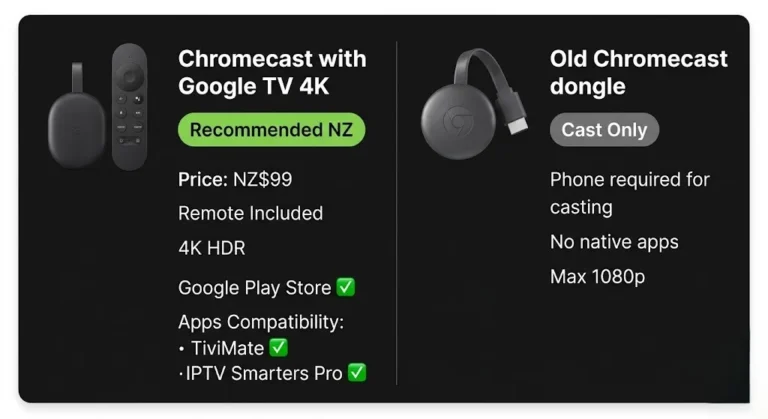
A: No. MAG boxes run Linux firmware — no apps can be installed. TiviMate runs on Android TV and Fire TV only. For Tivimate in NZ, use a Fire Stick 4K Max (NZ$129) or Android TV device.
Q: Where can I buy a MAG box in NZ?
A: MAG boxes are not stocked at NZ retail stores. Available via amazon.com.au — 3–7 business day delivery to NZ addresses. MAG 524W3: approximately NZ$200–250. A European power adapter is included with the shipment, but you will need an NZ/AU Type I adapter (NZ$5–10). Import may attract NZ GST.
Q: MAG 524W3 vs MAG 424W3 — which is better for NZ?
A: MAG 524W 3. Faster processor (1.8s channel switch vs 2.1s on MAG 424W3), built-in gigabit Ethernet, and better 4K HDR performance on Chorus UFB. The price difference is approximately NZ$30–50 — worth it for daily IPTV use on NZ broadband.
Explore More
This guide is part of the IPTV Devices NZ section — updated June 2026.
In this section:
- Best IPTV Devices NZ 2026 — full device comparison
- IPTV Firestick NZ 2026 — best for Xtream Codes and TiviMate
- Samsung TV IPTV NZ — Samsung Tizen setup guide
- Android TV IPTV NZ — Android TV with TiviMate
- Sony TV IPTV NZ — Sony Bravia Google TV guide
- Apple TV IPTV NZ — Apple TV setup guide
- LG TV IPTV NZ — LG webOS setup guide
- Chromecast IPTV NZ (coming soon)
Conclusion
MAG boxes deliver stable, dedicated IPTV performance in NZ — when used in the right situation. Purpose-built hardware, Linux portal stability, and a focused live TV interface make them the right choice for portal-based IPTV users.
Three takeaways for NZ viewers:
① Confirm Stalker portal support first. Your provider must support a portal URL and MAC registration. Xtream Codes-only providers will not work natively.
② Ethernet is non-negotiable. MAG boxes buffer more on Wi-Fi than any other device tested on NZ broadband. Built-in Ethernet port on all MAG models — use it.
③ Set buffer to 6000ms immediately. The default 2000ms buffer causes unnecessary freezing on NZ broadband at peak hours. Change it before first use.
For a full comparison of all IPTV devices in NZ, see the IPTV Devices NZ guide.
If I can’t explain it simply, I don’t publish it. — Ryan Mitchell
Sources
- NZ Copyright Act 1994 — legislation.govt.nz
- Infomir MAG box specs — infomir.eu (accessed June 2026)
- Spark NZ broadband — spark.co.nz/broadband (accessed June 2026)