
Knowing how to watch Australian TV in NZ is a genuine need for a significant portion of the population — from the estimated 65,000+ Australian-born residents to Kiwis who follow Australian sport, news, and entertainment that are unavailable on local platforms.
This guide covers every method available in 2026 with honest assessments of reliability, cost, and legal considerations. No single method is recommended above others — the right choice depends entirely on what you watch and how often.
This guide does not promote or recommend any specific service provider.
📺 Quick Answer
Four methods exist for watching Australian TV in New Zealand: free broadcaster apps via VPN (geo-blocked and inconsistent reliability); Smart DNS (faster but same detection challenges); paid Australian streaming services (Stan and Paramount+ work directly in NZ); and Australian IPTV (live channels without geo-restrictions, though provider quality and legal status vary significantly). Each suits different viewing habits — this guide covers all four objectively.

Summary Box
| Free AU apps from NZ | Geo-blocked — VPN required, inconsistent |
| Stan | Available directly in NZ — no VPN needed |
| Paramount+ | Available directly in NZ — no VPN needed |
| Kayo Sports | Geo-blocked — VPN required from NZ |
| Australian IPTV | No VPN needed — quality and legality vary by provider |
| AFL Saturday NZT | 9:30 PM NZST — late but watchable |
| NZ Copyright | legislation.govt.nz |
| Last reviewed | June 2026 — Auckland |
Who Is This Guide For?
- Australian expats in New Zealand wanting live AFL, NRL, and Australian news
- Kiwis following Australian sport or entertainment not available on NZ platforms
- Anyone who hit a geo-block trying to access ABC iview or 9Now from NZ
- New Zealand households wanting to understand all options before spending money
⚖️ Legal Note
VPNs are legal in New Zealand. Using a VPN to access geo-restricted content may violate individual platform terms of service — the issue is a contractual matter, not a criminal one. IPTV technology is legal; the legality of specific IPTV services depends entirely on the provider’s content licensing arrangements, which vary widely by provider and jurisdiction. Always verify before subscribing.
NZ Copyright Act: legislation.govt.nz — NZ Broadcasting Standards: broadcasting.govt.nz
This guide is part of our International IPTV NZ section—covering international TV channels and streaming options for New Zealand viewers in 2026.
Why Australian TV Is Geo-Blocked in New Zealand
Australian streaming services restrict content to Australian IP addresses under territorial content licensing agreements. When broadcasters like ABC, Nine, or Seven acquire content rights, those rights typically cover Australian territory only — New Zealand is a separate licensing territory.
From any NZ IP address, ABC iView, 9Now, 7plus, and 10 Play return a geo-restriction error regardless of whether you previously lived in Australia, hold an Australian subscription, or have an Australian bank account.
Understanding these restrictions is important because every method in this guide is working around a licensing boundary — not a technical glitch.
How to Watch Australian TV in NZ — The Four Options
| Method | VPN Required | Monthly Cost | Live Sport | Legal Status |
|---|---|---|---|---|
| Free apps + VPN | Yes | NZ$10–20 (VPN) | Unreliable | ToS risk |
| Smart DNS | No | NZ$5–15 | Inconsistent | ToS risk |
| Stan / Paramount+ | No | NZ$8–21 | Limited | Legal |
| Kayo via VPN | Yes | AU$25–35 + VPN | VPN-dependent | ToS risk |
| Australian IPTV | No | NZ$30–45 | Depends on provider | Varies by provider |
Option 1 — Free Australian Broadcaster Apps + VPN
A VPN routes your connection through an Australian server, making Australian streaming services see an Australian IP address. This is the most common first attempt for NZ viewers.
What you can access:
| Service | Content | Live Streaming |
|---|---|---|
| ABC iview | ABC TV, ABC News 24, ABC Kids | Yes |
| SBS On Demand | World cinema, multicultural, NITV | Yes |
| 7 plus | Seven Network, some cricket and AFL | Yes |
| 9Now | Nine Network, NRL | Yes |
| 10 Play | Network Ten, reality TV | Yes |
What works reasonably well:
Catch-up content on SBS On Demand and 7plus is generally more accessible via VPN than the commercial networks. These platforms are less aggressive with VPN detection for non-live content.
What works poorly:
ABC iview and 9 Now actively maintain VPN IP blocklists. A server bypassing detection today may be blocked within days. Live sport is the most unreliable use case — broadcaster detection increases significantly during high-traffic events like State of Origin or AFL finals.
Honest limitations:
- Requires ongoing VPN server switching when servers get blocked
- Violates platform terms of service — account suspension risk is low but real
- Samsung and LG Smart TVs cannot run VPN apps directly — requires router-level setup
- Free content requires a paid VPN subscription to access
When this option makes sense:
Occasional catch-up viewing of Australian drama, reality TV, and documentary content on SBS and 7plus. It is not a reliable primary option for watching live sport or daily news.
Option 2 — Smart DNS
Smart DNS reroutes only the geo-detection portion of your connection through an Australian server, without the full encryption overhead. This makes it faster than a VPN for streaming but offers no privacy protection.
Practical advantage: Configurable at the router level, covering every device on your network simultaneously. Works on Samsung and LG Smart TVs where VPN apps cannot be installed directly.
Practical limitation: Smart DNS faces identical IP detection challenges to VPNs for major Australian broadcasters. It is not a consistently reliable solution for ABC iview or 9Now, though, it performs reasonably for SBS On Demand and 7plus catch-up content.
Best suited for: Smart TV households wanting occasional SBS or 7plus catch-up without installing a VPN app, and viewers already using Smart DNS for other streaming services.
For configuring IPTV apps on your Smart TV without a VPN, see our Smart TV IPTV NZ guide.
Option 3 — Paid Australian Streaming Services
Services Available Directly in NZ
Stan operates in New Zealand and accepts NZ payment methods directly. Stan includes Stan Sport — Champions League, tennis majors, and some rugby — making it the most accessible legitimate Australian streaming option for NZ viewers without any technical workaround.
Paramount+ also operates directly in NZ, covering family content, A-League broadcasts, and Paramount films at a lower price point than Stan.
Services Requiring a VPN from NZ
Kayo Sports is geo-restricted to Australia. From NZ, a VPN is needed. Kayo covers AFL, NRL, cricket, Formula 1, and 50+ sports from a single subscription — it is the most comprehensive Australian sports platform for NZ viewers willing to manage VPN access.
Payment consideration: Kayo, Binge, and Foxtel Now require Australian payment methods. Stan and Paramount+ accept NZ payment directly — no workaround needed.
| Service | NZ Direct Access | VPN Required | Best For |
|---|---|---|---|
| Stan | ✅ Yes | No | Entertainment + Stan Sport |
| Paramount+ | ✅ Yes | No | Family, A-League |
| Kayo Sports | ❌ No | Yes | AFL, NRL, cricket, F1 |
| Binge | ❌ No | Yes | HBO, entertainment |
| Foxtel Now | ❌ No | Yes | Comprehensive cable |
Option 4 — Australian IPTV
Australian IPTV services deliver live and on-demand Australian channels from servers accessible worldwide, including New Zealand, without geo-restrictions or VPN dependency.
Channels typically available from Australian IPTV services include:
- Free-to-air: Seven, Nine, Ten, ABC TV, ABC News 24, SBS, NITV
- Sports: Fox Sports 1–5 (AFL, NRL, cricket, F1), beIN Sports, ESPN Australia
- News: Sky News Australia, ABC News 24, Nine News live
What to understand before considering this option:
Provider quality varies significantly — two services at the same price can deliver dramatically different experiences. The key criteria for evaluating any Australian IPTV service include peak-hour channel reliability, EPG accuracy for Australian time zones (AEST UTC+10, AEDT UTC+11 during daylight saving), and sports stream stability during live events.
Legal status varies widely by provider and jurisdiction. Some services operate with appropriate content licensing; others operate in legal grey areas. Research any provider carefully before committing. “Availability and legality vary widely by provider and jurisdiction” is not a disclaimer — it is the practical reality of this market.
NZ viewers evaluating Australian IPTV services should use the same assessment criteria as Australian reviewers: reliability during peak hours (7–10 PM AEST, equivalent to 9–11 PM NZST), EPG timezone accuracy, and sports stream consistency. Australian IPTV review sites publish several independent evaluation frameworks covering these criteria, including one detailed methodology here.
For device setup in New Zealand, our TiviMate NZ guide and IPTV Smarters Pro NZ guide cover full configuration for the most common IPTV apps.
Australian TV Time Zones for NZ Viewers
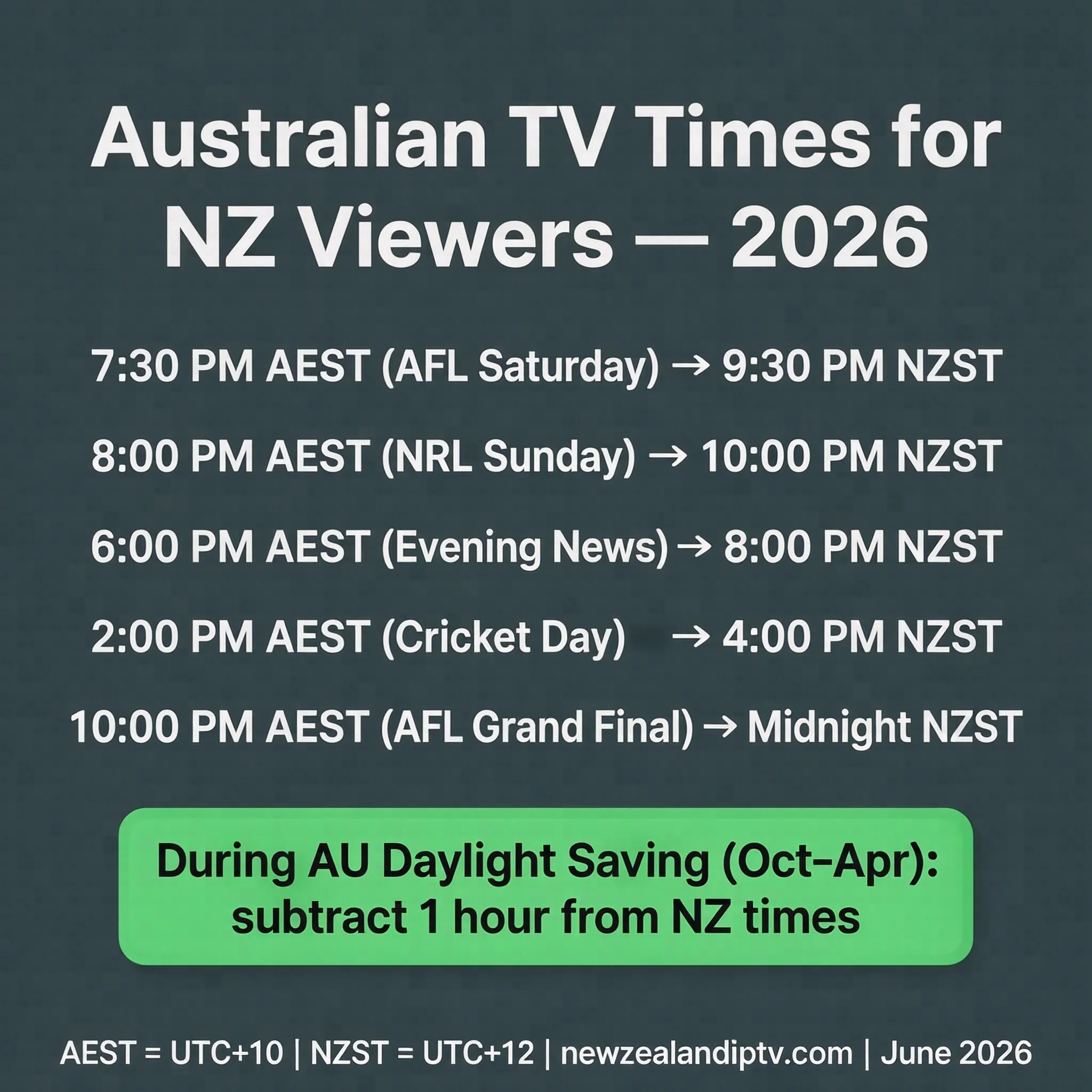
New Zealand Standard Time (NZST) is UTC+12, which is two hours ahead of Australian Eastern Standard Time (AEST, UTC+10). During Australian daylight saving (October–April, AEDT UTC+11), the gap narrows to one hour.
| Australian broadcast | NZST (Apr–Oct) | NZDT (Oct–Apr) |
|---|---|---|
| 7:30 PM AEST — AFL Saturday | 9:30 PM | 8:30 PM |
| 8:00 PM AEST — NRL Sunday | 10:00 PM | 9:00 PM |
| 6:00 PM AEST — Evening news | 8:00 PM | 7:00 PM |
| 2:00 PM AEST — Cricket day match | 4:00 PM | 3:00 PM |
| 10:00 PM AEST — AFL Grand Final | Midnight | 11:00 PM |
During Australian daylight saving, NZ viewing times improve significantly, as Australian prime-time content falls in the early NZ evening rather than late at night.
Device Setup by Method
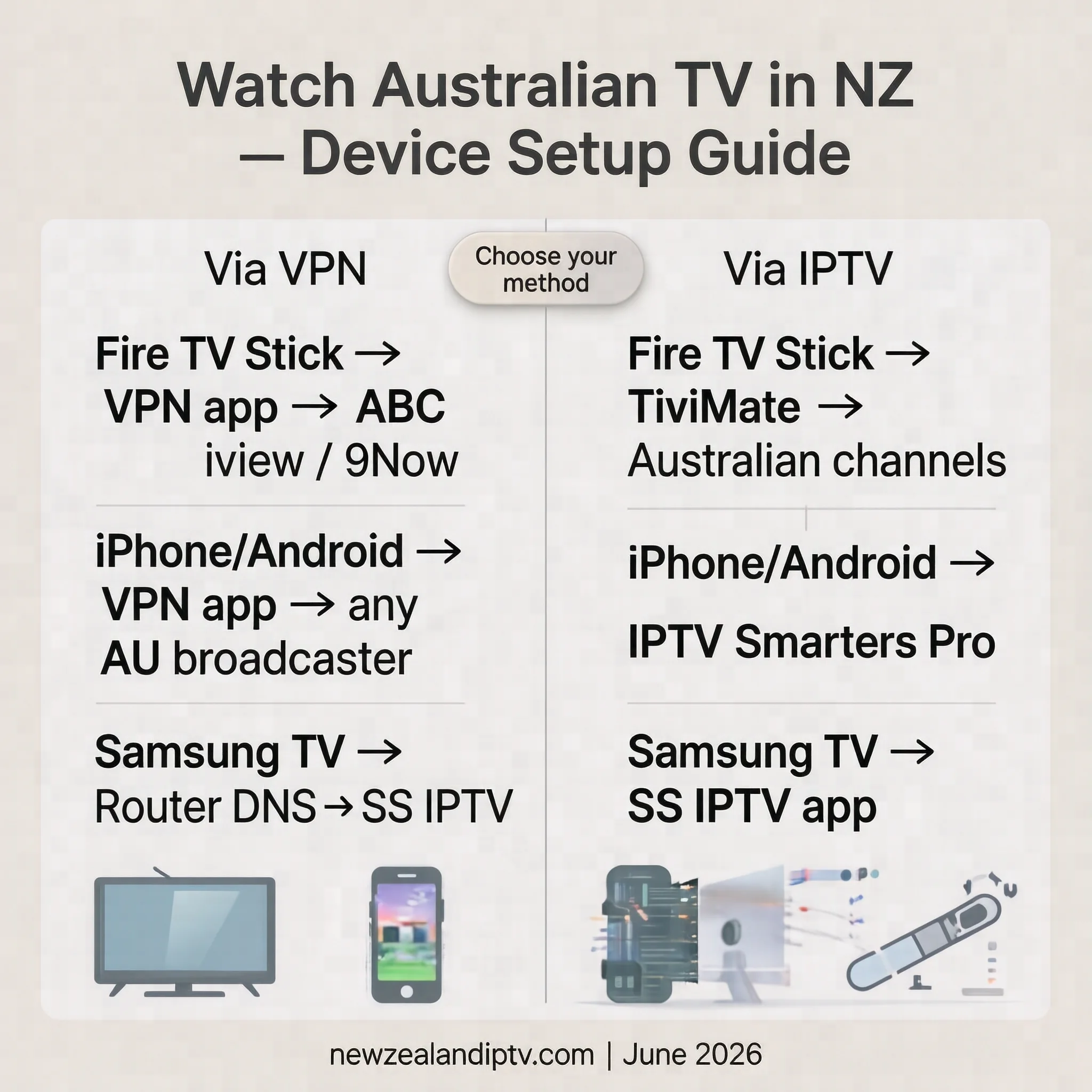
| Device | VPN | Smart DNS | IPTV App |
|---|---|---|---|
| Fire TV Stick | Full VPN app | Via router | TiviMate — recommended |
| iPhone / Android | VPN app | DNS settings | IPTV Smarters Pro |
| Samsung Smart TV | Router only | Native DNS | SS IPTV app |
| LG Smart TV | Router only | Native DNS | SS IPTV app |
| Chromecast / Google TV | Via phone | Via router | IPTV Smarters |
| Laptop / Desktop | VPN app | Browser extension | VLC Media Player |
For full IPTV device setup in New Zealand, see our IPTV Setup Guide NZ.
Which Option Suits Your Situation?
| Viewing habit | Most practical starting point |
|---|---|
| Occasional catch-up (drama, reality) | VPN + SBS On Demand or 7plus |
| Australian sport regularly | Kayo via VPN or Australian IPTV (research provider) |
| Australian news daily | Australian IPTV or ABC iview via VPN |
| Family viewing — mixed content | Stan (direct NZ) + VPN for FTA catch-up |
| Smart TV — no VPN app | Smart DNS or SS IPTV app |
| Budget — free only | VPN + free broadcaster apps — expect inconsistency |
FAQ
Can I watch ABC iView in New Zealand?
No, you cannot watch ABC iView directly in New Zealand because it is geo-blocked outside Australia. A VPN can sometimes bypass these restrictions, but ABC actively maintains a blocklist of known VPN IP addresses. Reliability is inconsistent, particularly for live content. For regular access to ABC News 24 live, other methods tend to be more reliable.
Can I watch 9Now in New Zealand?
9Now is geo-blocked in NZ. A VPN bypasses the geo-block inconsistently — Nine actively maintains a VPN block list. For NRL, Kayo Sports via VPN or an Australian IPTV service provides more consistent access.
What is the best option for watching AFL in NZ?
Three options in order of setup complexity: Australian IPTV with Fox Sports channels (no VPN required; reliability depends heavily on the provider), Kayo Sports via VPN (comprehensive but requires VPN maintenance), and 7plus via VPN (selected games only, free but inconsistent). The right choice depends on how much technical maintenance you are willing to manage and your budget.
Is it legal to use a VPN to watch Australian TV in NZ?
VPNs are legal in New Zealand. Using a VPN to access geo-restricted content may violate the terms of service of individual streaming platforms — the issue is a contractual matter between you and the service, not a criminal matter under NZ law. Always review the ToS of any platform you access via VPN.
Can I watch Australian TV on my Samsung Smart TV in NZ?
Samsung Tizen OS does not support VPN apps directly. Options include Smart DNS at the router level, the SS IPTV app from the Samsung app store, or a Fire TV Stick plugged into the HDMI port which supports both VPN apps and IPTV apps natively.
Will a VPN slow my internet enough to affect streaming?
Quality VPNs add latency overhead. On NZ fibre connections, this overhead typically does not affect HD streaming. On slower connections below 25 Mbps, VPN overhead can contribute to buffering — always test during a free trial period before committing to a subscription.
What Australian content is available directly in NZ without a VPN?
Stan and Paramount+ operate directly in NZ without any VPN or workaround. TVNZ+ carries some Australian co-productions. Beyond these, no major Australian broadcaster streams freely to NZ IP addresses.
Where can I find more on international channels in NZ?
Our International IPTV NZ section covers international TV options for every major community in New Zealand — including Pacific, Indian, Arabic, and European channels alongside Australian content.
The Bottom Line
Watching Australian TV in New Zealand is achievable in 2026 — but no single method works perfectly for every situation.
For occasional, non-live viewing: A VPN with free Australian broadcaster apps is a low-cost starting point. Expect inconsistency, particularly for live content, and occasional VPN server maintenance.
For live Australian sport: Kayo Sports via VPN is the most comprehensive dedicated option. Australian IPTV removes VPN dependency but requires careful provider research — quality and legal status vary significantly between services, and the burden of verification is on the subscriber.
For households wanting simplicity, Stan operates directly in NZ, requires no VPN or technical configuration, and covers Australian entertainment, including Stan Sport.
The right choice depends on what you watch, how regularly, and how much technical management you are willing to take on.
Updated: June 2026 — Auckland.
Sources
- NZ Copyright Act 1994: legislation.govt.nz
- NZ Broadcasting Standards Authority: broadcasting.govt.nz
- Australian Copyright Act 1968: legislation.gov.au
- Stan NZ: stan.com.au
- Paramount+ NZ: paramountplus.com
- Statistics NZ — Overseas-born population: stats. govt.nz